Best website builders for authors I’ve tried in 2026
Our team of experts and researchers rigorously test and evaluate website builders through transparent, in-depth testing procedures and methods using both in-house and industry-approved tools.
Drawing on cybersecurity insights, we provide unbiased, empirical rankings and analysis to help users make informed digital platform choices.
Learn more

As a writer myself, I know just how overwhelming it can be to choose the right website builder, especially if you’ve never built a site before. You pour your heart into your words, but setting up a portfolio or author site still feels like you’ve stepped into a completely different world.
I’ve spent over 3 years testing and reviewing the best web builders for authors, and by now, I’ve learned exactly what makes a platform stand out for authors. The ideal builder should be simple enough that you can publish your latest poem or book updates in minutes, but powerful enough to make your writing leave a lasting impression online.

If I had to choose just one website builder that ticks all those boxes, it would be Wix. It has a free version, is easy to use, and comes with an AI content writer that can help you create everything from engaging blog posts to catchy book descriptions in seconds.
Below, you’ll find my full list of the best website builders for authors – tested, compared, and ranked based on real experience. Whether you’re promoting your first novel or building a personal brand as a freelance writer, these are the tools that can help your words truly stand out.
Best website builders for authors 2026: in short
- Wix (from $0.00/month) – best all-around website builder for authors
- Hostinger AI Builder (from $1.79/month) – best author website builder with AI features
- SITE123 (from $5.50/month) – beginner-friendly website builder for authors
- IONOS (from $1.00/month) – most affordable website builder
- Squarespace (from $9.50/month) – premium author website builder
- WordPress.org (free) – powerful customizable platform for authors
Best web builders for authors: detailed list
Finding the best website builder for writers can be time-consuming and tricky. To make this decision easier, I compiled a list of the 5 best web builders for writers.
1. Wix – best website builder for authors in 2026

| Rating: | |
| Starting price: | $0.00/month |
| Template count: | 2,000 |
| Free plan: | ✅ Yes |
| Current deal: | Get Wix with 50% OFF |
Wix is my #1 choice for a website builder for authors in 2026. I really appreciate the design flexibility made possible by more than 2,000 templates. The drag-and-drop editor is intuitive, and the ADI website generator can create a full site in just minutes. In my opinion, it is suitable for both beginner users and seasoned website-building professionals. Plus, my favorite thing is that it offers a functional free version. Here’s what you can expect from Wix:
- A full-featured blogging platform. Wix offers a fully functional built-in blogging platform. When I tested it, I was pleased how easily and quickly I can create a blog post. Plus, the platform includes SEO tools, and you can use various design elements to make the blog feel really like you.
- Artificial design intelligence (ADI) and drag-and-drop editor. Wix offers two different editors. Depending on your level of experience, you can either choose to get your site automatically generated by Wix ADI or create one yourself. I like both options – the drag and drop editor offers more control and is nice if you like tinkering. On the other hand, the ADI creates a website really fast, and you can still edit it afterwards.
- Extensive App Store. While Wix has a pretty impressive amount of advanced features, the provider also offers a large third-party app store. I found all kinds of useful extensions for my marketing campaigns, social media communication, and anything else you might want for your blog.
Building a website for authors with Wix
What is great about Wix is that you can choose either a quick and easy website-building process or a more challenging but rewarding one. All you have to do is pick how you’d like to build your site. The builder comes with 2 separate editors: a traditional and 100% flexible drag-and-drop editor, and an ADI (artificial design intelligence) automatic site generator. I found both to be fast and really easy to use. I recommend choosing ADI if you’re a complete beginner, and the drag-and-drop editor if you want more control.
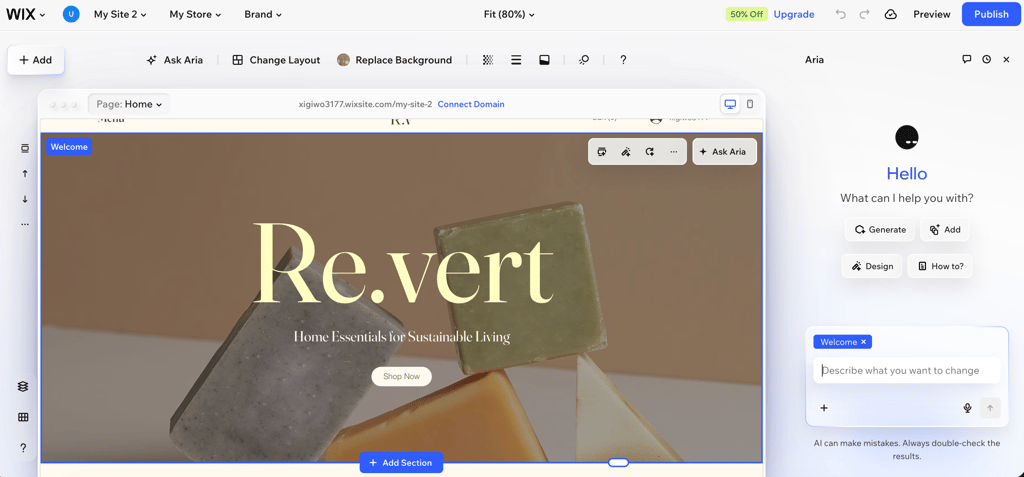
If you go with ADI, all you have to do is answer a few questions, and the builder will quickly generate a website that you can further personalize. However, with the traditional approach, you can choose from over 2,000 modern and responsive all-purpose templates. With a choice as wide as that, you’ll definitely find plenty of options suitable for a beautiful author site.
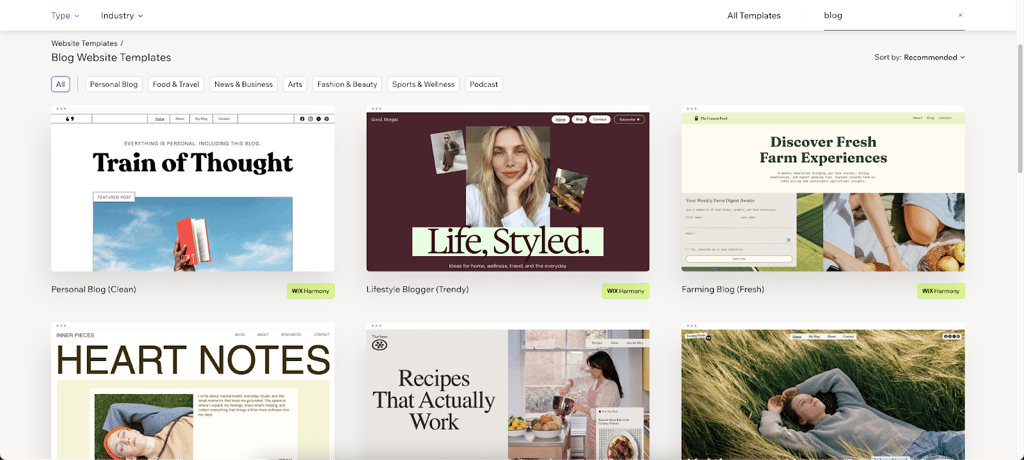
Once you choose a template, you’ll be redirected to Wix’s flexible drag-and-drop editor that allows you to place elements anywhere on the site. Add anything you want: links to social media accounts, contact forms, reader reviews, book listings, a blog, and more. Wix also offers a blogging platform with plenty of built-in analytics and SEO tools for better site performance.
Wix pricing
Wix offers a free plan for building a basic website. If the free plan feels too limiting, I recommend choosing the Light plan from $11.75/month for your author’s blog. It is fairly affordable, includes 2GB of storage, and you can invite collaborators. However, if you’d also like to include an online store, then the Core plan will be better. All Wix plans have a 30-day money-back guarantee, and include a free domain for a year, no ads, and 24/7 customer support.
2. Hostinger AI Builder – best author website builder with AI features

| Rating: | |
| Starting price: | $1.79/month |
| Template count: | 430+ |
| Free plan: | ❌ No |
| Current deal: | Get Hostinger Website Builder, 87% OFF + free months |
Based on my hands-on experience, Hostinger AI Builder is my second favorite builder for authors. It’s affordable and offers a highly functional, modern platform suited for authors with diverse visions. This is what you can expect:
- Inuitive AI builder experience. Hostinger AI Builder is an ideal option for beginners. You can easily build you author's site using natural-language prompts. What I liked most is that building a website felt like working with a lightning-fast assistant. However, if you want to build a website the traditional way, Hostinger also offers that option.
- Beginner-friendly blogging tools. These are already built into Hostinger AI Builder's editor, allowing you to easily edit, design, and publish your blog posts without any coding. Hostinger also offers WordPress plans if that’s your preferred content management system (CMS).
- Flexible editor. Hostinger AI Builder comes with an easy-to-use drag-and-drop editor that enables you to create a functional site by adding numerous pre-designed elements. Additionally, its premade grid system helps to navigate the element placement more easily. You can also edit your site using prompts. It's like tasking a professional builder to make changes for you.
- Interactive design. I really enjoyed tinkering around with Hostinger's interactive design features. I could animate certain elements, make text shimmer, add hovering effects. It was really useful for adding some charm and personality to my author's website.
Building a website for authors with the Hostinger AI Builder
To create an author's website with Hostinger AI Builder, you only need to briefly describe the website you want in your own words. Then Hostinger will generate a fully functional site for you. On the other hand, you can also use the traditional drag-and-drop editor and website templates. Editing the site is easy. I just needed to ask the AI agent for changes, and they got made. Alternatively, I could always go back and implement the changes manually.
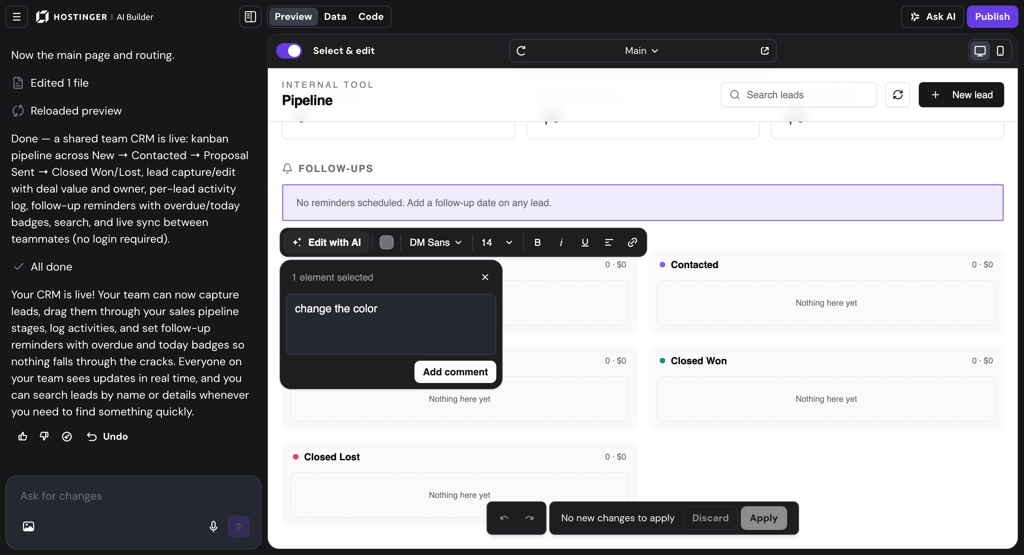
If you wish to build a site yourself, Hostinger AI Builder has over 430 premium themes to choose from. While there are no author-specific templates, all themes are responsive, well-structured, and professional-looking.

As for Hostinger Website Builder's blogging platform, it’s very easy to navigate. I liked that I could drag and drop various design elements in my blog posts without any coding.
Hostinger AI Builder pricing
Hostinger AI Builder offers two plans with a starting price of $1.79/month. Both plans come with a 30-day money-back guarantee to test the editor fully before committing.
3. SITE123 – easy-to-use builder for author site

| Rating: | |
| Starting price: | Free or $5.50/month |
| Template count: | 160+ |
| Free plan: | ✅ Yes |
| Current deal: | Get SITE123 now 50% OFF |
SITE123 is another great, easy-to-use website builder for authors looking to create a simple yet functional website. The builder offers quick and simple website creation with basic features at $5.50/month. With it, you can get a dynamic author’s website up and running in minutes. Here are some of SITE123’s main appeals for authors:
- Functional, built-in blogging platform. SITE123 offers a highly functional blogging platform where you can easily post and manage your content. Additionally, the blogging platform also comes with its own analytics, so you can track and improve the performance of your posts.
- AI tool for generating content. Text AI tool makes it easy to create descriptions for various elements on your site.
- SEO Adviser app. This tool is great for both beginners and experienced users. It analyzes your website and suggests changes to boost your site’s search engine ranking and attract more visitors.
- Multi-language support. If you choose the Premium plan or higher, SITE123 allows you to add extra languages to your website. By offering content in different languages, you can broaden your audience.
Building a website for authors with SITE123
As the name itself suggests, SITE123 lets you create a website in just three steps: log in, choose the type of website you want to build, and edit the generated site. Alternatively, you can pick a template and customize it, which is what I chose while testing it. Regardless of your approach, you'll work with a beginner-friendly, section-based editor.

SITE123 has over 160 pre-designed templates. All templates are pretty, functional, and responsive. While there are no writer-specific ones, any template can be altered to fit your design needs. I mixed and matched elements from different templates, which gave my site a personal touch without having to start from scratch.

I found that the drag-and-drop editor is pretty simplistic in terms of design flexibility. However, you can easily add elements like contact forms, portfolios, images, and posts. You can even mix different templates to create a truly unique site. If you’d like to learn more about it, read our SITE123 review.
What really stood out to me was the WYSIWYG (What You See Is What You Get) editing experience. As you tweak your content or update your layout, you immediately see the results – no switching between backend and preview mode. This real-time view makes it much easier to fine-tune your pages, especially if you're someone who likes to visually build and edit on the fly.
Of course, no author’s website is complete without a blog. SITE123’s blog manager is intuitive and straightforward, with SEO and analytics already built in to ensure that your posts reach the right people.
SITE123 pricing
SITE123 has a free plan and 4 paid options, ranging from $5.50/month to $85.00/month. I recommend the Advanced plan, which offers email marketing features. However, if you plan to sell books, the Professional plan (from $13.50/month) might be better, as it includes eCommerce features.
Every plan includes integrated hosting and domain management, which means you won’t need to juggle separate services or providers. For beginners, that’s a huge win – you can register a domain, set up your site, and publish it all in one place.
4. IONOS – cheapest website builder for writers

| Rating: | |
| Starting price: | $1.00/month |
| Template count: | 49+ |
| Free plan: | ❌ No |
| Current deal: | Get up to 96% OFF IONOS website builder |
IONOS offers the most affordable website builder on my list. I found it to be a simple and quick way to get a modern-looking website online. If you’re curious about AI design tools but don’t want to spend hours tweaking every pixel, you’ll like it. You can choose from more than 49 templates and set up your site using an AI-powered web builder. Here are a few features that make it especially appealing for writers:
- AI tools. IONOS website builder has helpful AI tools that can help you save time on website building and focus more on actual writing. My favorite features from IONOS include AI Text Generator and Improver, AI Image Generator, and AI SEO Text Generator. You can also always rely on AI assistance for your individual needs.
- Performance-oriented tools. If you want to boost your website’s performance – and ultimately your sales – you can also take advantage of tools like site analytics, SEO optimization, and competitor tracking.
- Built-in website translator. This tool can help you translate your texts into the most popular languages, helping you reach overseas audiences.
Building a website for authors with IONOS
I decided to build my author site using IONOS’ AI website creator, and honestly, I was surprised by how smooth the process was. I simply entered my site’s name, business category, a short description, tone, font style, and color palette – I went with Ocean Dreams. Within about 20 seconds, the builder generated 8 different design options for me to choose from. If you don’t love what you see, you can easily refine your answers and get new options – a nice touch for creative users.
Once I chose my design, I was redirected to the IONOS website builder dashboard, where I could access the editor, analytics, marketing tools, and apps. Everything you need is right there in one place, making site management straightforward and efficient.
On top of that, IONOS also offers an AI Logo Creator, which we covered in our in-depth IONOS review. It’s just as simple to use: enter your business name and industry, and a few seconds later, you have a professionally designed logo. This complements the website builder perfectly, allowing you to create both your site and branding in one seamless workflow.

While the setup and AI features impressed me, I did feel that IONOS’ website editor is a bit limited. The customization options are fairly basic – the element controls are minimal, and the overall design flexibility feels restricted. It also lacks a comfortable content management system, which makes me wonder how smooth everyday content updates (like posting new blogs or book news) would really be.

That said, if you’re building a static author portfolio site – something you only update once or twice a year – IONOS absolutely gets the job done. It looks modern, feels reliable, and the customer support team is friendly and helpful. There’s even an AI Assistant that can offer guidance along the way.
IONOS website builder pricing
IONOS offers 3 plans, with the cheapest ones starting at only $1.00/month. While this price is attractive, you should keep in mind that this is only the price for the first year. The renewal price increases to $12.00/month for the Starter plan and $18.00/month for the Plus plan. While this provider doesn’t have a free trial, it offers a 30-day money-back guarantee, which you can use to test the service.
For writers, I recommend opting for at least the Plus plan (the Pro might be even better). This plan includes an AI Website Builder, a free domain for the first year, some eCommerce, and, most importantly, advanced AI tools.
5. Squarespace – premium, minimalistic author site builder

| Rating: | |
| Starting price: | $9.50/month |
| Template count: | 200+ |
| Free plan: | ❌ No, but there’s a 14-day free trial |
| Current deal: | Get up to 50% OFF Squarespace |
Squarespace is a premium website builder for any author looking to build a visually captivating website. Although the builder’s pricing is on the higher end, starting at $9.50/month, the templates are visually appealing and unique. Let’s take a closer look at what Squarespace offers:
- Built-in blogging platform. Squarespace comes with a very functional and easily customizable blogging platform that you can use to engage with your audiences and drive more traffic to your site. Additionally, you can adjust SEO settings for each blog post individually.
- Excellent site-wide SEO and marketing settings. For better website optimization, Squarespace offers extensive site-wide SEO tools. The builder also includes marketing features like mailing lists, promotional pop-ups, and profiles.
- Strong eCommerce tools. The Business plan gives you access to eCommerce tools so you can easily sell products. These tools offer great flexibility, making Squarespace one of the top web builders for small businesses.
Squarespace makes author website building very easy. Once you log in, all you have to do is name your site, pick a template, and start editing it to your liking.
Building a website for authors with Squarespace
For starters, Squarespace has over 200 sleek-looking all-purpose templates to choose from. Although there are no writer-oriented options, you should have no trouble finding the perfect background and layout for your bestseller.

Once you find the one you like, you’ll be redirected to the builder’s section-based editor, which we explored in our Squarespace review. The editor allows you to add, delete, and move the sections and blocks within your chosen template. Squarespace has many pre-designed blocks, including contact forms, social media links, and event calendars, to make your site one of a kind.

And if you’re a writer who needs a blog, Squarespace comes with a comprehensive blogging platform. The tool is pretty straightforward. You can create content, add buttons, and manage each post’s SEO settings to make the most out of it.
Squarespace pricing
Squarespace has 4 plans, with prices ranging from $9.50/month to $49.50/month. If you simply wish to test the builder’s functionalities, Squarespace offers a free 14-day trial. On top of that, all plans come with a free custom domain, an SSL certificate, unlimited bandwidth and storage, SEO features, and basic website metrics.
6. WordPress.org – advanced blog platform for authors

| Rating: | |
| Starting price: | Free software, hosting plans start from $3.00 |
| Template count: | 13,000+ |
| Free plan: | ✅ Yes, free software, but requires hosting |
| Current deal: | Get up to 69% OFF Wordpress! |
WordPress.org is a free content management system (CMS) and the original blogging platform that enables you to create any website. However, while WordPress itself is free, you’ll need to pay for hosting to make your website live. You can customize every aspect and own everything on your site. Let’s see what you can expect from WordPress itself:
- WordPress is the original blogging tool. Started as a content platform, it’s easy to use, customizable, and can be heavily optimized for search engines.
- Full control over the website. You can either self-host your WordPress site or opt for a paid hosting service provider. Either way, you own all the content and rights to your website.
- Can be paired with a website builder plugin. WordPress comes with lots of templates that you can slightly modify. However, to further extend the customization options, you can install a preferred website builder plugin.
Building a website for authors with WordPress plus a website builder
Building an author's website is just as easy as with any other website builder. First, WordPress comes with a wide selection of themes that can be further customized. For even more design freedom, it can be paired with a website builder. As for blogging, WordPress is the most well-known blogging platform.
Let’s talk about the templates. There are 13,000+ free and paid WordPress themes to choose from. You can find anything from simple site templates to designer-made and writer-oriented ones. We examined the template selection in our WordPress review.

For more design freedom, pair your WordPress with a compatible builder like Wix or Hostinger AI Builder. The builder extension lets you create a personalized site in minutes.
WordPress is the ultimate blogging platform. All tools, features, and available extensions are meant to help you create a highly optimized blogging site. The interface is very intuitive and comes with everything you need to write your blog. Plus, since it’s the most popular platform, there are a lot of tutorials and information out there on how to use it.
WordPress plus hosting pricing
WordPress itself is free, but you do need to pay for hosting. The price of hosting depends on what kind of solution and plan you need. For most author websites, the cost can be kept below $10.00/month. Two very popular hosting solutions include Hostinger (from $1.79/month) and IONOS (from $1.00/month). Both providers put extra emphasis on WordPress hosting and even come with website builder extensions that are WordPress compatible.
Best website builders for authors compared
| Author web builder | Rating | Starting price | Templates | Free plan | Blogging |
| Wix | $11.75/month | 2,000+ | ✅ Yes | ✅ Yes | |
| Hostinger AI Builder | $1.79/month | 430+ | ❌ No | ✅ Yes | |
| SITE123 | $5.50/month | 160+ | ✅ Yes | ✅ Yes | |
| IONOS | $1.00/month | 49+ | ❌ No | ✅ Yes | |
| Squarespace | $9.50/month | 200+ | ❌ No | ✅ Yes | |
| WordPress | Free | 13,000+ | ✅ Yes | ✅ Yes |

How we tested web builders for authors
Our research team and I reviewed 34 providers in total according to our website builder testing methodology. After this, we chose only the 5 best ones to make sure that they would be a good fit for an author's website. Here’s a short breakdown of the evaluation criteria that I have used:
- Templates (40%). I ranked the top 5 website builders based on whether they include templates dedicated to authors, writers, and bloggers.
- Ease of use (25%). I looked at how easy the builder editor is to navigate. I checked whether website builders had a drag-and-drop editor, integrated design elements easily, and if the blogging and SEO options were good. I also paid attention if templates were responsive across devices and if the builder followed the WYSIWYG principle – letting me see changes in real time as I edited.
- General features (20%). I took into account general features that are necessary for a good website builder: storage, SSL certificates, bandwidth, and customer support.
- Pricing (15%). I noted whether the builder offers free plans or introductory discounts, and which features are available with each pricing tier.
How to build a writer’s website
Creating a website for authors involves more than choosing a platform. It’s about clearly and professionally representing yourself and your work while staying true to your voice. Choosing a website builder is just a first step. To truly stand out, you need to create a site that reflects your personality and guides visitors through your work with ease. You can also check out our guide for starting a book blog if you, as an author, are planning to start one.
Step 1: choose a clean, simple design template
Your template is your digital first impression. Stick to simple layouts with strong typography – they’re easier to read and navigate, especially on mobile devices. Responsive templates also ensure your site looks good on any screen.
Step 2: add a professional bio and contact page
Your About page should tell your story in a relatable way – who you are, what you write, and what inspires you. Don’t forget a contact form so readers, agents, or event organizers can easily reach you.
Step 3: structure your site with engaging content
Create dedicated pages or sections for each book. Start with a short teaser, then follow with a more detailed summary, including personal thoughts. This makes your site feel more authentic and gives readers a reason to explore.
Step 4: make navigation effortless
Organize your work by categories like thrillers, romance, or historical fiction. Clear menus and intuitive structure help visitors find what they’re looking for without getting lost in the scroll.
Step 5: link your books to where they’re sold
Attach direct links to every retailer that sells your books – Amazon, Bookscouter, or even your personal shop if you have one. Many site builders also support eCommerce tools and payment integrations for selling directly.
Step 6: share your work on social media
Connect your website to your social platforms to keep readers in the loop. Most website builders offer built-in social media integrations, so you can easily link your Instagram, X, Facebook, and other accounts.
FAQ
How much does it cost to build an author website?
Building a professional author website can cost anywhere from free to around $16.00 per month, depending on the website builder you choose. Wix offers a limited free plan, while Hostinger begins at $1.79/month. Other platforms can be more expensive but may include additional design flexibility. Compared to hiring a professional web designer, which can cost up to $2000, a website builder is an affordable way to create a high-quality, personalized site to showcase your work.
What should an author's website look like?
An author's website should display the writer’s work and reflect their personal brand in a way that’s engaging to readers. It should be a central hub that stores all the necessary information about the author, their work, or upcoming events.
Should a writer have a website?
Yes, a writer should have a website, as it helps attract new audiences, communicate with readers, and sell their work online.