Hostinger AI Builder review 2026
Our team of experts and researchers rigorously test and evaluate website builders through transparent, in-depth testing procedures and methods using both in-house and industry-approved tools.
Drawing on cybersecurity insights, we provide unbiased, empirical rankings and analysis to help users make informed digital platform choices.
Learn more

Hostinger website builder has been around since 2020, originally under the name Zyro. In 2003, it merged with Hostinger’s main services, becoming the website builder we know today. Now, Hostinger has combined its website builder with Hostinger Horizons, its AI app builder, to create Hostinger AI Builder.
The Cybernews team has been testing and reviewing it since day one. We have tracked how it’s grown from a simple drag-and-drop tool into a full-fledged AI-powered website-building platform.
For this Hostinger Website Builder review 2026, I spent about a month creating and tweaking test sites. Based on my hands-on experience, here’s what I’ve gathered on its pros and cons, the quality of its templates, how it handles different types of sites, and much more.
Quick verdict – is Hostinger a good website builder in 2026?
Hostinger AI Builder is an affordable and beginner-friendly website builder for creating websites, blogs, portfolios, online stores, and web apps. Its Agentic mode handled complex projects well in my tests, although I still needed to review the results. Overall, I recommend it for freelancers and small businesses. However, if you need advanced eCommerce features or extensive customization, Shopify or Wix might be a better fit.
| ⭐ Rating: | |
| 🥇 Overall rank: | #8 out of 45 |
| 💵 Price: | From $1.79/month |
| 🪄 Ease of use: | Extremely easy to use |
| 🎨 Templates: | 430 |
| 🏢 Business features: | eCommerce functionality, analytic tools, SEO settings |
| 👨💻 24/7 live support: | Yes |
| 🔥 Coupons: | Hostinger Website Builder coupon 87% OFF! |




Our in-house research team and expert writers work hand in hand to regularly test website builders and provide accurate and fact-checked information. Discover the ins and outs of how we test and evaluate website builders.
Hostinger AI Builder pros and cons
Hostinger AI Builder pricing and plans
Hostinger AI Builder stood out to me with its affordable price. It starts at just $1.79/month, while Wix’s cheapest plan is $11.75/month, and Base44’s price is at $16.00/month. All plans include an AI website builder, useful AI tools, and hosting, all in one platform. You also get SSL certificates, built-in SEO tools, and marketing integrations. That’s everything you might need to build a personal website, an online store, or a web app without coding.
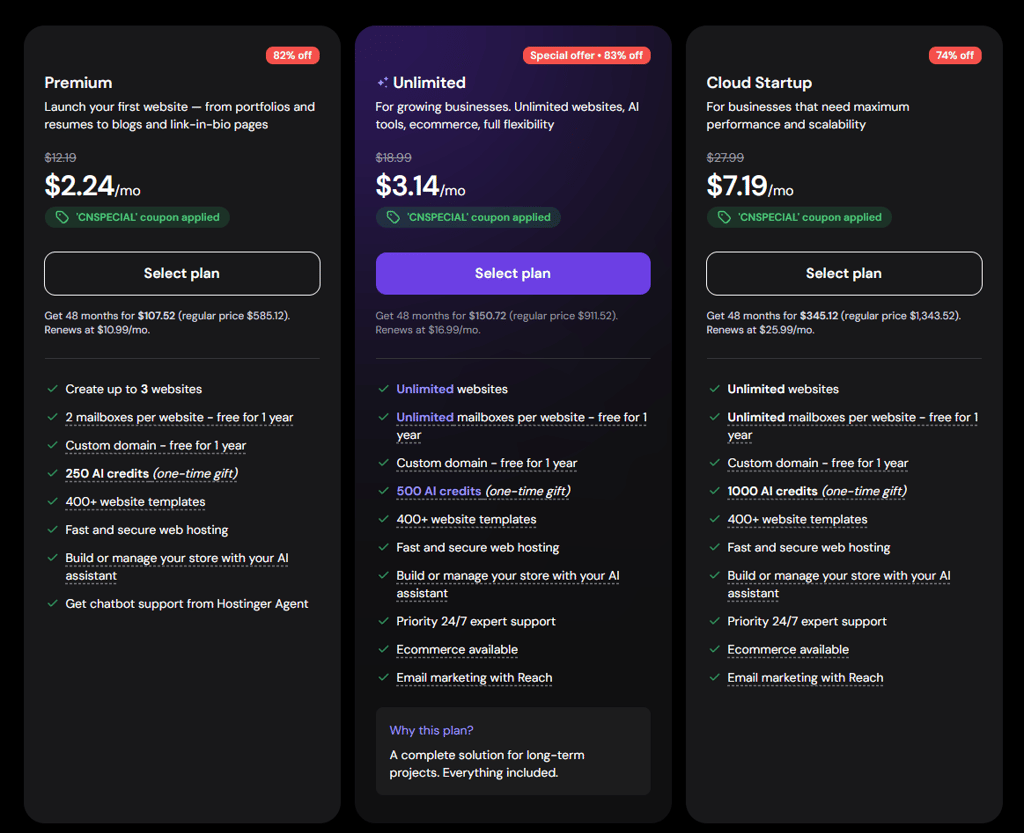
You can choose from 3 plans – Premium, Unlimited, and Cloud Startup. The entry-level plan, Premium, is at $1.79/month, and includes 3 websites, 2 mailboxes per website for one year, a free domain for one year, and 250 AI credits for website and app creation. It’s a good fit for portfolios, blogs, and simple business websites.
The Unlimited plan is at $2.51/month, and adds many more resources than the Premium plan. You get unlimited websites, unlimited mailboxes per website for 1 year, a free domain for one year, 500 AI credits for website and app creation, eCommerce features, email marketing, and 24/7 priority support. It’s actually a complete solution for growing businesses and online stores.
The Cloud Startup is at $7.19/month. This plan includes the same core website and business features as Unlimited, plus 1000 AI credits. It’s aimed at businesses that need maximum performance and scalability.
I like that Hostinger AI Builder gives you ways to try the service before committing. You can use its 7-day free trial or take advantage of the 30-day money-back guarantee.
For a personal website or portfolio, I’d start with Premium. If you need an online store or email marketing tools, Unlimited offers more relevant features. Cloud Startup is worth considering if your business needs more resources.
Hostinger AI Builder delivers excellent value for money, starting at just $6.29/month, compared to $11.75/month for Wix and $9.50/month for Squarespace. You get AI website-building tools, hosting, and useful business features in one platform without paying a premium price. The 0% platform transaction fees are another big plus for online stores, and the 30-day money-back guarantee gives you time to try it out.
Building a website with Hostinger AI Builder
To understand how Hostinger AI Builder works, I decided to personally test it, creating a portfolio for a fictional London-based wedding and portrait photographer. In the Hostinger dashboard, I selected Agentic mode and prompted AI to build a minimalistic, dark-mode website with a gallery, contact form, and charcoal, black, and muted gold colors.
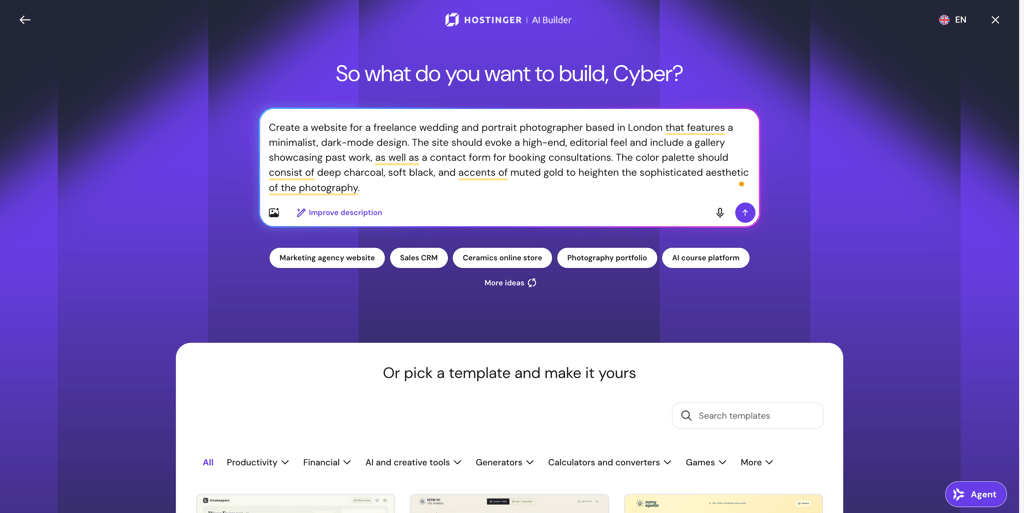
The first draft took around 17 minutes to generate. The initial website included relevant placeholder text, lifestyle imagery, and a complete layout for Riley Hart Lifestyle Photography. However, I noticed that the AI chose a sand and terracotta palette instead of the colors I requested, so I asked to change it to blue and white. The update took around 2 minutes. After connecting a custom domain and completing the publishing process (that’s another 5 minutes), I had a live photography portfolio.
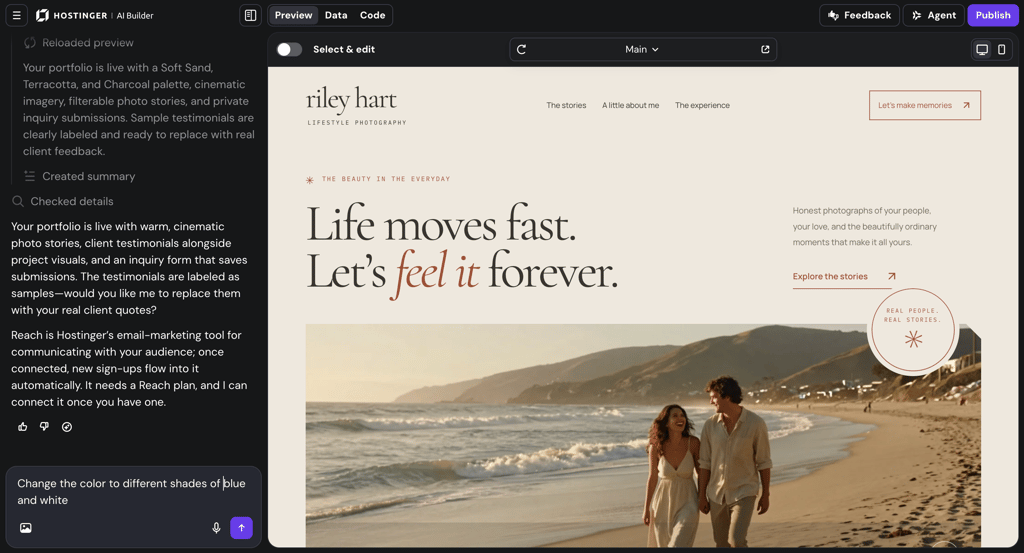
Overall, the process was straightforward and required little manual work. The AI generated the initial design and content, which I could then adjust using follow-up prompts. I still needed to review the result before publishing, but I didn't have to build the website from scratch.
Building an online store with Hostinger AI Builder
Next, I gave Hostinger AI Builder a more complicated task. I used the same Agentic mode and asked it to create an online store for a fictional ceramics brand called Clay Heart. I requested a colorful design, a product gallery, and a shop featuring hand-thrown stoneware.
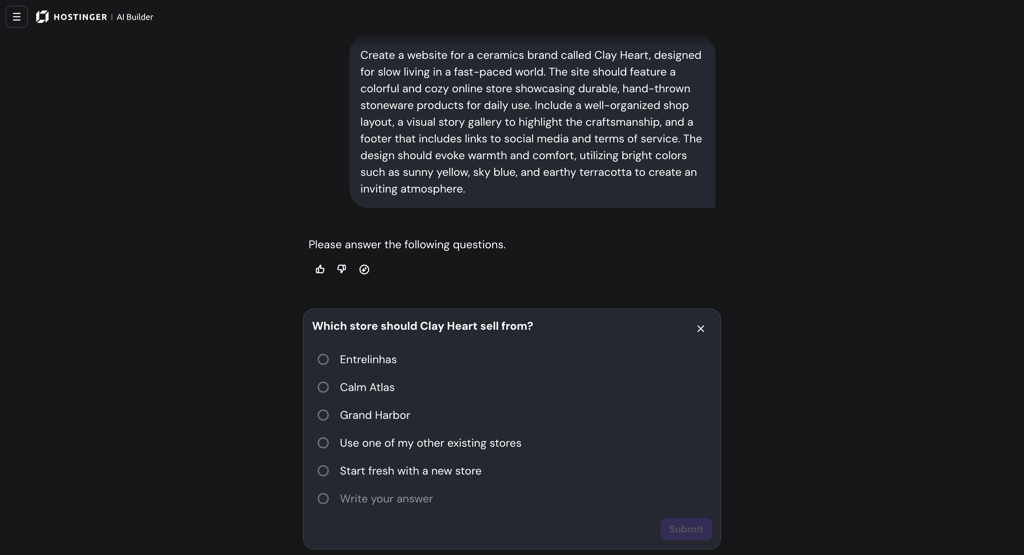
This time, the AI asked whether I wanted to use an existing store or create a new one. I chose to build a new store, and received the first draft in around 10 minutes. The result was satisfying – it included six sample products, a shopping cart, and a hosted checkout. Adding user accounts took another 4 minutes, and publishing took around 6 minutes. I also tested the live shopping cart, which worked as expected.
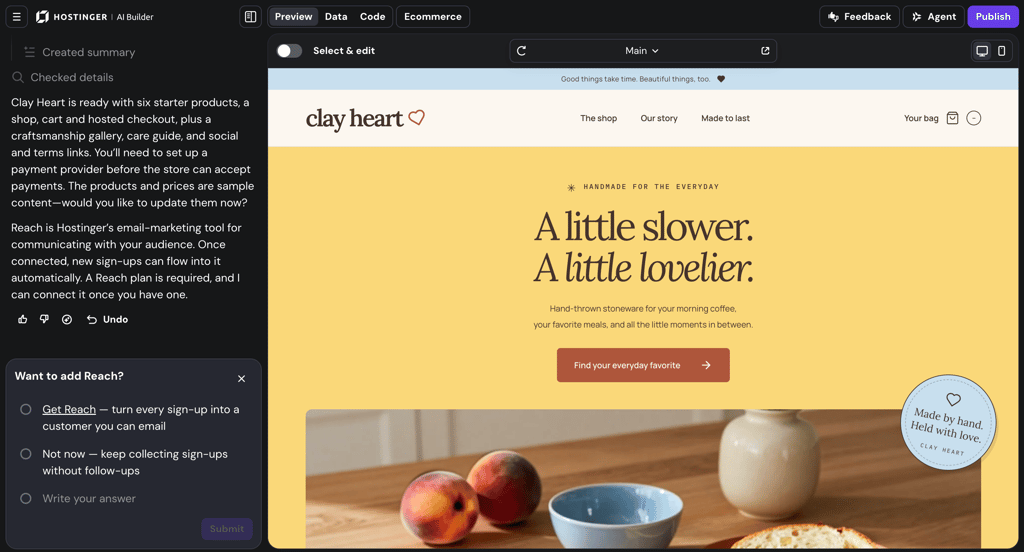
I didn’t have to tweak much because the store dashboard made it easy to manage products, orders, customers, and sales analytics. I could also manage appointments and subscriptions as well as connect Reach, Hostinger’s built-in email marketing tool.
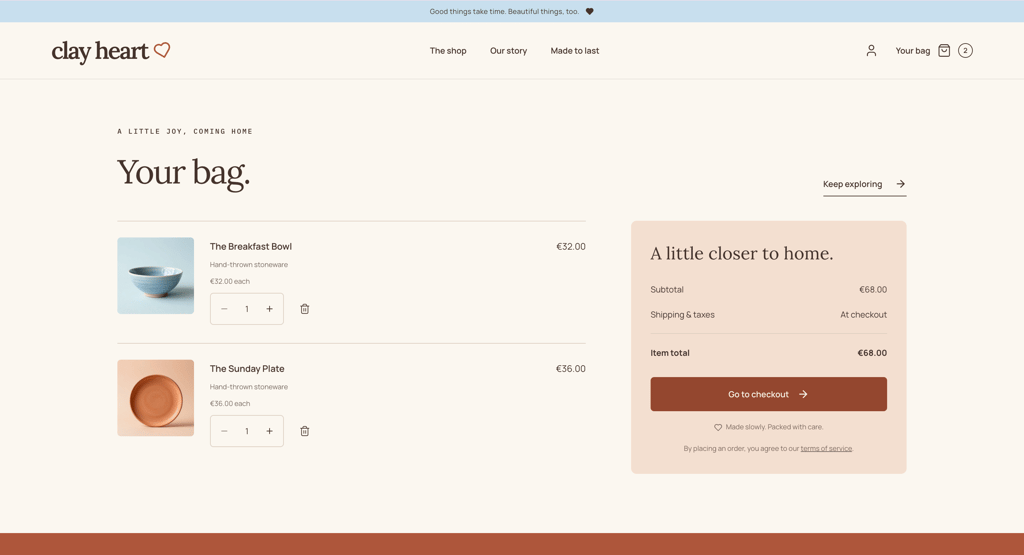
Once again, the process was very straightforward. Best of all, Hostinger charges 0% platform transaction fees. That’s a big deal, since other builders like Wix and Squarespace take a cut from your sales, while Hostinger lets you keep every dollar you earn.
Building an app with Hostinger AI Builder
Another thing I wanted to test was how well Hostinger AI Builder creates apps. For this task, I created AutoCare, a vehicle maintenance app for tracking repairs, expenses, and service reminders. Like with other tasks, I used Agentic mode and asked the AI to build a mobile-friendly dashboard with vehicle profiles, maintenance history, and a dark navy, electric blue, and white design.
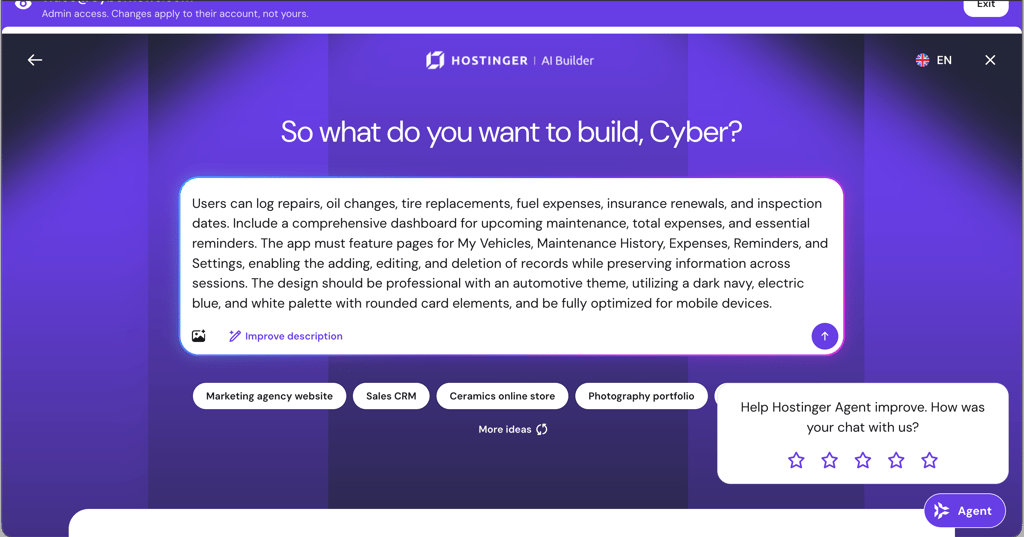
The first version was ready in 10 minutes. I could then preview the app, access its data, and edit the underlying code. I asked to add vehicle photo uploads and improve the search function with live suggestions. The AI made these changes in around 11 minutes.
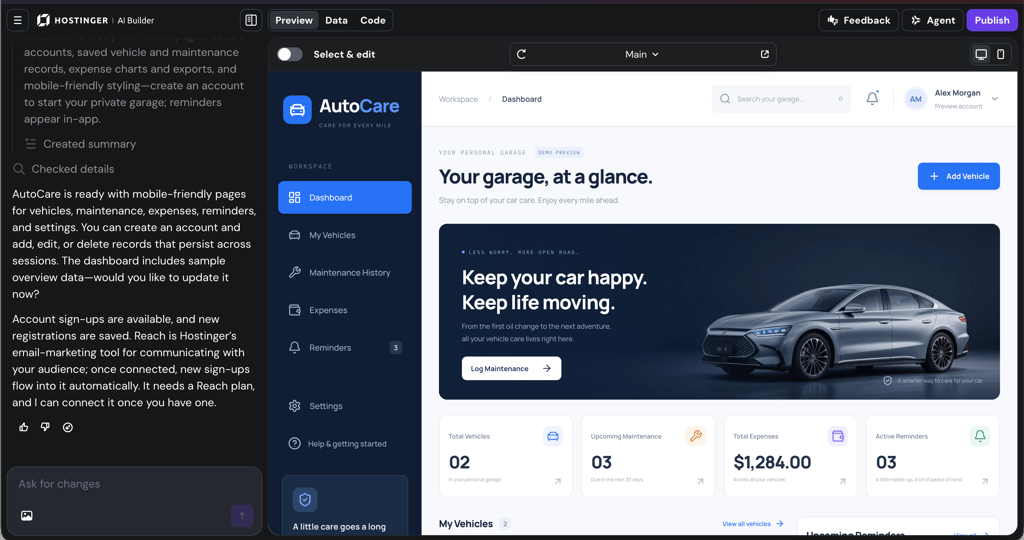
I liked its integrated backend because it supported features such as user accounts, contact forms, and saved records. Advanced users can also export the generated code, although edited code can’t be imported back into AI Builder to continue prompting.
Overall, my experience was positive, but I still needed to test the app and identify missing features. My advice is to treat generated apps as starting points, not finished products.
Building an AI app with Hostinger AI Builder
Finally, I decided to add an AI feature to the previously created AutoCare app. I wanted it to generate personalized maintenance recommendations based on vehicle age, mileage, and previous maintenance history. Again, I used Agentic mode to add the feature to the existing app.
The feature took around 11 minutes and 30 seconds to generate. I was impressed by how well it integrated with the existing dashboard. I could ask questions about a vehicle, review personalized maintenance recommendations, and save them as reminders. However, some responses displayed raw Markdown symbols instead of properly formatted text, showing why testing is essential.
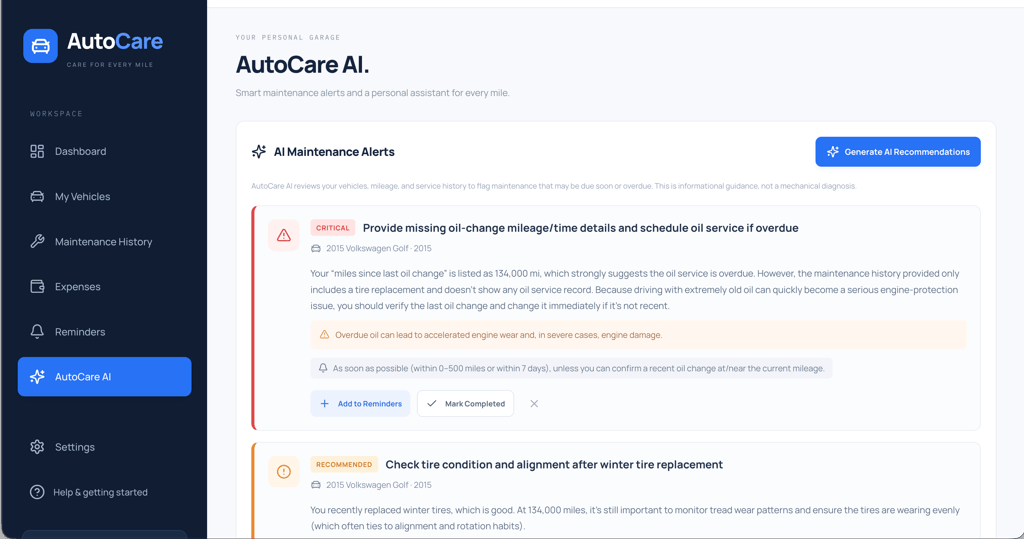
Overall, Hostinger AI Builder handled my tests well, but human oversight remained important. Although the AI generated functional features, I still needed to check the results and identify issues that required fixing. I recommend writing clear prompts and making focused changes one at a time. It's also worth monitoring credit usage, as complex requests and repeated changes consume AI credits.
SEO tools and marketing – solid for beginners
Hostinger AI Builder includes beginner-friendly SEO settings, built-in analytics, and marketing integrations. I like that these tools are easy to use and not overly complicated. However, if you want more detailed performance data, you might need external analytics tools.
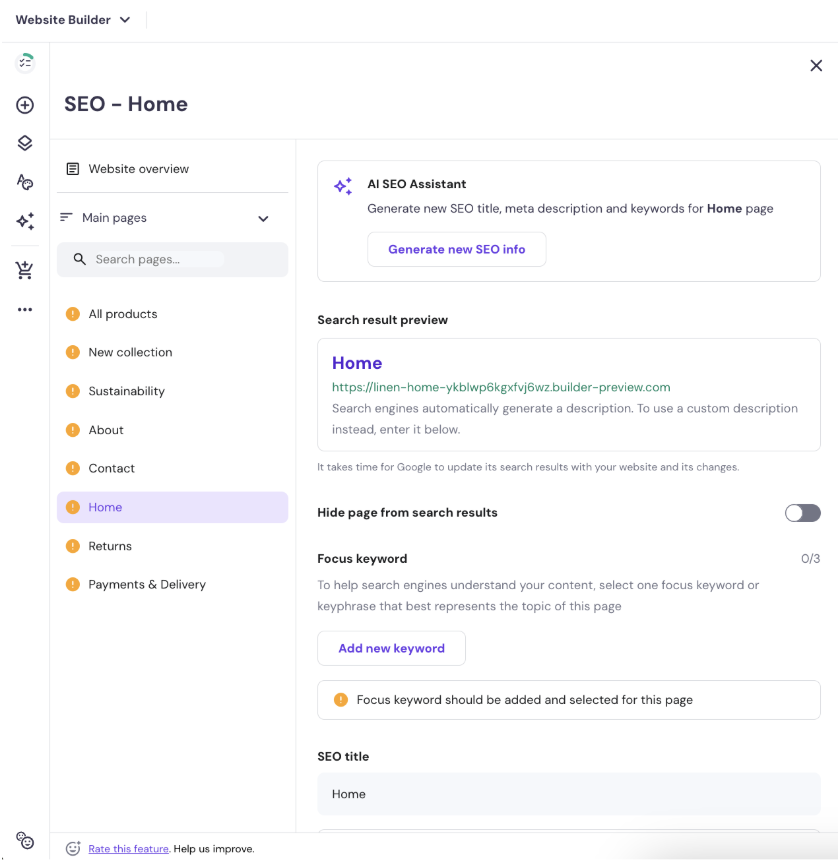
SEO settings are easy to manage. In manual mode, I could edit meta titles, meta descriptions, page URLs, and keywords. The builder provided clear recommendations and explained what each setting meant. I could also control whether search engines could index individual pages. For beginners, the AI SEO Assistant is another useful feature, as it can generate metadata. I also tested Agentic mode, where I could request SEO changes through prompts, such as updating meta titles and descriptions. This worked smoothly.
Marketing integrations are useful if you want to connect external tools. And, in Hostinger AI Builder’s case, they’re easy to set up. From the sidebar, I quickly added Google Analytics and Facebook Pixel for performance tracking and ad campaigns without any technical hassle.
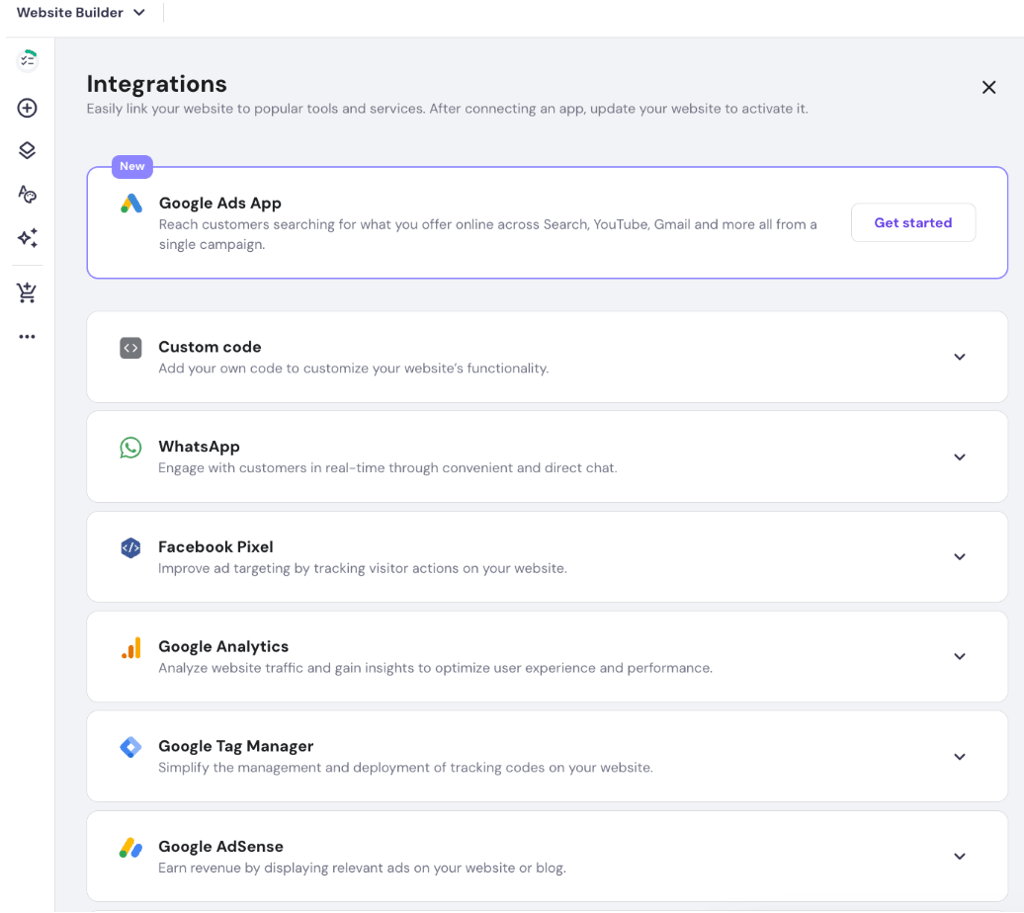
However, Hostinger’s built-in analytics lack the depth needed for detailed performance analysis. While I could monitor basic visitor statistics, I needed to connect Google Analytics to get more comprehensive insights into traffic sources and user engagement.

Finally, Hostinger also offers Reach, an AI-powered email marketing tool. I gave it a try on one of my websites and found it easy to use. I could put together professional-looking newsletters in just a few minutes, monitor campaign results, and explore ways to grow my email audience.
Hostinger’s SEO and marketing features are easy to use, especially for basic website optimization. Connecting Google Analytics and adding Facebook Pixel gave me options for tracking performance, while the AI SEO Assistant helped simplify metadata optimization. These tools should be enough for many small and medium-sized websites. However, if you need more detailed analytics or greater control over your setup, you might find the options limiting.
Hostinger AI Builder customer support
Hostinger AI Builder offers 24/7 support through live chat and email and a large help center with tutorials and guides. I was pleasantly surprised when I contacted them, as I received my first reply in under a minute, and my issue was solved soon after.
The chat started with Hostinger Agent, Hostinger’s AI chatbot. It’s useful for basic questions and quick fixes, but I asked it to connect me with a real agent. The agent replied almost instantly and gave me clear, helpful answers.
I also like that if you can’t wait in the chat, you’ll get an email notification when the agent responds. And if you don’t feel like chatting at all, the same icon works as a search tool for the help center, which has plenty of step-by-step guides.
Overall, Hostinger Agent can feel limited for complex issues, but Hostinger’s support agents and its helpful knowledge base provide efficient help.
8. I got a reply in under a minute, and my issue was solved right after. The AI chatbot is fine for quick fixes, but the real agents are where it truly shines.
Video review
If you prefer video over reading, a detailed Hostinger Website Builder review is included right below.
Final verdict – should you use Hostinger AI Builder?
Hostinger AI Builder is a reliable choice if you’re looking for an affordable and beginner-friendly platform with all the essential features. In my tests, its AI tools handled everything from website design to eCommerce features and AI-powered app functionality, although you might still need to review and refine the results.
Overall, it offers plenty of flexibility for freelancers and small businesses. However, if you need specialized eCommerce tools or more advanced customization, Shopify or Wix might be better choices.
FAQ
How good is Hostinger website builder?
Hostinger AI Builder is great for beginners who want to build a website without coding. It can create simple websites, online stores, and web apps from text prompts. My tests showed that it’s easy to use and generates functional results quickly. However, you’ll still need to test the site and make some adjustments before publishing.
Is Hostinger AI Builder free?
No, Hostinger AI Builder doesn’t offer a free plan. You can start with a 7-day free trial, but you can’t publish your site until you upgrade to one of the paid tiers. After that, plans begin at $1.79/month.
Does Hostinger have an AI builder?
Yes, Hostinger AI Builder includes a full suite of AI tools, including a website builder, writer, image generator, blog generator, SEO tools, logo maker, product generator, and heatmaps.
Can I use Hostinger Website Builder for eCommerce?
Yes, Hostinger’s Unlimited plan includes eCommerce features, allowing you to manage products, inventory, and orders and accept payments through over 100 payment methods. Hostinger charges 0% platform transaction fees, although payment processing fees may still apply.
Can I move my Hostinger AI Builder site to another platform later?
Yes, but the process depends on the building mode. In Manual mode, you can export text, images, and other content to WordPress, but design, layout, eCommerce, forms, integrations, and SEO settings won’t transfer. In Agentic mode, you can export your project’s source code and host it elsewhere, although integrated backend data isn’t included.
Is there a Hostinger AI Builder free plan?
No, Hostinger AI Website Builder doesn’t have a permanent free plan. However, you can try it with a 7-day free trial before committing to a paid plan. You can also take advantage of the 30-day money-back guarantee if you’re not satisfied.