Website builders vs custom-built sites: which is right for you?
Our team of experts and researchers rigorously test and evaluate website builders through transparent, in-depth testing procedures and methods using both in-house and industry-approved tools.
Drawing on cybersecurity insights, we provide unbiased, empirical rankings and analysis to help users make informed digital platform choices.
Learn more
Any business, even a small local bakery, freelancer, or startup, can benefit from having an online presence. It’s a big step towards being discoverable and proving credibility.
Creating a website is a great way to start and display your services, prices, and portfolio. This raises the main question: should you use a website builder or build a custom site by hiring a developer to code a site from scratch?
I’ve built websites using both options, which have pros and cons depending on the website you’re building, how fast you need it, and how much you’re willing to spend.
In this article, I’ll go over the key differences between website builders and custom-built sites, focusing on factors like cost, security, flexibility, and time spent, to help you figure out the right option for you.
-
Website builders are cheaper to start with, but you still pay ongoing platform fees. Custom sites cost more upfront and have separate costs for hosting, maintenance, and updates.
-
Builders let you launch a site in hours. Custom sites usually take weeks or months to build.
-
If coded well, custom-coded sites load faster and offer better SEO control, often under 1.5s, while builder sites take 3-5s on average.
-
Builders handle security and updates for you. Custom sites provide full control, but you have to manage everything yourself.
-
Builders are easy to customize but have design limits. Custom sites offer full freedom but require more knowledge.
-
Most users are fine with a builder. Choose custom if you need total control, unique features, or advanced performance.
Which option gives you better value for money?
Both builders and custom-built sites have various costs you have to keep in mind. Let’s break down what you can expect to pay upfront and to keep up your website.
Website builders: low starting costs and expensive add-ons
If you’ve ever seen a website builder ad, you might have noticed some of them advertise prices as low as $1.00/month. That sounds great, and it can be, but there are usually extra costs to consider.
Often, those low prices apply only for the first term, like a 1-year subscription. Once the promo pricing ends, renewal prices can jump significantly. For example, IONOS offers $1.00/month for the first year, but if you choose a plan with an online store, the price goes up to $30.00/month when it renews.
On top of that, the total cost depends on your plan, the features you need, and any paid apps or templates you add on. Some platforms also charge for third-party apps or take a cut of your sales. Shopify, for example, adds extra transaction fees unless you use its payment gateway. Its paid templates can also cost anywhere from $100.00 to $500.00 as a one-time fee.
If you’re planning to grow your site over time, it’s smart to check whether your builder lets you upgrade plans easily and what add-ons might cost. Otherwise, your costs could increase faster than you expect.
Custom-built sites: higher upfront costs and more control later
Custom-coded sites cost quite a bit more upfront. Unless you’re comfortable coding yourself, you’ll probably hire a developer or agency. That means paying for everything – planning, design, development, testing, hosting setup, and security. Prices vary a lot, but you should expect to spend thousands.
Don’t forget ongoing costs, too. Hosting usually isn’t included, and unless you can update or fix things yourself, you’ll need to pay for maintenance and any needed redesigns.
The upside is you get way more flexibility and control. If your site is complex or you expect to grow a lot, custom code often ends up being a better long-term investment.
Need a website fast, or willing to wait?
One of the biggest differences between using a website builder and building a custom site is the time it takes to create a functional site. In short, building a website with a builder is always quicker, but let’s break down why.
Website builders: from idea to live site in a day
If you need a site up quickly for a product launch, event, or seasonal promo, a website builder can get you online in just a few hours. I’ve launched basic sites in a single afternoon with tools like Wix or Hostinger Website Builder. They’ve gotten a lot smarter lately, with AI assistants that help generate text, images, and even SEO descriptions.
You also get access to a library of ready-made designs, so once you’ve picked a template, it’s mostly just drag-and-drop to customize it. Contact forms, image galleries, blog sections, online store features, and basic SEO tools are usually built-in, which is another time saver.
Even edits are fast. I’ve updated product pages and changed layouts in minutes. What I like most is being able to see changes as I make them. You just move things around on the page, drop in a new image or headline, and it’s done.
Custom-built sites: a slower, step-by-step process
Custom sites take longer. Instead of using a tool that’s ready to go, you usually need to work with designers and developers. There’s back-and-forth on mockups, layout decisions, and the actual coding and testing. I’ve worked on projects like this, and even the simpler ones took weeks before anything went live.
Even small changes are not quick. If you want to swap out a banner or add a section, you’ll likely need to go through a developer, or at least spend time digging into code. It’s a much more manual process overall, and the time adds up fast.
SEO and performance
Most builders give you the basics for SEO: title tags, alt text, responsive design, and a sitemap. That’s enough for small sites or portfolios, but once you’re targeting more competitive keywords or need custom control over how your pages appear in search, they start to feel limiting.
With a custom site, you can control everything, from URL structure and meta tags to how search engines crawl and index your content. And those technical details can make a real difference in your site's ranking.
When it comes to speed, custom-coded sites are usually faster. They don’t come with extra code or features you don’t need, so pages load quicker. According to Ranktracker, most builder-based websites take 3-5s to load, while well-built custom sites load in under 1.5s. That’s a big difference, especially since Google says over half of visitors leave if a page takes more than 3 seconds.

Security and ownership
Web builder platforms handle much of the security behind the scenes, including automatic updates and patches. However, there’s a risk that vulnerabilities can be introduced without your direct control or knowledge.
Custom-built websites offer full control over your code and security setup, but it also means you’re fully responsible for managing updates, patches, and monitoring for vulnerabilities. Here’s a breakdown of what to consider when it comes to security
Who’s responsible for security?
On web builders, many features depend on third-party apps or templates from the platform’s marketplace. If a security issue arises, such as a vulnerability in a plugin or a broken integration, the platform itself usually isn’t held accountable. Their terms of service often make it clear that you use these tools at your own risk, and you may be responsible for any consequences.
For example, in 2025, a serious authentication flaw was found in Wix’s acquired AI platform Base44, allowing attackers to bypass login protections. It was fixed quickly, but the incident highlighted how third-party integrations can expose users to unexpected risks.
In contrast, with a custom-coded site, you or your developer control the entire codebase and security processes. You decide when and how to apply updates and patches, which gives you more control but also more responsibility.
Hidden code and potential risks
With web builders, some apps and templates don’t clearly disclose which scripts or external services they run. From my experience, sites built on these platforms can look clean in the editor, but security scans sometimes reveal third-party trackers, ad networks, or JavaScript libraries running behind the scenes, which the site owner never knew about.
In 2024, attackers abused Webflow’s CDN to distribute phishing PDFs, leading users to fake CAPTCHA and login pages. Since Webflow automatically hosted the files, many site owners were unaware of what was being served.
Custom-coded sites aren’t immune to hidden risks either. If developers use external libraries or integrate third-party services without a thorough review, vulnerabilities can be introduced. The difference is that with custom code, you or your developer can inspect the code directly to understand and control what’s running.
Fixing security issues
Website builders handle most updates automatically, which means you often don’t need to worry about the technical details. However, it also means you’re relying on the platform or third-party developers to fix vulnerabilities quickly.
With custom-built sites, you’re in charge of identifying and fixing security issues. This gives you more control over implementing fixes, but it also means you need the expertise to keep your site secure or hire someone who can.
Design and customization
Website builders make it easy to design a professional-looking site without needing to touch code. Most use intuitive drag-and-drop editors and offer a wide range of templates. It’s super simple to add a new section, swap out an image, tweak fonts or colors, or rearrange your layouts. That’s great if you want to manage your site without hiring a designer.
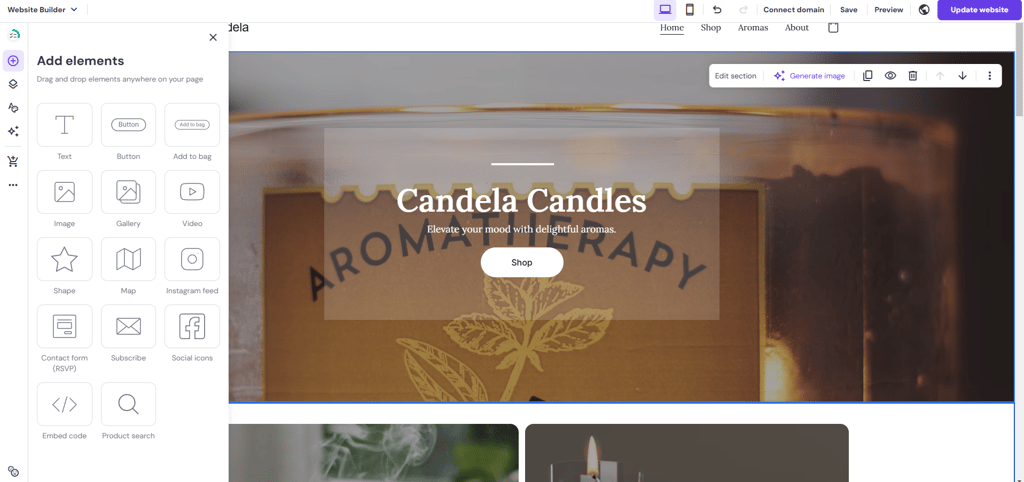
That said, builders do have design limitations. You need to work within the structure of a template or grid, so if you want something unique or more complex, like custom animations, interactive elements, or a non-standard layout, you’ll probably find it difficult to achieve.
Custom-coded websites give you complete creative freedom. You can design every element from scratch, match your brand exactly, and build interactive or dynamic components. However, this level of customization requires design and development skills, and making changes later isn’t as quick or easy unless you know how to code or work with a developer.
Scalability and getting ready for the future
It’s easy to focus on just getting your site online, but I’ve learned it’s just as important to think a few steps ahead. Builders are great for getting started, but they usually lock you into their system. You’re limited to the templates, features, and integrations they support.
One thing people don’t always realize is that most web builders don’t support migration. You can’t just export your site and move it to a different platform or host. If you ever want to switch builders or move to a custom-coded setup, you’ll likely have to rebuild your entire site from scratch.
For smaller projects like portfolios or static landing pages, this probably won’t matter. But if you’re building an online store, planning to grow your content, or adding things like member areas or custom integrations, it’s worth checking what upgrade options are available. Some have strict limits on product listings, storage, or third-party tools. If there’s no room to grow, you could hit a wall faster than expected.
Custom-coded sites take more work upfront, but they’re much more flexible in the long run. You can switch hosts, change features, and scale as needed without being locked into someone else’s system.
Which option is best for your website?
Not all websites have the same goals, and the best way to build your website depends heavily on what you’re trying to develop. I’ve prepared a breakdown of the most common use cases and which option makes more sense for each.
Portfolio or personal site
If you're a freelancer, photographer, designer, or student building a personal brand, a website builder like Wix, Squarespace, or Hostinger is the fastest and most cost-effective option. You get a wide choice of templates, galleries, and contact forms, which are all customizable to fill with your content. Unless you need unique functionality, there’s no reason to custom-code a portfolio or personal website.
eCommerce store
For simple stores selling physical or digital products, builders like Shopify, Wix, or Squarespace offer built-in eCommerce tools that cover most needs, including payments, shipping, and inventory tracking. However, a custom-built site gives you more flexibility if you run a large or complex store with custom checkout flows, integrations, or special product logic. Remember that website builder plans that can handle large eCommerce stores with many products tend to get expensive. Over time, a custom-coded site can save you money.
Blog or content site
A website builder is the easiest way to go if you just want to share your thoughts, write articles, or post updates about your business. Builders like Wix, Hostinger, or Squarespace have built-in blogging tools, so you can start writing immediately without worrying about setup or code.
However, a builder might feel limited over time if you're creating an online magazine, a knowledge base, or a blog with many categories, authors, or custom layouts. Custom-built sites allow you to organize content exactly how you want and add advanced features, like custom article templates, related post suggestions, or membership access. In short, builders are great for simple blogs, while custom sites work better for larger, more complex ones.
SaaS or web app
A custom-coded site is usually the better choice if you’re building a complete web app, like a booking system, dashboard, or SaaS product. Apps often need complex features, user roles, and custom integrations that builders can’t fully support.
That said, some builders like Wix offer tools for simpler projects. Its Membership Area lets you add login bars, member-only pages, chats, welcome emails, loyalty points, and badges, which is great for communities, client portals, or selling digital products. Overall, builders can handle simple apps, but custom coding is best for full-scale, feature-rich projects.
Business website
Website builders are usually more than enough for small businesses, like cafes, agencies, and salons. You can display services, locations, booking forms, and contact info easily. Custom builds are worth the extra effort for larger companies with advanced needs, like integrations with internal systems, custom CRMs, or user portals. Ultimately, builders cover most small business needs, while custom sites are useful for more complex requirements.
Final thoughts
There’s no one-size-fits-all answer when it comes to building a website. I’ve used both website builders and custom-coded sites, and the best choice really depends on what you’re building, how fast you need it, and how much control you want.
If you’re after speed, simplicity, and affordability, a website builder is probably all you need. But if you want total creative freedom, better performance, or advanced features, custom code is worth the extra time and investment.
Either way, the most important thing is to get your site online and make it work for your goals.