GoDaddy website builder review
Our team of experts and researchers rigorously test and evaluate website builders through transparent, in-depth testing procedures and methods using both in-house and industry-approved tools.
Drawing on cybersecurity insights, we provide unbiased, empirical rankings and analysis to help users make informed digital platform choices.
Learn more

GoDaddy website builder is designed for beginners and small business owners. It offers an all-in-one package that combines an easy-to-use site editor, robust eCommerce tools, and marketing features – everything you may need to launch your startup site quickly. Of course, that’s not the full picture, which is why I decided to dive deep into a comprehensive GoDaddy website builder review.
Many know GoDaddy for web hosting, but its website builder has its user base as well. When I researched and tested the platform, I was pleasantly surprised that it packs all the essentials into a sleek, user-friendly interface. That said, it’s certainly not flawless. Most notably, the editor may feel somewhat limited for advanced use.
So, is GoDaddy website builder worth the consideration? Here are the main specs to consider if you’re interested, but keep reading on to learn all about this platform.
| ⭐ Rating: | |
| 🥇 Overall rank: | #24 out of #38 |
| 💵 Price: | From $9.99/month |
| 🪄 Ease of use: | Very simple to use, a bit limiting |
| 🎨 Templates: | 270 |
| 🏢 Business features: | In-house features, suited for beginners |
| 👨💻 24/7 live support: | Yes |
| 🔥 Coupons: | Cybernews Website Builder Coupons |




Our in-house research team and expert writers work hand in hand to regularly test website builders and provide accurate and fact-checked information. Discover the ins and outs of how we test and evaluate website builders.
GoDaddy website builders pros and cons
What website is GoDaddy builder best for?
While GoDaddy certainly doesn’t offer the best website builder in 2026, it has some strengths that draw in users. So, what is it good for? What is it not? Let’s take a look at how GoDaddy website builder handles some of the challenges thrown its way.
| Website type | Benefits | Limitations |
| Online store | Great eCommerce features, accompanied by guides to help out beginners | There’s only one plan with eCommerce functionality |
| Blog | A very simple blogging editor, good SEO tools | The blogging editor is very basic, there are better options offered by other website builders |
| Portfolio site | A ton of modern design templates to portray your art in the best possible light with an easy to use editor | Not a lot of customization – the ease of use is possible because of the not-so-flexible design editor |
GoDaddy for business websites
GoDaddy is all about small businesses – and that absolutely shows. This builder offers useful tools that are accompanied by helpful guides for beginners to give them leverage to grow. That includes the GoDaddy InSight tool, which measures a business’s performance, the SEO Wizard that helps to edit your site in order to rank better, and a simple, but powerful eCommerce platform.
GoDaddy for online stores
The eCommerce platform on the GoDaddy website builder is actually quite impressive. While it is only available with one plan (the most expensive one, Commerce), you get a simple, no-frills eCommerce solution. Accompanied by helpful guides, the platform is perfect if you want to sell online, but have no experience doing so.
GoDaddy for portfolios
GoDaddy is a decent option for artists. While there are plenty of other more advanced website builders for artists, this web builder is an option to consider if you’re not very tech-savvy.
By choosing GoDaddy for your portfolio, you get a selection of business features that help you sell your art as well as modern design templates that portray it in the best possible light. It’s a great option if you want to build a simple site to showcase and sell your artwork online.
GoDaddy for blogs
GoDaddy offers a very simple blogging solution. The editor itself is pretty basic; however, you might enjoy the SEO tools that this website builder offers. Without good SEO, your blog won’t rank on search engines, no matter how good your content is. For that case, you can definitely utilize the SEO Wizard.
SEO tools are available with all GoDaddy plans and mainly will help you edit your content and titles to rank better for your desired keywords. The tools are simple and can help you make basic adjustments, but if you don’t have any previous experience with search engine optimization, I think GoDaddy covers the basics.
GoDaddy website pricing
You can try out GoDaddy website builder for free using a 7-day free trial, which offers access to all the premium features. You can even connect to a custom domain, but note that your site will be moved to a temporary domain unless you update to a paid plan after the trial. That said, if you don’t upgrade, your website remains accessible, just with basic features.
As for premium subscriptions, GoDaddy offers 3 plans that range from $9.99/month to $20.99/month. These prices are below the industry average, making this a pretty solid deal for both personal and business users.

If you opt for an annual plan, you can save quite a lot of money. For example, the Basic plan costs just $9.99/month. On the other hand, if you choose to pay monthly, you will see a significant increase in pricing. You can expect to pay anything between $21.99 (Basic) to $44.99 (Commerce) per month.
Here's a quick comparison of GoDaddy website builder plans.
| Plan | Features | Price |
| Basic | Excellent simple plan for personal websites: Get up to 62% OFF GoDaddy website builder | $9.99/month |
| Premium | Send up to 25,000 monthly emails, enjoy unlimited ads on Meta and Google, and set up appointments | $14.99/month |
| Commerce | All features above, plus eCommerce functionality | $20.99/month |
Note: Annual plans offer discounts for the first year. Afterward, the 3 plans will cost $16.99, $29.99, and $34.99 per month, respectively.
Let's break down these 3 GoDaddy website builder plans, and see just how much they offer for the money and if this cheap website builder is worth it or not.
Basic plan
Basic costs $9.99/month ($21.99 when playing monthly) and offers all the basic features. It's a great plan if you're just making a simple portfolio website for yourself and your business. The Basic plan provides:
- Free custom domain and professional email for the first year
- Access to GoDaddy Airo AI
- Advanced website analytics
- Basic marketing tools
- 100 monthly marketing emails
- SEO Wizard
This pretty much covers the basics, but if you want to use your website for eCommerce, you will need to choose a different plan. That said, if you need the bare minimum or you simply want to try web building for yourself, this is the plan to consider.
Premium plan
Premium costs $14.99/month ($39.99 when paying monthly) and is a great alternative to Basic for users who need more freedom when using marketing tools. Additionally to what you get with the Basic plan, the Premium plan provides:
- Advanced marketing tools
- Unlimited ads on Google and Meta
- 25,000 monthly marketing emails
For marketing-focused startup businesses, this certainly offers more flexibility than the Basic plan. This will probably allow you to send all the marketing emails you need as a startup. Plus, you will be able to set up ad campaigns to grow your business further.
Commerce plan
Commerce costs $20.99/month ($44.99 when paying monthly) and includes everything above, and then some. With this plan, you get:
- 100,000 monthly marketing emails
- Extensive eCommerce features
- Selling on social media platforms and marketplaces
If you're looking to use your website to sell online, Commerce is the GoDaddy website builder plan you should pick. After all, it's the only eCommerce-capable option here.
Additional costs
The GoDaddy website builder seems like an all-in-one service. It includes marketing tools for promoting and monetizing your site. For the price of the plan, you get a free domain name, the website builder itself, and email marketing. But you should consider extra charges as well.
After your initial purchase expires, GoDaddy’s renewal prices rise up. The 3 plans will cost $16.99, $29.99, and $34.99 per month, respectively. Additionally, the domain is free for one year only. After that, you’ll have to pay the standard domain rate which is always changing. At the time of the latest update, a .com domain cost $4.99 for the first year after the renewal of the website builder. Later on, it would cost you $21.99/year.
Overall, if we subtract the price of a domain, your website can cost as much as $15/month more than your initial purchase (when considering the Premium plan). Keep that in mind when choosing this website builder for your website.
Is GoDaddy website builder easy to use?
The short answer is yes, GoDaddy website builder is fairly easy to use, which is why it’s often praised by those who’ve never built websites at all. In my experience, it’s one of the quickest sign-ups I’ve gone through in a while. The overall management experience was also very simple, everything was easy to reach, and there were plenty of guides to point me in the right direction.
Here’s a quick rundown:
- The setup process – only takes a couple of steps to sign up and start editing your website.
- Building the website – a very simple experience, and at times, it might even feel a little limiting.
- Managing the website – with a simple interface, I had no trouble finding what I needed.
To test GoDaddy website builder and check whether or not it was easy to use, I built a test website. So, let’s take a deep dive into the process.

Getting started with GoDaddy website builder
Getting started with GoDaddy website builder is a pretty straightforward process that allows tailoring your website to your needs. First, I defined the goals for my website (e.g., selling products or booking appointments). Then, I picked a category (e.g., Photography), chose my website's name, added contact details, and added a short description of my business. GoDaddy's AI used the info to generate a customizable description that I could use to fast-track the process.
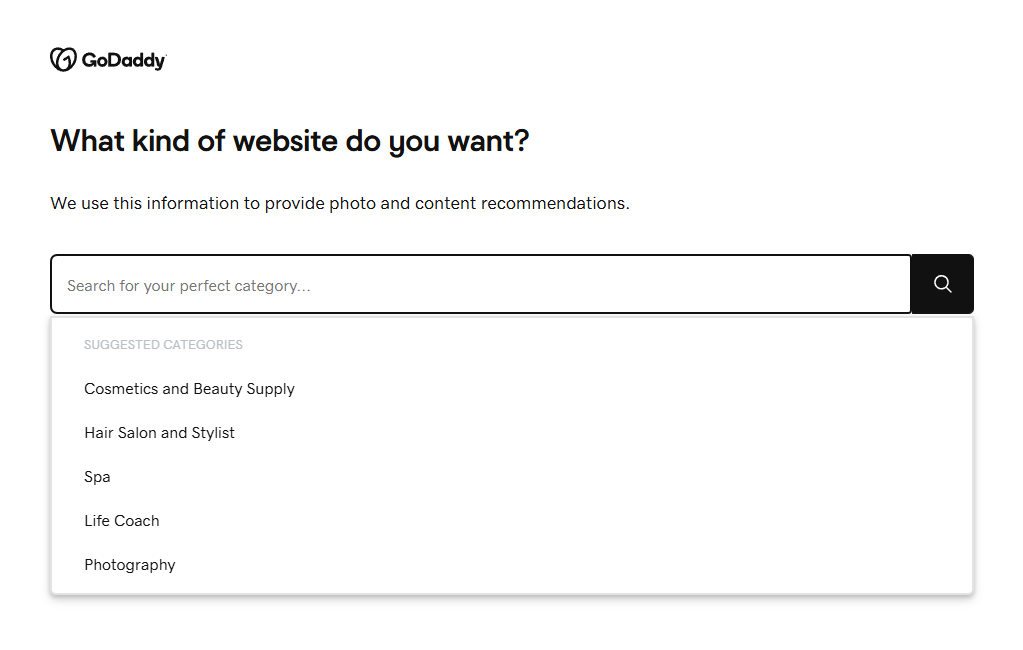
By completing these simple steps, I could immediately start editing my website. However, while the initial setup asked enough questions to build a custom website, I would have preferred additional options upfront, like choosing a theme right away.
Of course, these options exist, but they are simply available later on in the website building process. The setup is made to be extremely simple. All the decisions that you make here can be quickly changed, too.
GoDaddy website editor
GoDaddy’s website editor is clearly built for beginners, and it hits that market perfectly. Editing options aren’t particularly extensive or in-depth, but they are useful and functional.
On the right-side panel, you can navigate to Website, Theme, Store (on Commerce plan), and Settings menus:
- Website. The menu allows editing page structures, customizing site-wide layouts, and managing the add-ons. This is also the menu in which you can add and edit the sections of your website.
- Theme. This menu allows browsing through the available themes and picking such visual elements as colors and fonts.
- Store. As you can guess, this one is all about the eCommerce functionality.
- Settings. The final menu provides access to everything that’s related to managing your website and your account.
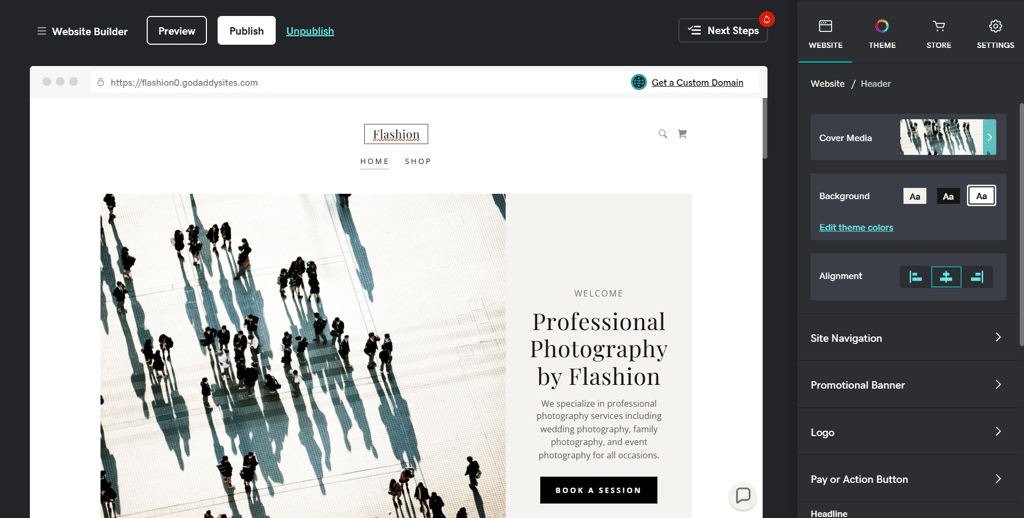
When I dived into the Website menu, I found around 30 sections to choose from, including some more specific picks, such as online appointments and restaurant menus. You can even add custom code.
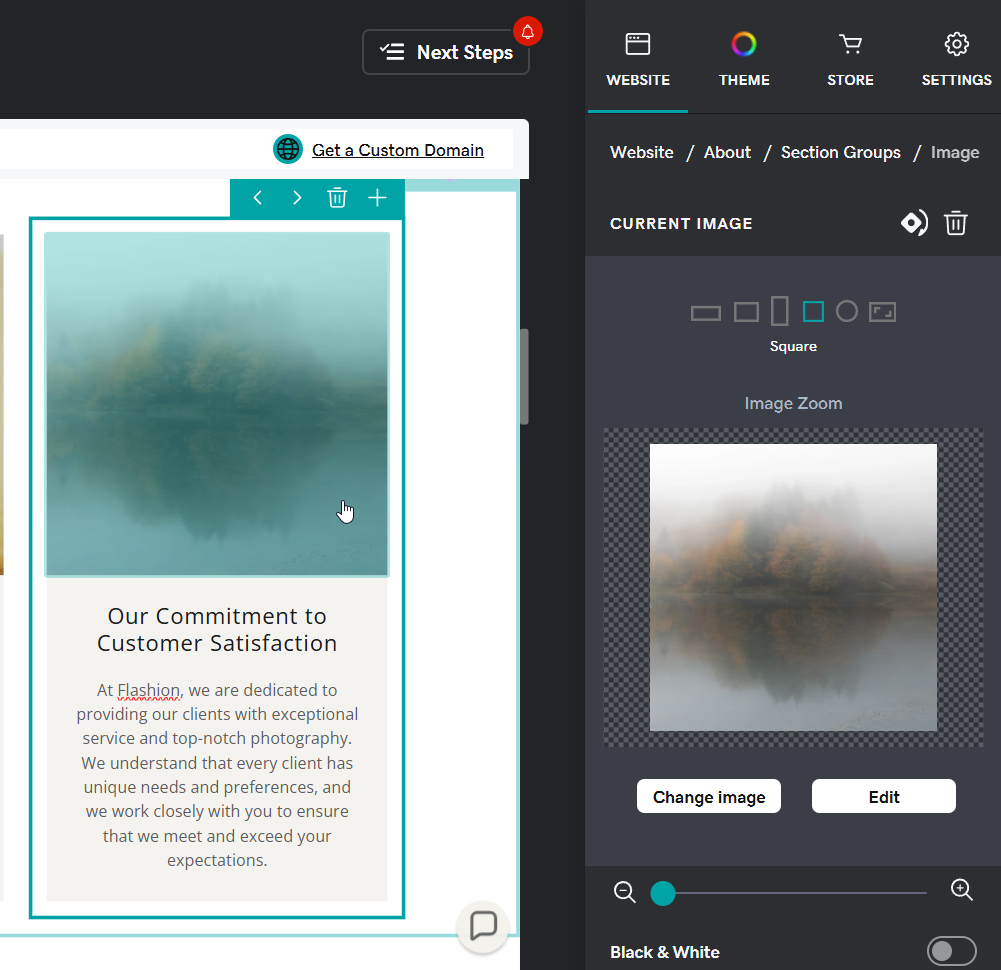
Stacking sections together was actually very enjoyable. They work seamlessly with one another, and you can easily mix and match those sections to build the kind of website you want.
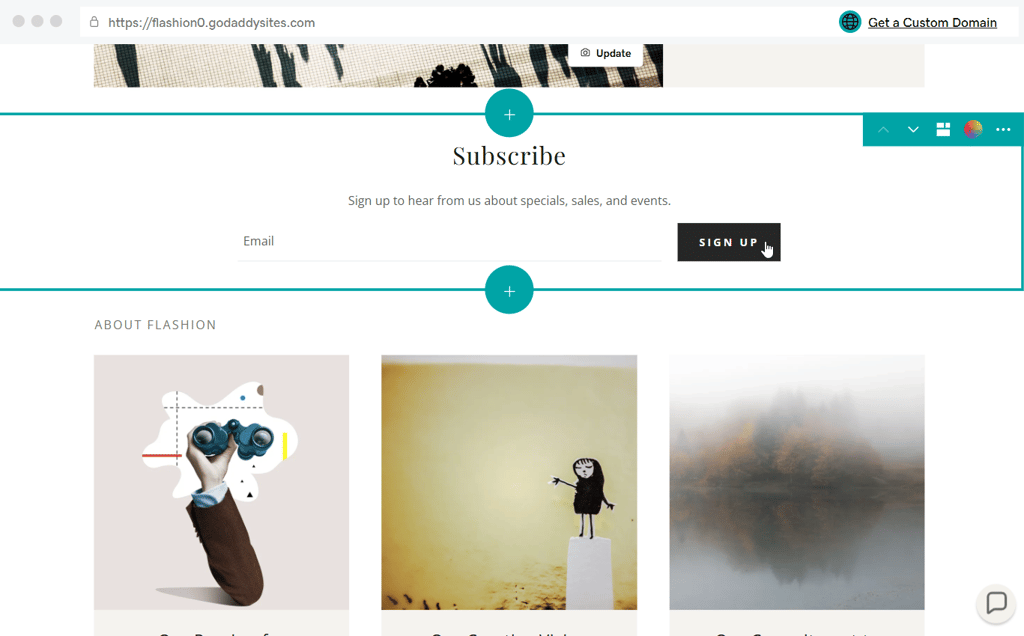
The website editing itself will be quite limited though. You won't be able to move the items around as you please. Instead, you can only take the existing options and shift them around, as well as edit an item's preferences on the right-hand side menu.
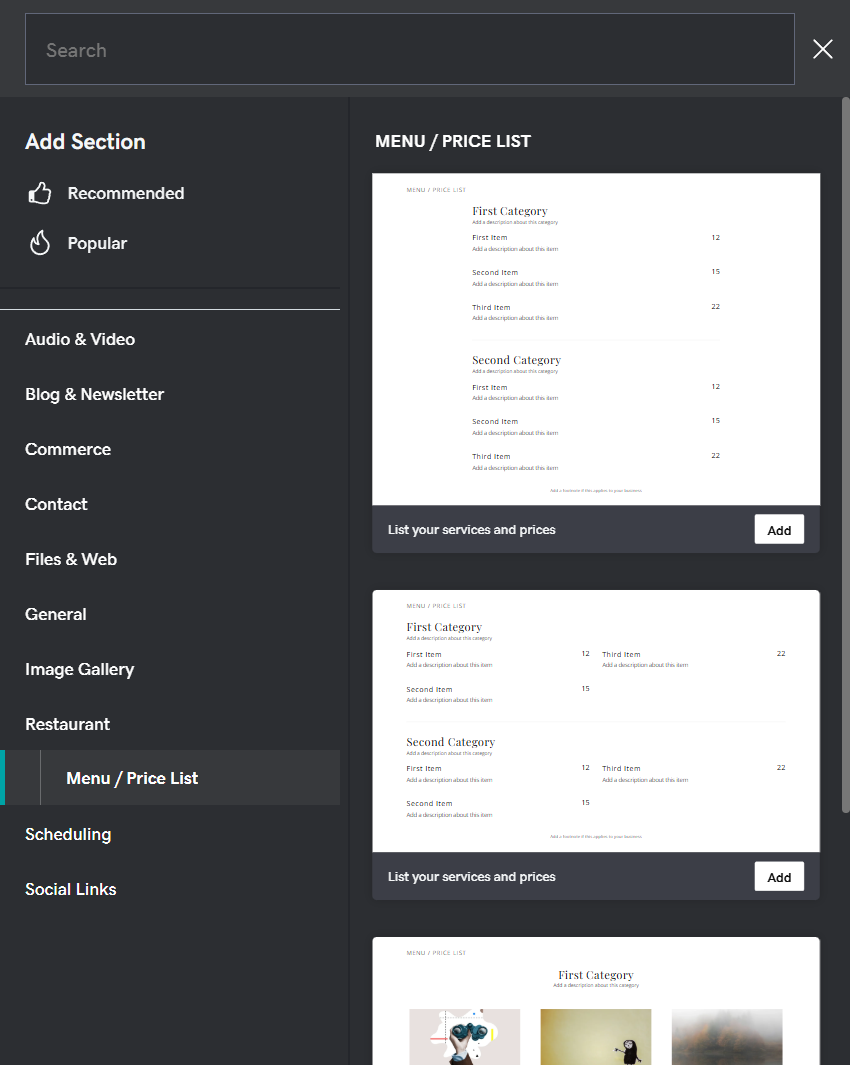
In my opinion, this limited design freedom could be a problem to more advanced web designers, and honestly, it doesn’t get much better from this point on. GoDaddy website builder is focused on the beginners, so everything's built to be as simple as possible. Unfortunately, design customization is the sacrifice the platform has decided to make.
As for the Theme menu, there are four roads to take: Browse Themes, Color, Fonts, and Buttons.

The Fonts and Buttons submenus do what you might expect: they let you change the appearance of text and buttons on your site. And when you choose to Browse Themes, you are taken to the Try a new look section.
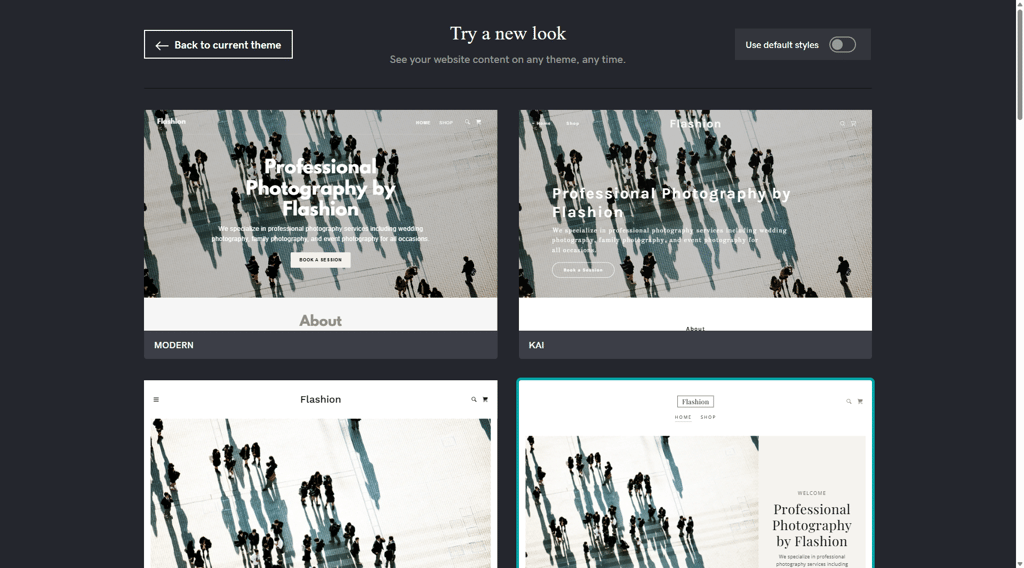
Finally, the Color menu lets you choose literally any color scheme you can think of. There is even a neat little HEX code box that you can use to type in your own color to make sure your site matches perfectly with any existing branding.

Overall, I think this menu is great for beginners. Being able to quickly change your entire website’s color scheme, font, and theme with just a couple of clicks can save a lot of time and help avoid confusion.
How easy is it to change colors? In under 30 seconds, I changed my entire website from a pink theme to a gray one.

Managing the website
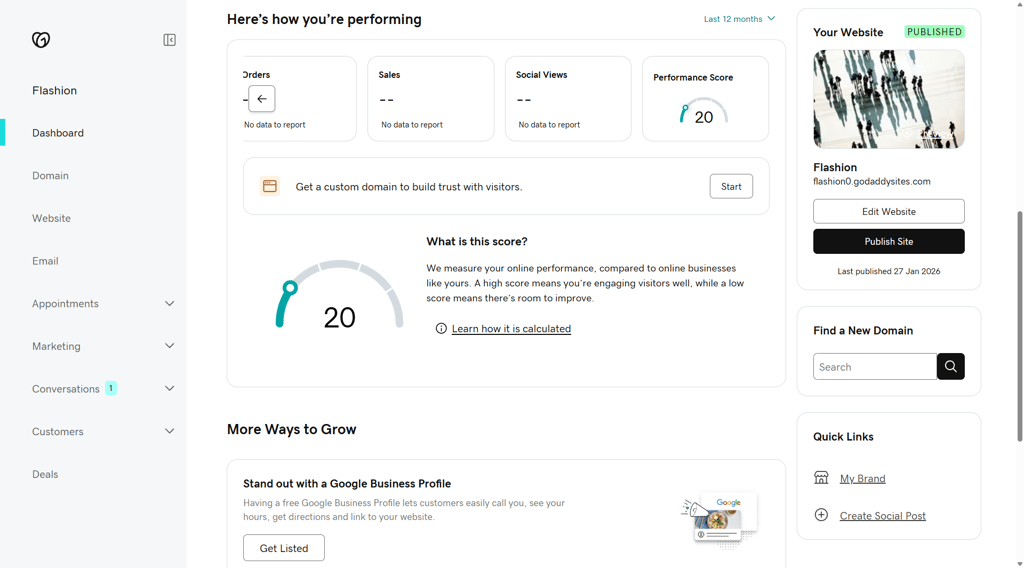
The GoDaddy Dashboard is fairly simple to use, and you can easily manage appointments, marketing, online store, and other things unrelated to website design. It provides a general to-do list powered by GoDaddy Airo AI.
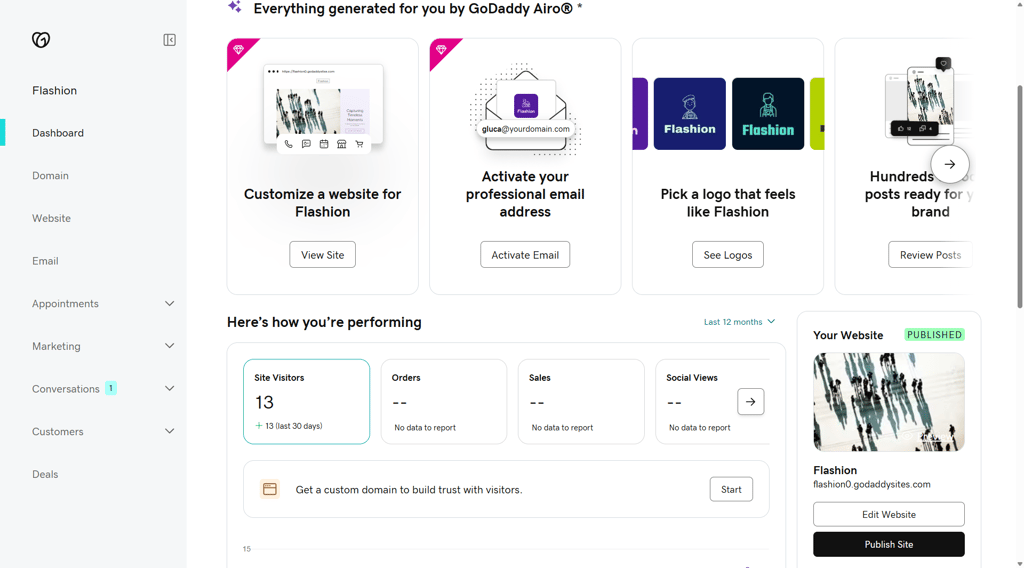
As you scroll down the Dashboard, you can find more information about your site visitors, orders, sales, social views, and a performance score. Additionally, there’s a helpful section with tips on how to grow your business.
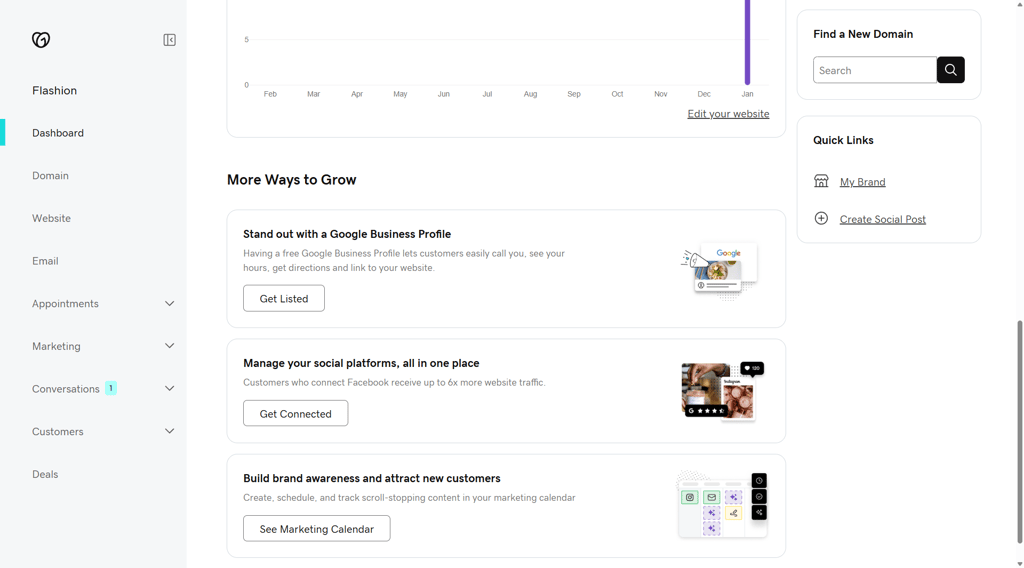
Personally, I like how marketing-centered this dashboard is. In the Marketing tab, you can create original graphic content, manage social media posts, perform an SEO check, manage the blog, and even run email marketing campaigns.
Overall, I was quite impressed by the GoDaddy website builder Dashboard. It has plenty of options and is easy to use. In fact, the Dashboard acts as a full-blown business management center while remaining intuitive and easy to use.
GoDaddy website themes
GoDaddy doesn’t offer many themes. Instead, it keeps things simple, clean, and fresh.
There are 22 basic themes in total. They are quite simple but they will match your selected color scheme and visuals. The best part – they don't cost anything. All themes are available with all 3 GoDaddy website builder plans.
While building a test website, I tested numerous themes. In the image below, you can see two themes compared side by side. They compliment the basis that’s already set up, and they beautifully adopted the colors and images I provided.

The next two themes (see image below) are very different from one another, yet they both look professional. More importantly, they build on top of my original ideas instead of creating something completely new. In the past, I have used website builders that would mess up the entire design when I changed a theme, so this is a huge plus from me.

Overall, GoDaddy website builder appears quite minimalistic when it comes to themes. Instead of completely taking over, they level up the images and color schemes that the user chooses. This is why I don’t mind that there are only 22 themes. Of course, if there were more diverse and interesting layouts to choose from, that would make GoDaddy web builder more attractive.
GoDaddy website eCommerce
As mentioned already, GoDaddy focuses on small businesses. The platform's Dashboard is an extensive business mission control center, combining most of the required features under one hood. And the platform manages to combine simplicity with a solid amount of functionality. Let’s take an in-depth look.
Product and inventory management
GoDaddy is not known as an eCommerce website builder. However, setting up a store via the Dashboard is fairly simple. All you have to do is follow the Set Up Your Store to-do list.
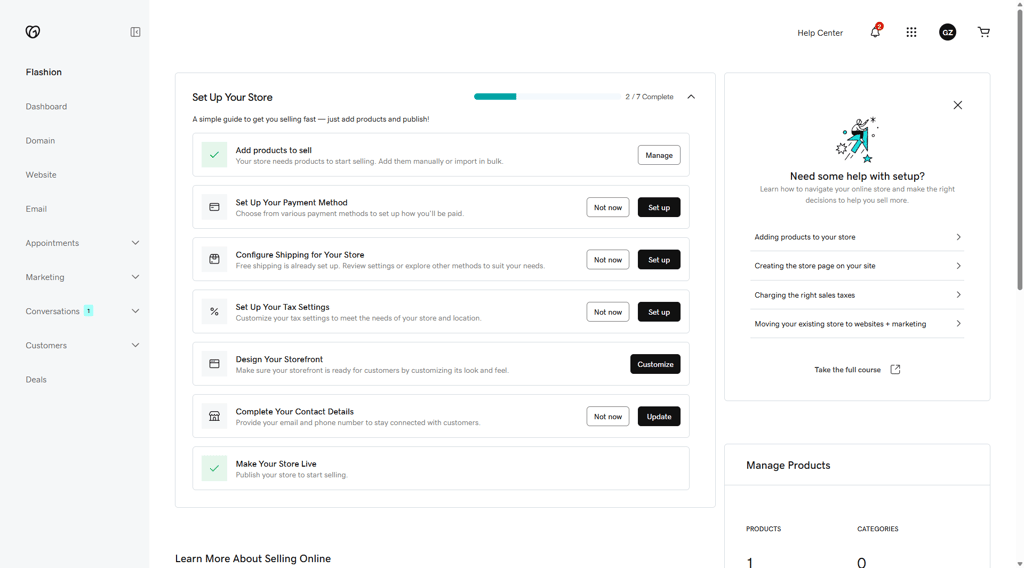
You can also enable product reviews, cart recovery, and text notifications for incoming orders. Just note that all the eCommerce features are available with the Commerce plan. Thankfully, there are no additional paywalls or hidden extras – what you see is what you get.

Adding a store to the website is quite straightforward, too. All you have to do is add the Store element so you can showcase your products anywhere, on any page.
Adding products is simple, and takes just a few minutes. And your selected color scheme carries on to all the elements, so there won't be any mismatches. There are also plenty of ways to display the products. You can customize layouts, colors, and display options, to create an attractive storefront.
In the past, GoDaddy lacked integration of products and editing. However, right now, you can add and edit products via the Dashboard. You can even use GoDaddy Airo AI to instantly generate listings from up to 20 product images.
Overall, GoDaddy offers a simple, no-frills product and inventory management solution. If you want to sell online, but have no experience doing so, this could be a solid choice.
Payments
When creating an online store with the GoDaddy website builder, you’ll have to set up at least one of several payment choices. In total, there are 4 online payment gateways: Square, Stripe (including ApplePay), PayPal, and GoDaddy Payments. Additionally, it’s also possible to add an offline payment method such as by check or payment in-person.
If you end up choosing one of the online payment options, keep in mind that while GoDaddy does not charge for transaction fees, the payment gateways themselves do – you’ll have to pay 2.9% + $0.30 for every transaction made with Square or Stripe and 2.7% + $0.30 with GoDaddy Payments.
Analytics
For an online store, analytics is crucial. It can help track successes, spot issues, and optimize SEO or marketing efforts. While GoDaddy supports seamless integration with Google Analytics, it also provides robust built-in analytics right in the Dashboard. You can track such data as site visitors, orders, sales, social views, or bookings.
All in all, combining native tools with optional Google Analytics makes tracking your site's performance very quick and simple.
GoDaddy marketing features
A good business needs to be marketed. While with some other website builders you might need additional third-party plugins, GoDaddy Websites + Marketing offers useful in-house marketing tools. So, let's take a look at how these marketing tools could help you make your business website have a stronger online presence.
GoDaddy website SEO
GoDaddy’s Airo AI assistant takes an automated approach by automatically analyzing your website and optimizing your SEO without asking any questions.
For example, it can add relevant keywords to your content, include alt text to your images, and optimize your meta title and description data.
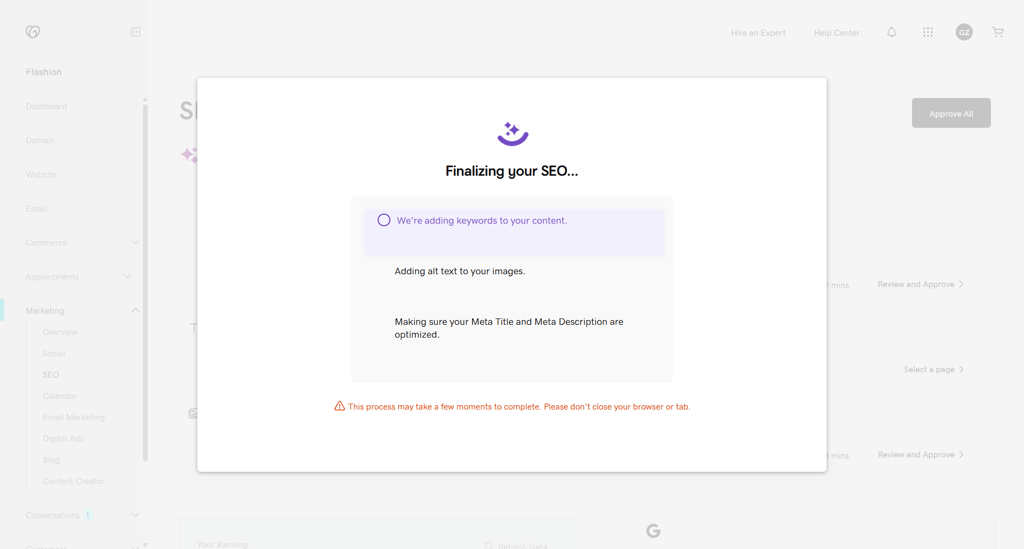
These automated SEO updates go live immediately; however, you're free to review and customize the work. It’s fairly easy to fine-tune keywords on specific pages, add or modify image descriptions, and adjust meta tags and titles across different pages.
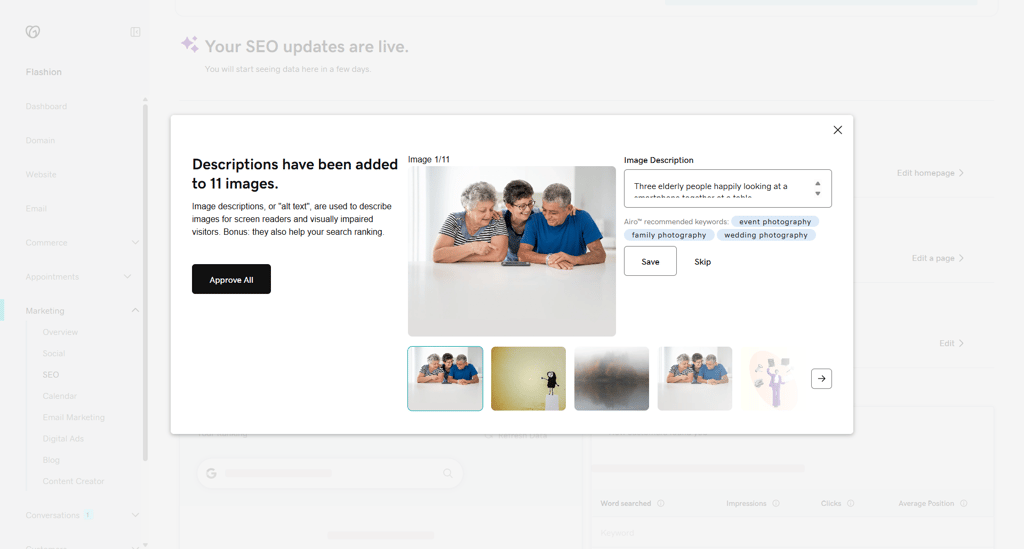
Sounds great, but keep in mind that the AI tool only handles the very basics. Of course, that can be very helpful if you’re new to the world of SEO. When I used the automation, I found that it helped speed up the process and get my site up and running smoothly.
Overall, I found GoDaddy SEO features to be pretty decent. Although, I am not sure if this is worth the premium. If you're a complete beginner at all things SEO, you might find this a useful tool that will help you rank higher. But if you know your way around, you won't get any groundbreaking knowledge or advanced metrics.
Email marketing
To get the most out of your website, utilizing email marketing is always a great idea. Currently, GoDaddy email marketing is integrated with the GoDaddy Website Builder. This is great news, since the standalone email marketing product is quite pricey, with the prices ranging from $21.99 to $89.99 a month.
The free GoDaddy Website Builder integration offers a seamless experience for users who look into collecting email addresses and using new contacts to grow their business.
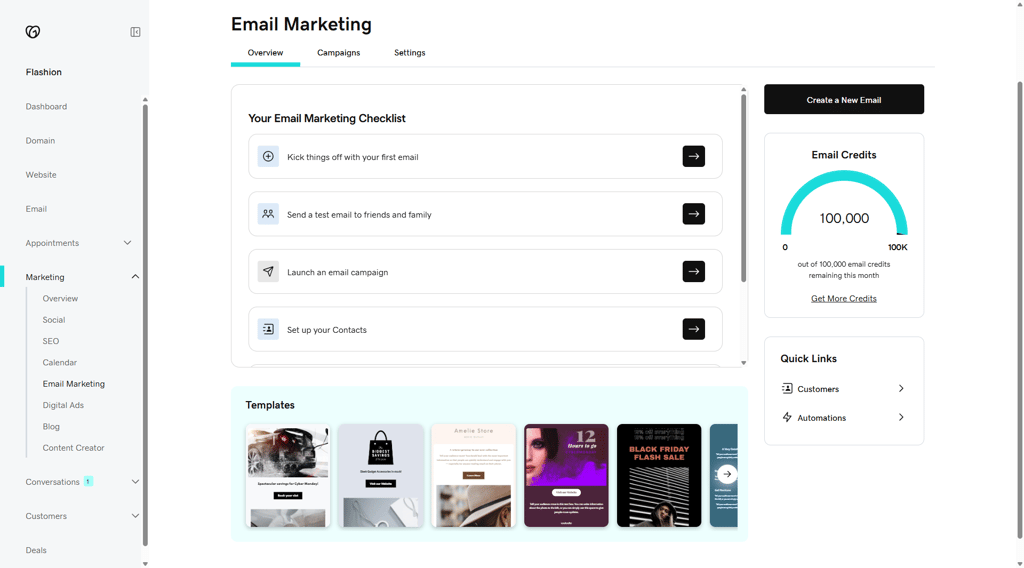
The integration includes a simple-to-use email editor with a drag-and-drop composer for fast creation of emails. Not to mention, it also includes a gallery of high-quality stock images to make emails look professional – saving you headaches from having to find visuals for your email campaigns.
Social media integration
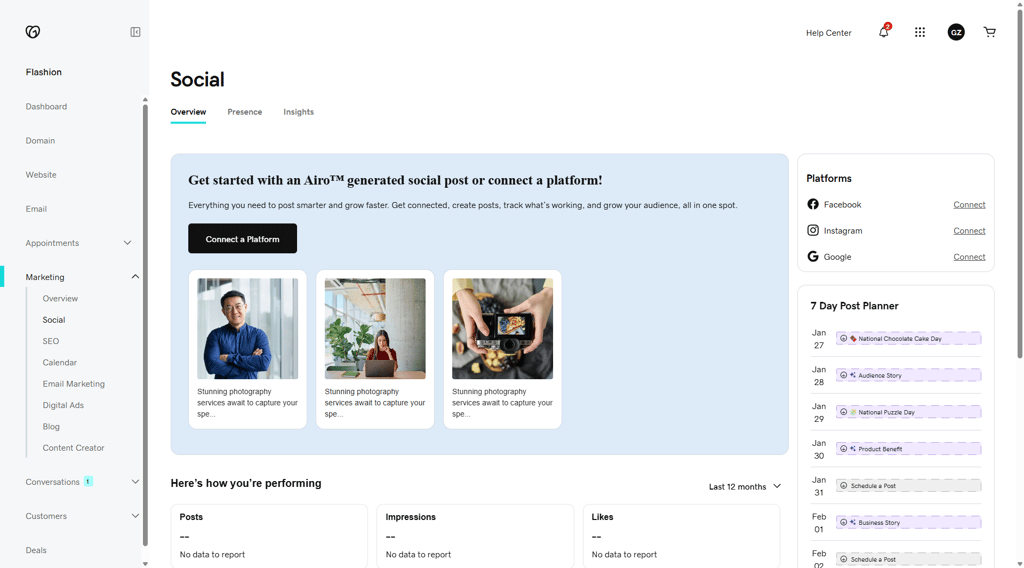
Social media integration is a huge part of marketing. Via your GoDaddy Dashboard, you can manage everything from one central location. You can connect Facebook, Instagram, or Google to your account.
I found it very simple to add social media buttons to the site. You simply need to pick where you want to place them and add a section. Using the Social Links section, you can place the URLs of your social media sites without performing any unnecessary steps.
You can also add an Instagram feed to your site and automatically share reviews and highlight products – all of these things guarantee a great social media presence for your business.
GoDaddy InSight
GoDaddy InSight, which you can access via the Dashboard, provides information on what you should focus on to grow your business, whether it’s selling online or attracting local customers. Interestingly, when I tested the platform, I noticed that it offered the same tips for two different websites I created, even when they had different goals. This makes InSight feel more like a general GoDaddy Airo to-do list rather than a truly personalized action plan.
Most of the proposed tasks are still useful, though. They cover basic setup steps like connecting a domain, adding services, and setting up key website details.
All considered, I found that I could use GoDaddy Insight to grow the website and learn about different steps that could help me achieve goals.
Once you take recommended actions, GoDaddy Insight actually analyzes the impact and provides an InSight Score. The score measures website views, conversions, social media activity, and other elements on a scale from 0 to 100.
Just note that the score compares you to other similar businesses. On one hand, this makes the score quite flimsy, on the other – you can see how you’re doing in comparison to others.
GoDaddy website builder performance
Since the website builder is hosted by GoDaddy hosting, you can expect great performance. When I tested it, using WebPageTest.org, it demonstrated great results:
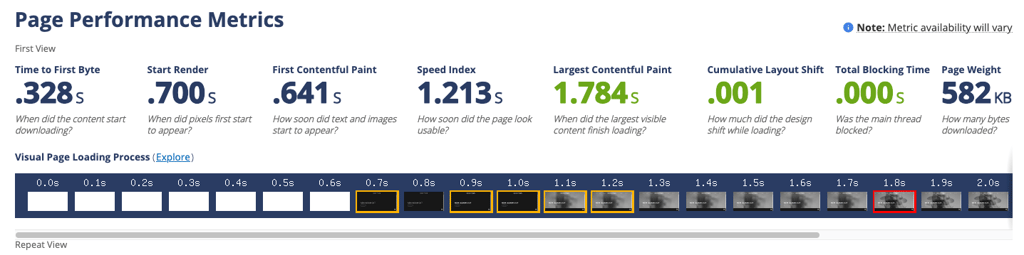
So what do these numbers actually mean? The speed index of 1.213s means that my test website guarantees an excellent experience for visitors because pages load quickly and smoothly, with content appearing almost instantly when someone clicks a link. There are no delays or crashes.
Alternatives to GoDaddy website builder
During this GoDaddy website builder review, I found the platform to be very fast, easy to use, and great for small business owners. But it still has its shortcomings, namely limited customization and a small number of templates. Here are some top alternatives, if you decide that this platform is not for you.
Wix
Wix website builder is my top website builder recommendation. With over 2,000 templates and great editing options for both beginner and advanced users, you get complete design freedom. Wix also integrates plenty of apps to ensure you can make literally anything with this website builder. Pricing starts from $17.00/month. To learn more about the differences between the two, read our complete Wix vs GoDaddy comparison.
Hostinger Website Builder
Hostinger Website Builder is another great pick if you want strong AI features on a budget. Hostinger’s AI wizard can generate a solid website in mere seconds, which makes it especially convenient for beginners. With 430+ templates, a free domain, and fast hosting included, it’s an easy all-in-one option for getting online quickly without spending much. Pricing starts from $2.69/month.
IONOS
IONOS website builder is a solid choice if you’re looking for a cheap website builder for a small business, too. The plans are very affordable and come with useful extras like a free domain and email, plus AI-powered templates to speed up the setup process. I also like that IONOS includes personal support, which can be a big advantage if you’re building your first business website and want help along the way. Pricing starts from $1.00/month.
GoDaddy website builder review: final word
Overall, while GoDaddy website builder might not the best on the market in 2026, it's certainly a decent builder that small businesses will genuinely enjoy using.
While the builder is easy-to-use for beginners, has great-looking themes that don’t overpower your creative choices, and, in general, can help you set up a basic website very quickly, there are some important drawbacks. The editing on the platform is limited, and the number of themes is quite small.
All in all, whether GoDaddy website builder is the right choice for you will depend on your skill level and needs. Fortunately, GoDaddy offers a free 7-day trial for all plans, so you can test the platform and see what you think for yourself.
FAQ
Is GoDaddy website builder good?
Yes, GoDaddy website builder is a good option for small businesses. It's very easy to manage, and there are plenty of intuitive business tools.
Is GoDaddy website really free?
GoDaddy website builder offers a free 7-day trial for all plans. But it has no free plan, so if you do not upgrade to a paid plan after the trial, all the premium features will no longer be available. If you use a custom domain, the website will be moved to a temporary domain instead.
How much does it cost to build a website on GoDaddy?
The cheapest GoDaddy website builder plan costs $9.99/month if you commit to an annual subscription. Note that after the first year, the pricing renews at $16.99/month. If you choose to pay monthly, it costs $21.99/month.


