The best wedding website builders of 2026
Our team of experts and researchers rigorously test and evaluate website builders through transparent, in-depth testing procedures and methods using both in-house and industry-approved tools.
Drawing on cybersecurity insights, we provide unbiased, empirical rankings and analysis to help users make informed digital platform choices.
Learn more

I first started searching for the best wedding website builder to help my friends plan their big day. They needed a simple, well-designed platform that was quick to set up. Finding the right web builder was harder than I thought, as there are numerous options on the market.
With help from the Cybernews team, who have spent years testing website builders, I quickly found the best option. Their insights made it easy to choose the top-rated wedding website builder. Here's a closer look at what makes it stand out.
Best wedding website builders: shortlist
- Wix – best wedding website builder overall with a free plan
- Hostinger Website Builder – best AI web builder
- Canva – most customizable wedding website maker
- Remixer by DreamHost – easy-to-use wedding website creator
- Squarespace – wedding web builder with the most elegant designs
- Lovebird – wedding website creator with interactive website features
- WordPress.com – cheapest wedding website builder
-
Any wedding website builder should be easy to use, offer a free plan, include at least basic privacy controls, and have features tailored for wedding sites.
-
The top 7 wedding web builders I reviewed in this article were selected based on their accessibility for beginners, pricing, tailored features, template customization options, and the availability of ready-made templates.
-
Wix is the best wedding website builder because of its generous free plan, easy-to-use editor, and wedding-useful features, such as built-in RSVPs and gift registry.
-
Your wedding website doesn’t have to contribute to your celebration expenses pot. A free website builder plan is usually enough to create a good-looking and well-functioning wedding website.
What should a wedding website builder have
A good wedding website builder doesn’t need much. However, there are a few things that, in my opinion, are mandatory for a wedding website platform:
- Ease of use. A good wedding web builder has to be simple enough so it's accessible to both beginner and experienced users. Clean and organized dashboard, easy navigation, and a beginner-friendly editor are non-negotiables for any wedding site maker.
- Tailored features. There are some things that a website builder can’t call itself a wedding web builder without. It should offer the essential features, such as digital RSVPs, gift registry integration, custom design templates, and an event schedule.
- Privacy controls. Wedding websites often include personal details, such as venue addresses, RSVP information, and guest lists, which make privacy controls essential. A wedding website builder should let you decide who can access your site, offering options like password protection and private guest access.
- Free plan. Most wedding websites aren’t complicated, and a free plan from a web-building platform is usually enough to build a good-looking, functioning site.
Best wedding website builders – detailed reviews
To find the best wedding website builders, we reviewed 45 platforms. We focused on the ease of use, selection of wedding templates, pricing, and features, and picked the 7 best web builders for wedding sites.
1. Wix – top wedding planner platform with a free version

| Rating: | |
| Pricing: | $17.00/month |
| Free plan: | ✅ Yes |
| Special deal: | Get Wix with 50% OFF |
Wix is my top-rated website builder for wedding platforms. It offers a free version, which includes a wide range of features, such as customizable RSVPs, a Google Maps widget that helps your guests find the venue, and 25+ wedding templates, making it a breeze to create your perfect website.
Features
- Templates. Wix might not specialize in weddings, but thanks to the 25+ dedicated templates, you’ll definitely think so. Aside from this, you also get a lot of customization options, from font designs to editing and adding new elements. Thus, you’ll have a website that tells your whole wedding story.
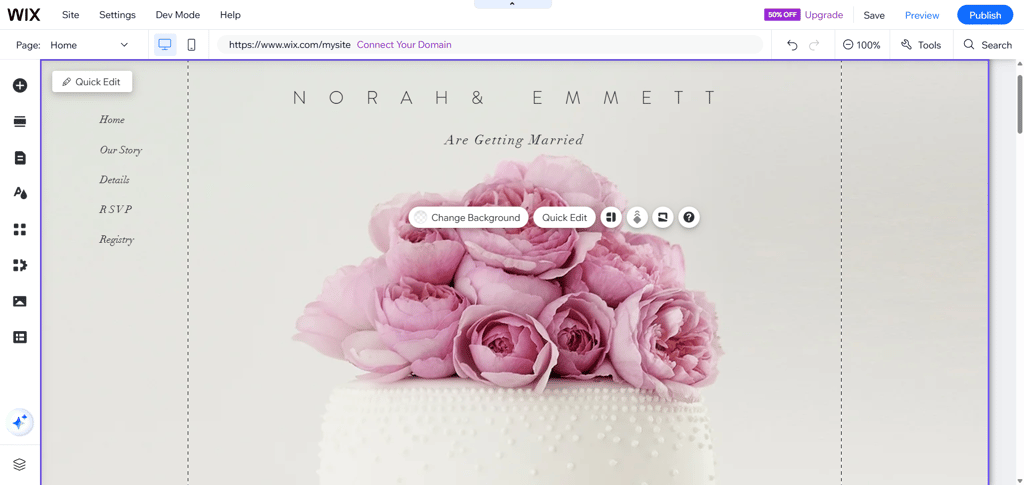
- Integrations. Wix also has incredible gallery and video options if you’re a wedding photographer. Plus, you can add social media or other integrations with Instagram, Vimeo, and all Meta platforms.
- Security. Wix allows you to lock your wedding site with a password. This allows you to control who can access your content, which is crucial for such private events.
- RSVP. I also liked the RSVP form overview that Wix offers. You can see how many people responded to your invitation and even change details at any time.
- AI. Wix also utilizes artificial intelligence (AI), allowing you to build your website within seconds. The best part is that you can create your whole design and content with AI and still edit it afterward.
How much does it cost to build a wedding website with Wix?
With Wix, you can build your wedding website for free. It gives you access to a good selection of tailored website templates that include essential features like digital RSVPs, gift registries, and even Honeymoon funds. The only downside of the free version is that you’ll be assigned a free Wix subdomain, so your website address will look like something random, e.g., ashandkas.wixsite.com, instead of a custom domain.
If you decide to go for any of the paid plans, the prices start from $17.00/month. They all include a free custom domain, so you can pick the domain name yourself, along with the extension from several available options provided by Wix.
2. Hostinger Website Builder – best AI builder for wedding websites

| Rating: | |
| Pricing: | $1.79/month |
| Free plan: | ❌ No |
| Special deal: | Get Hostinger Website Builder, 87% OFF + free months |
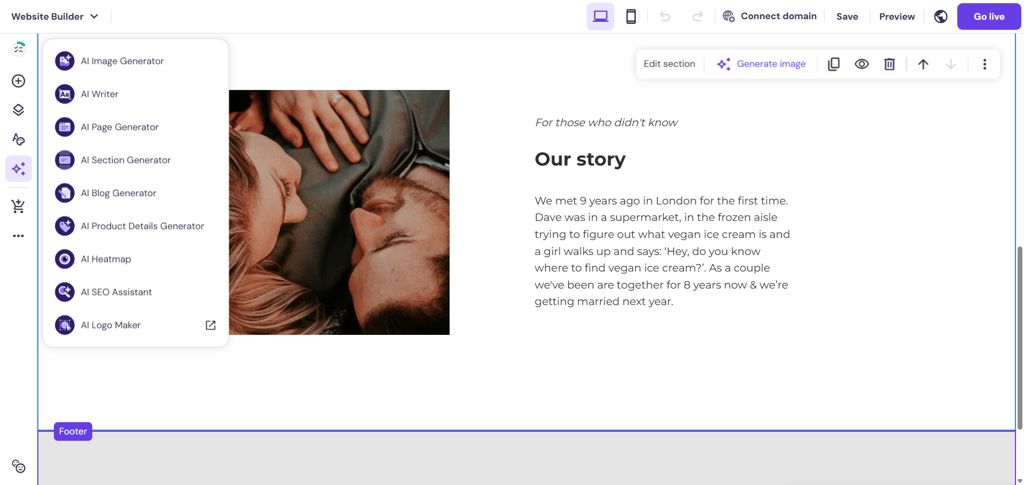
Hostinger Website Builder stands out with its AI tools, which make the site creation process exceptionally smooth and easy. With Hostinger, not only can you create a perfect wedding platform in a few minutes, but you can also customize it to best fit your wedding theme.
Features
- Drag-and-drop. Creating the website of your dreams has never been easier with Hostinger Website Builder’s drag-and-drop editor. You can easily add, remove, or rearrange elements and page layouts. The best part is that the smart grid snaps them in place, so your website looks neat and well-organized.
- AI. Hostinger Website Builder has a somewhat limited template range, but there’s a solution for this. If you don’t find a theme that aligns with your wedding style or preferences, you can use the AI functionality and build a website in a few seconds. You can make edits on your desktop computer or your iOS or Android (operating system) device.
- RSVP. I also liked that you can easily add RSVP forms or an FAQ page from the Hostinger Website Builder dashboard. As a result, your guests will always have the necessary information, such as the dress code, event schedule, or time of the celebration.
- Social media integrations. Ultimately, Hostinger Website Builder allows you to integrate with mobile app platforms, like Facebook Live Chat. Therefore, you can easily connect with your friends and share your excitement in real time.
How much does it cost to build a wedding website with Hostinger Website Builder?
It’s a bit of a shame that Hostinger Website Builder doesn’t offer a free version. Still, this is one of the most affordable web builders I’ve reviewed, so you can find a pricing plan that aligns with your budget. The fee varies from $1.79/month to $18.99/month.
I recommend the Business Website Builder plan, which costs $2.51/month for the extra benefits that come in handy for wedding sites. Some of the benefits you’ll get are mobile editing and a free domain. However, the biggest pro of this plan is the full suite of AI features, from an AI website builder to an image generator.
3. Canva – best website builder for wedding template variety
| Rating: | |
| Pricing: | Free or from $18.00/month |
| Free plan: | ✅ Yes |
| Special deal: | Get Canva website builder, now from 16% OFF |
Canva is my top recommendation for those who are looking for the biggest variety of wedding-themed website templates. It offers an impressive collection of 260+ templates, and that’s not counting wedding invitations, checklists, and programs. So, if you’re looking for a ready-made template for a simple wedding website, Canva is a good choice.
Features
- Drag-and-drop editing. Like Hostinger Website Builder, Canva also uses a drag-and-drop editor, which makes it beginner friendly. You can easily move elements, add new ones, or remove them altogether.
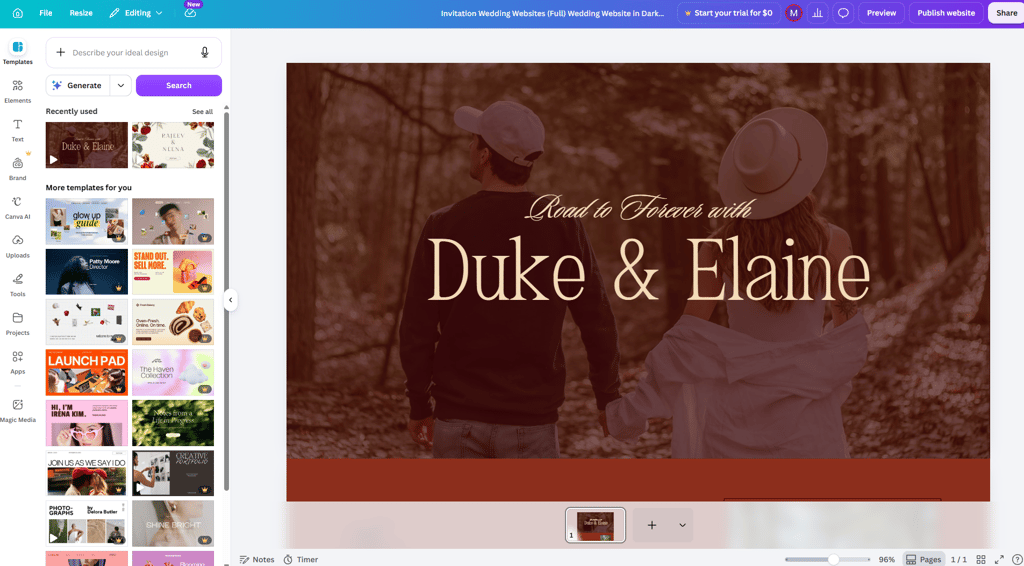
- Template customization. Canva allows for complete freedom when it comes to placing elements and customization. Since there are no grid limits, text, images, videos and other components can be placed exactly where you want.
- Collaboration. Where Canva truly stands out is the ease of collaboration. You can send a link to your other half, and they can jump in and make changes to your wedding site without creating an account.
- Integrations. Canva integrates with services like Gmail, Instagram, Google Calendar, and YouTube, making it easier to create a more interactive wedding website. You can embed social media posts, add a countdown or schedule through Google Calendar, showcase engagement or wedding videos from YouTube, and simplify communication with guests using Gmail.
How much does it cost to build a wedding website with Canva?
On Canva, you can build your wedding website completely free. While some of the templates are locked behind a paywall, the freedom of customization this platform allows really isn’t much of a downside. A paid Canva subscription starts at $18.00/month, and it unlocks some extra features, such as resize, translate, and background removal tools, gives you higher AI allowance, and lets you use Canva offline. However, for a simple wedding website, you can get by with the free version.
4. Remixer by DreamHost – beginner-friendly wedding website builder

| Rating: | 4.0 |
| Pricing: | From $1.99/month |
| Free plan: | ❌ No |
| Special deal: | Get Remixer Website Builder, now 83% OFF |
Remixer is a website builder that’s perfect for effortless WordPress wedding websites. Thanks to the Quick-Start Inspirations Wizard and the drag-and-drop editor, even less tech-savvy users can create a top site in no time.
Features
- WordPress templates. Remixer doesn’t have its own templates. Instead, I tried using the WordPress ones, which are extremely customizable and let you use the drag-and-drop editor to place any page elements.
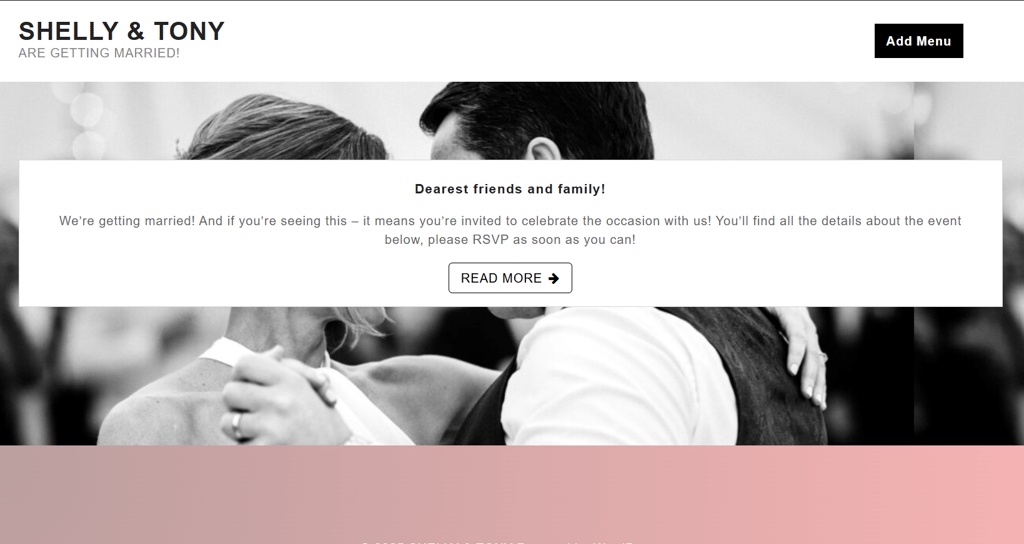
- Quick-Start Inspirations Wizard. The wizard guides you through three easy steps to the best wedding website.
- Post and page builder. I really liked that Remixer allows you to craft posts and separate pages in addition to building the overall website. Therefore, you can add any page after finishing your site.
- AI. Ultimately, the AI website builder helps you create your wedding website without any expertise or hassle. Just enter your requests and leave it all to the AI.
How much does it cost to build a wedding website with Remixer?
Building your wedding site with Remixer costs $1.99–7.99/month. This is affordable overall, but I wouldn’t go for the cheapest subscription. The best choice is the WordPress Hosting Growth plan, which costs $3.49/month. This offer includes a free domain, professional email, an AI website builder, unlimited websites, and a setup wizard.
5. Squarespace – top-rated for effortless drag-and-drop editor

| Rating: | |
| Pricing: | From $9.50/month |
| Free plan: | ❌ No |
| Special deal: | Get up to 50% OFF Squarespace |
Squarespace stands fifth on this list as a great builder with a straightforward drag-and-drop editor. With it, you can easily create a unique-looking website. An intuitive and well-organized interface is guaranteed, too.
Features
- Templates. One thing is clear: Squarespace appreciates quality over quantity. Due to this, I found only 10 wedding templates. Still, they’re all customizable, allowing you to change the colors, fonts, and even page layouts.
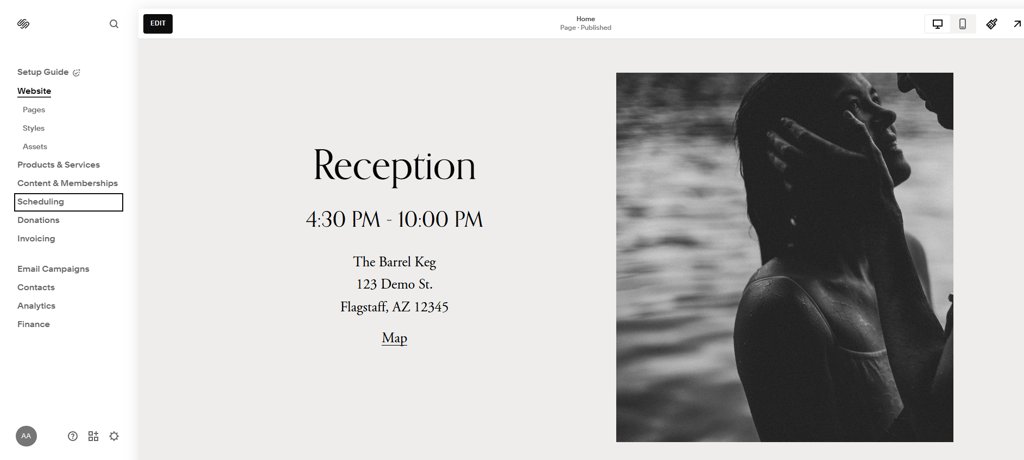
- Plug-ins. Unfortunately, Squarespace doesn’t offer any specific RSVP forms. However, due to the available plug-ins in the app store, like Zola, you can tweak any contact form to collect the number of guests that will attend your big day.
- Drag-and-drop. Squarespace is one of the highest-ranked website builders for photographers, newlyweds, and even beginners without technical expertise. Luckily, I found its drag-and-drop editor a breeze, as you can place any element wherever you want.
- AI. Thanks to the Blueprint AI tool, you can now design a website platform in less than five minutes. What’s even better is that you can select the colors, tone of voice, and font of your page.
How much does it cost to build a wedding website with Squarespace?
Squarespace is a bit on the more expensive side. Its plans range between $9.50/month and $49.50/month. However, you get the best value by picking the Core plan, which costs $14.50/month.
This is my go-to subscription because it can host 5 hours of video, allows for unlimited contributors, and offers eCommerce features. This is a much better option than the slightly limited entry-level plan. Moreover, all Squarespace website plans offer a free custom domain.
6. Lovebird – wedding website creator for interactive sites

| Rating: | 3.9 |
| Pricing: | Free |
| Free plan: | ✅ Yes |
Lovebird is a great wedding website-building platform for couples who want an interactive website for their guests. It supports QR code access, Google Calendar, and Google Maps integrations for a quick view of ceremony-related details.
Features
- Templates. Lovebird is built specifically for weddings, so every template is designed with wedding events in mind. You can personalize the layout, fonts, colours, photos, and sections to match your wedding theme, creating a site that reflects your style without starting from scratch.
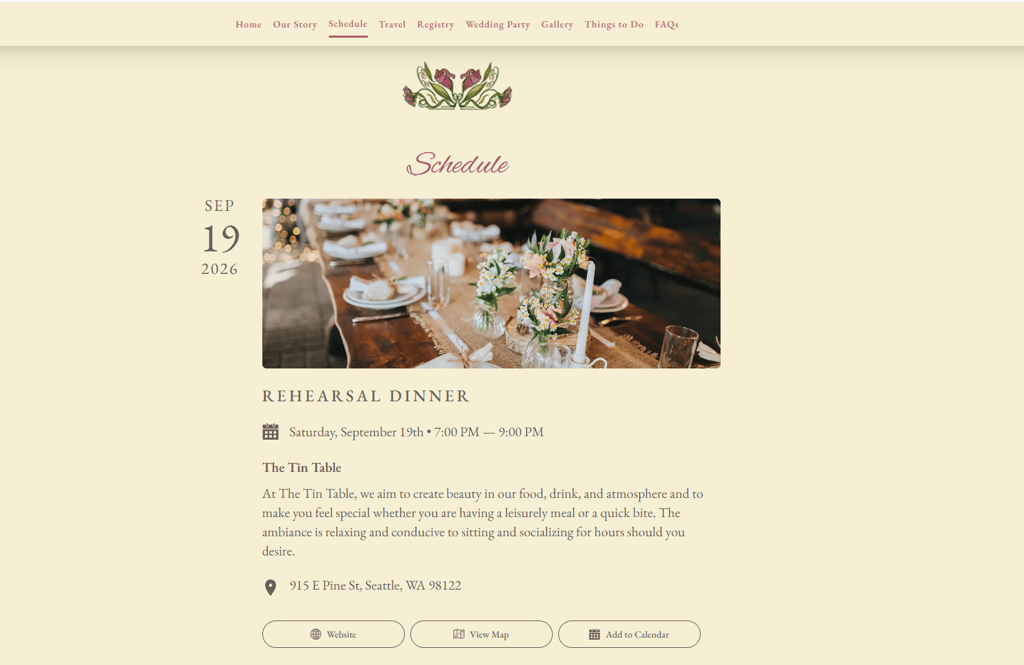
- RSVPs and guest management. Unlike general website builders, Lovebird includes built-in RSVP functionality. Guests can confirm attendance online, while couples can track responses, collect meal preferences, manage plus-ones, and send updates from a single dashboard.
- Event planning tools. Lovebird stands out for its dedicated wedding planning features. You can create an event schedule, share venue details with maps, provide accommodation recommendations, answer common questions in an FAQ section, and add a gift registry to keep all essential information in one place.
- Privacy controls. Since wedding websites often contain personal information, Lovebird offers privacy-focused features such as password protection, private guest access, and search engine blocking. This helps ensure that only invited guests can view your wedding details.
- Mobile-friendly design. All Lovebird wedding websites are optimized for smartphones and tablets by default. Guests can easily RSVP, check directions, browse your schedule, or access important updates from any device without compromising the browsing experience.
How much does it cost to build a wedding website with Lovebird?
Lovebird is a free platform. Therefore, you don’t need to spend a cent to build your wedding website. However, if you’d like some advanced features, like QR codes, a custom URL, collect RSVPs on your website, or guest polling, the prices start from $99.00 (one-time payment).
6. WordPress.com – most affordable wedding site builder
| Rating: | |
| Pricing: | From $2.75/month |
| Free plan: | ✅ Yes |
| Special deal: | Get up to 69% OFF Wordpress! |
WordPress.com is a well-known website-building platform that’s also affordable. For $2.75/month, it offers a guided website builder, a free domain for 1 year, and the option to extend your site with WordPress plugins.
Features
- Templates. WordPress.com offers a wide range of professionally designed themes, including templates suitable for weddings and personal events. Each theme is fully customizable, letting you adjust colours, fonts, layouts, and images to create a website that matches your wedding style.
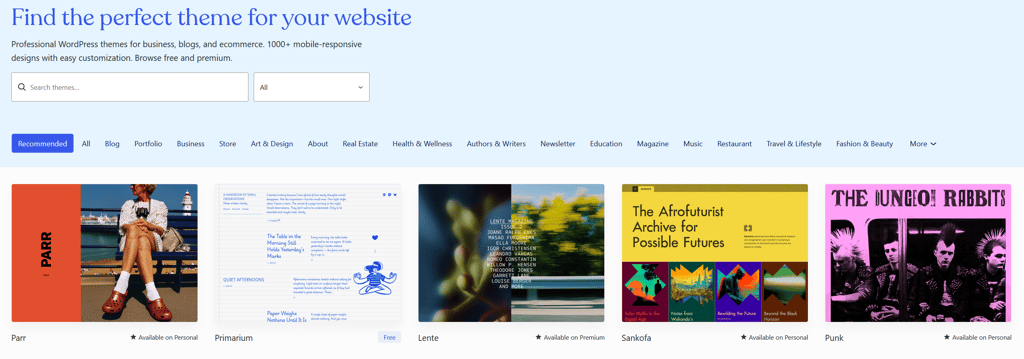
- Plugins and integrations. One of WordPress.com's biggest strengths is its extensive plugin ecosystem. You can add RSVP forms, gift registries, event calendars, maps, photo galleries, and guestbook features using plugins such as WPForms, The Events Calendar, or third-party wedding services.
- Block editor. WordPress.com uses the Gutenberg block editor, which makes building pages straightforward. You can arrange content using drag-and-drop-style blocks for text, images, galleries, videos, countdown timers, maps, and buttons, giving you plenty of flexibility without coding.
- AI. WordPress.com includes an AI-powered writing assistant that can help generate page content, polish existing text, and overcome writer's block. This makes it easier to create welcome messages, your love story, FAQs, or event descriptions in just a few minutes.
How much does it cost to build a wedding website with WordPress.com?
Unfortunately, WordPress.com doesn’t have a free plan. However, it’s an affordable site creation platform, with subscriptions starting from $2.75/month. With the entry plan, you also get a free domain for 1 year, 6GB of storage, unlimited pages, and a guided web builder, making the price worth it. What’s more, WordPress.com offers a 14-day money-back guarantee for risk-free testing.
Final thoughts
After reviewing numerous website builders for wedding websites, I picked Wix as my top choice. Its RSVP forms, social media integrations, and free version fulfilled all of my expectations. Creating the website was a breeze.
However, the other listed providers also offer strong features, such as customization and various templates. That said, I encourage you to go through my detailed reviews once again and keep in mind that the best choice often depends on your needs.




Our in-house research team and expert writers work hand in hand to regularly test website builders and provide accurate and fact-checked information. Discover the ins and outs of how we test and evaluate website builders.
FAQ
What platforms allow couples to build wedding websites quickly?
All the platforms that I’ve listed above are great for building wedding websites quickly. My top recommendation is Wix, as it offers a broad selection of wedding templates and a solid free version. However, Hostinger, Canva, and Remixer are also great picks, depending on your website needs.
What is the average cost of a custom wedding website?
You can build your custom wedding website completely free. Platforms like Wix, offer a solid free version, which is enough to build and host your wedding site. However, if you opt for a paid service, prices range between $1.99/month and $9.50/month.
What are the best wedding website builders for tech-savvy couples?
Wix and WordPress.com are the best wedding website builders for tech-savvy couples. Wix offers extensive customization, advanced design tools, and a large app marketplace, while WordPress.com provides great flexibility through themes and plugins, making both ideal for users who want greater control over their wedding website.
What wedding websites are the easiest to make?
The easiest wedding websites to make are those built with beginner-friendly platforms like Wix, Squarespace, and Lovebird. They offer ready-made templates, intuitive editors, and built-in wedding features, allowing you to create and publish a personalized wedding website in just a few hours, even without technical experience.
What security features should we enable on a wedding website builder?
Any wedding website should have these security features enabled: password protection, HTTPS encryption, two-factor authentication (if available), private event visibility, and spam protection for RSVPs. It’s also recommended to choose a builder with secure payment processing for cash or registries.
Is Squarespace better than Wix for a wedding website?
Whether Squarespace is better than Wix for wedding websites depends on your preferences. More precisely, Wix has 2,700+ templates, from which you can choose the perfect one for your wedding and customize it, while Squarespace has better website performance overall. However, Squarespace cannot offer much flexibility. To learn more about the differences between these two providers, read our Wix vs Squarespace comparison.