Wix vs Squarespace 2026 – hard to choose the winner
Our team of experts and researchers rigorously test and evaluate website builders through transparent, in-depth testing procedures and methods using both in-house and industry-approved tools.
Drawing on cybersecurity insights, we provide unbiased, empirical rankings and analysis to help users make informed digital platform choices.
Learn more

Wix versus Squarespace are popular website builders, and I genuinely like using them both. In this 2026 review, I compare them side by side in categories like pricing, ease of use, use cases, and more – highlighting their key differences and similarities to help you choose the right fit.
Wix vs Squarespace 2026: my verdict
Wix is better than Squarespace overall in 2026 because it offers more design flexibility, better business features, and a free plan, making it a more versatile choice for most users.
However, Squarespace remains a top-tier website builder with polished templates, a simpler editing experience, and strong performance. Wix’s paid plans start at $11.75/month, while Squarespace starts at $9.50/month, making Wix the more affordable option at the entry level.
Thus, choosing a winner is difficult because both platforms are excellent. Still, Wix’s combination of flexibility and value gives it the edge for users who want more control over their website and room to grow.
| Wix | Squarespace | |
| ⭐Rating | ||
| 💵 Price | From 11.75 | From 9.50 |
| 🎨Templates | 3100 | 200 |
| 🪄Flexibility | 800+ web apps, custom plugin integration, suitable for any site | Numerous plugins for shipping, inventory, sales, marketing, and finance |
| 🔎SEO tools | Meta titles and descriptions, URL customization, Google Search integration, image optimization, structured data markup, and site inspection | Meta titles and descriptions, custom URLs, image alt text, and canonical tags |
| ⚒️Additional tools | Sales of digital products and services, email and newsletter builder | Email and newsletter templates, and email marketing analytics |
| 🖼️Portfolio websites | Countless templates for various portfolio sites | Ideal for visual media, minimalist templates for showcasing work |
| ✍️Blog websites | Numerous templates, easy-to-use site editor, ideal for creating blogs | Templates for blog websites |
| 🛒eCommerce websites | eCommerce features for building an online store | Two eCommerce plans for building an extensive online store |
| 🔥Top deals | Wix coupon 50% OFF | Get up to 36% OFF Squarespace |

Key takeaways
- Wix offers more for less. It has a free plan and affordable paid options, starting from $11.75/month.
- Wix is more customizable. Squarespace offers a simpler, more streamlined editing experience.
- Wix has more templates. It offers 2,000+ templates, while Squarespace has a smaller curated selection.
- Wix offers broader business tools. Both provide SEO, analytics, marketing, and eCommerce features.
- Both offer reliable hosting. Wix guarantees 99.9% uptime, while speed can vary by site.
- Wix offers more support options. It provides phone, chat, and email support, while Squarespace offers 24/7 support.
Wix vs Squarespace cost: which one is cheaper?
Wix is cheaper than Squarespace, with paid plans starting at $11.75/month, compared to $9.50/month for Squarespace. Wix’s Light plan includes 2GB of storage, a free domain for one year, hosting, and basic marketing tools. Its $14.50/month Core plan adds 50GB of storage, online payments, eCommerce, bookings, and five collaborators.
Squarespace’s $12.50/month Basic plan includes hosting, a custom domain for one year, website analytics, and tools for selling products, content, and memberships. Higher plans add more advanced commerce and business features.
Overall, Wix offers better value if price and flexibility are priorities, while Squarespace remains a strong option for users who prefer its streamlined design and tools.
Wix pricing
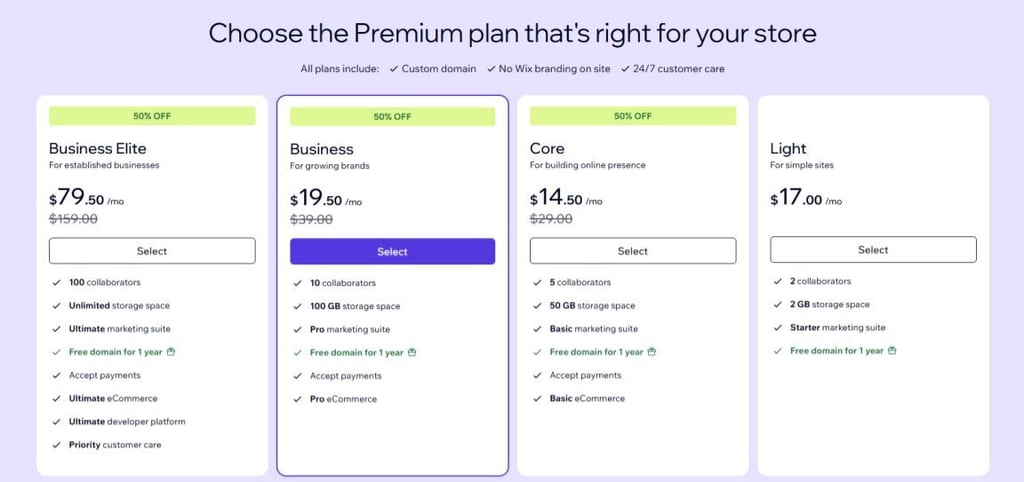
Wix offers a range of plans (including a free one) and tends to deliver more features than Squarespace. Here are the key details:
- Free plan – includes Wix branding, limited storage, and no custom domain
- Light plan – $17.00/month
- Core plan – $14.50/month
- Business / Business Elite – up to ~$79.50/month for full eCommerce capabilities
- Money-back guarantee – Wix offers a 14-day money-back guarantee for its paid plans
Squarespace pricing
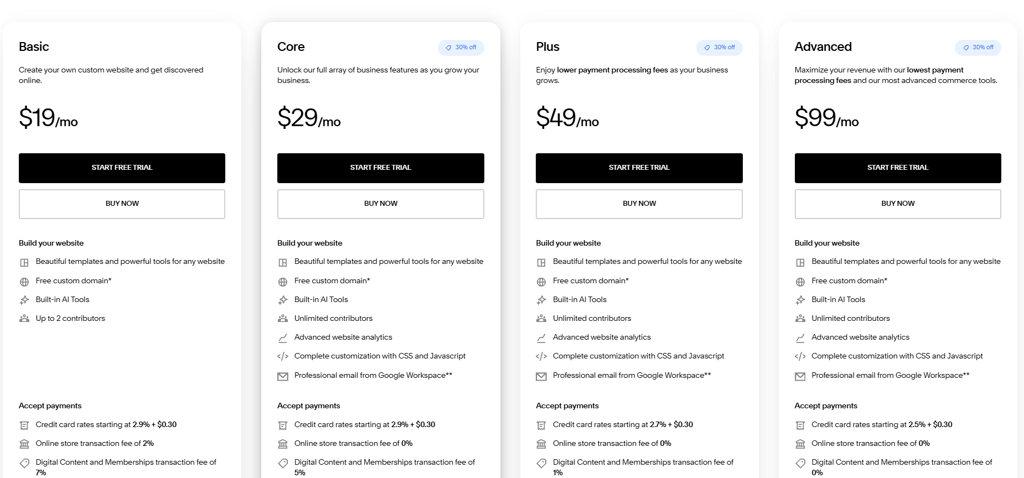
Squarespace is more streamlined in pricing, but with fewer tiers and no free plan. Luckily, it offers a 14-day free trial. Besides, you can get an additional discount with the Squarespace promo code CNSQUARESPACE10. Here’s how it structures its plans:
- Basic plan – $9.50/month
- Core plan – $14.50/month
- Plus plan – $24.50/month
- Advanced plan – $49.50/month
- Money-back guarantee – Squarespace offers a 14-day free trial (which acts like a guarantee before you commit)
Which is easier to use – Wix or Squarespace?
Wix wins for ease of use, but they’re both strong competitors. Both Wix and Squarespace are beginner-friendly and offer intuitive editors, so you don’t need coding skills to build a website. Wix gives you more freedom to customize layouts and elements, although its extensive options can take a little longer to master.
Squarespace feels more streamlined from the start, making it easier to navigate, but its design controls are more limited.
Overall, Wix is the better choice if you want a balance of simplicity and creative control, while Squarespace is ideal if you prefer a cleaner, more guided experience.
Using Wix
What I loved about Wix was that it was customizable and provided a smooth user experience. While it offers 2,000+ templates, it doesn't limit you to only these templates. You can still design your page structure however you want. On top of that, since your website's mobile version looks slightly different from your desktop's, you can edit it separately on the Mobile Editor. Additionally, Wix lets you fully customize the menus and navigation of your page. This means you can design the layout, control the menu's behavior, and personalize its appearance.
Wix also offers advanced AI tools to help you build your dream website. I really liked Wix’s AI text generator, image creator, image editor, section generator, and portfolio creator.
The sheer number of AI tools can feel a little overwhelming at first, but I found Wix’s generative AI quite useful. For example, I gave the same prompt to both providers' AIs, and although both sound human-like and creative, Wix's generated text is more expansive and descriptive. These tools make Wix great for bloggers, content creators, copywriters, and other creatives.
On the other hand, the regular editor allows for a lot more freedom:
-
You start by picking one of the 2,000+ templates available.

-
Then you move on to the editing part – it is a classic drag-and-drop editor, so customizing the look will be really easy. There are hundreds of various elements that can be added, mixed, matched, and combined on your Wix site. I was a bit annoyed since the editor takes a while to load, but once it’s all settled and ready, there are no noticeable loading times when designing your website.
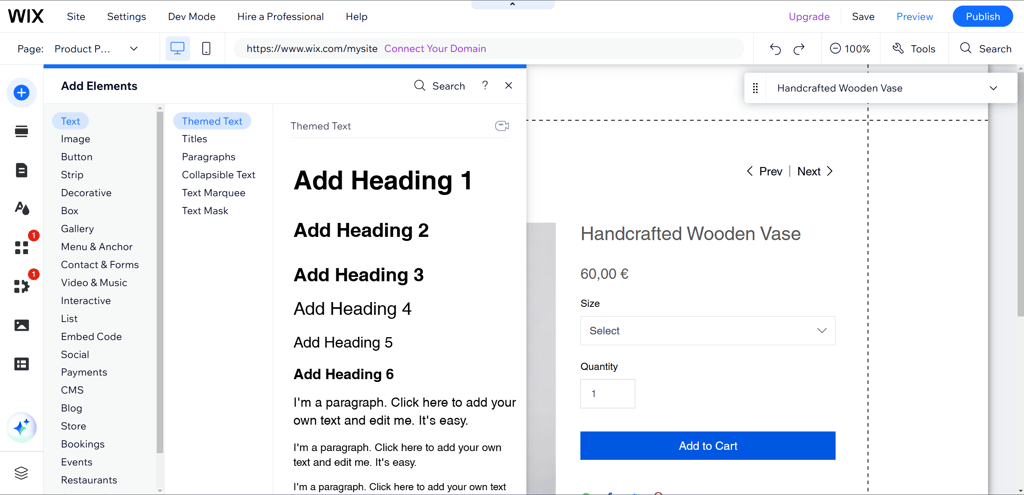
Overall, using Wix can cause a bit of sensory overload. But there's a good reason for that – there's so much you can do. With two different editors, hundreds of themes, and abundant design customizability, you get a lot of freedom and flexibility. And once you get used to the editor, things start looking pretty intuitive.
Using Squarespace
Squarespace offers fewer customization options, making the setup process a little less hectic. I think it’s hard to get lost while navigating with Squarespace, because the interface is very clean, and all the settings are listed conveniently on the left side of the panel. Additionally, for those who want great results quicker, there is Squarespace Blueprint AI – the provider’s proprietary AI website builder.
Building your website with Blueprint AI:
-
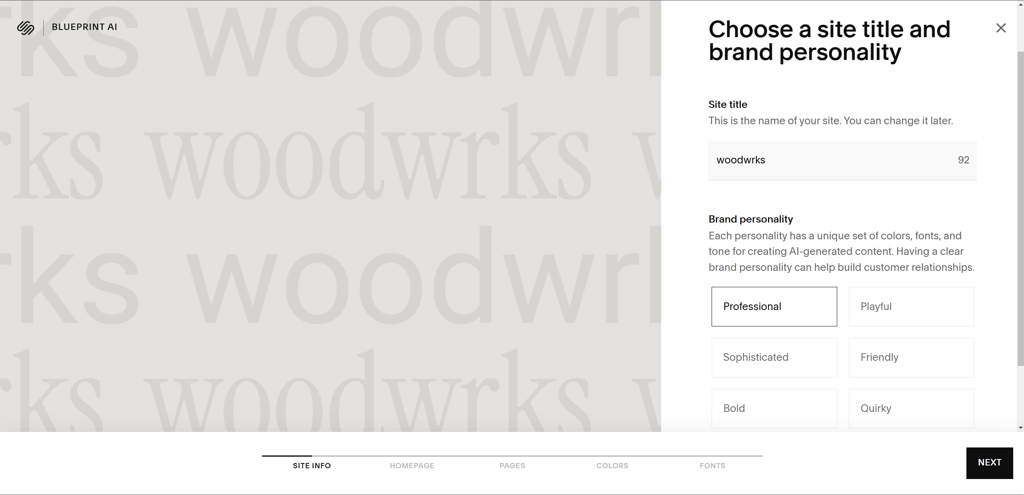
Just like Wix, Squarespace asks you to describe your website to better understand which elements would fit it. However, unlike Wix, it doesn’t ask any specific questions, which can make it hard to describe if you don’t have a clear vision. Additionally, you can choose a brand personality that aligns with your website.
-
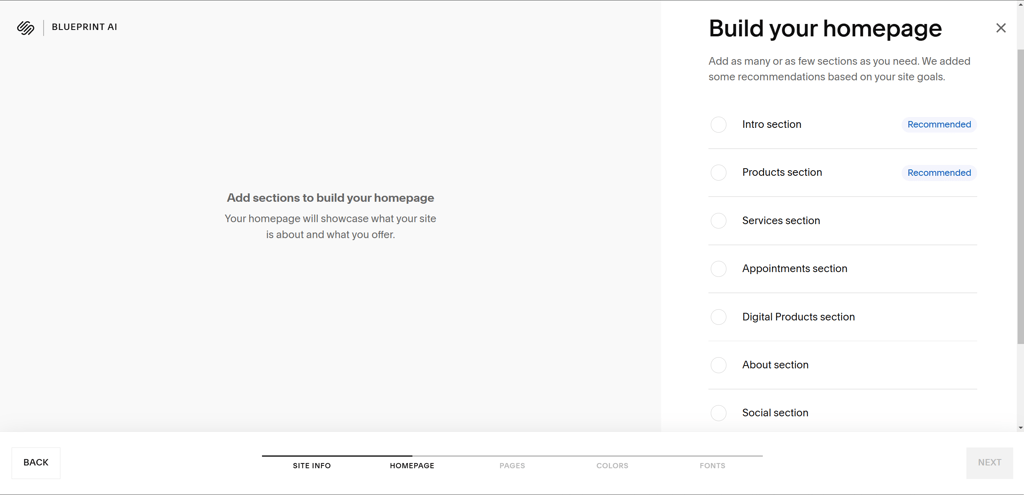
Then you’re taken to the editor, where you can build the foundation of your website. Blueprint AI suggests the most important sections you should add based on your previous website description. However, it leaves most of the website design work up to you.
-
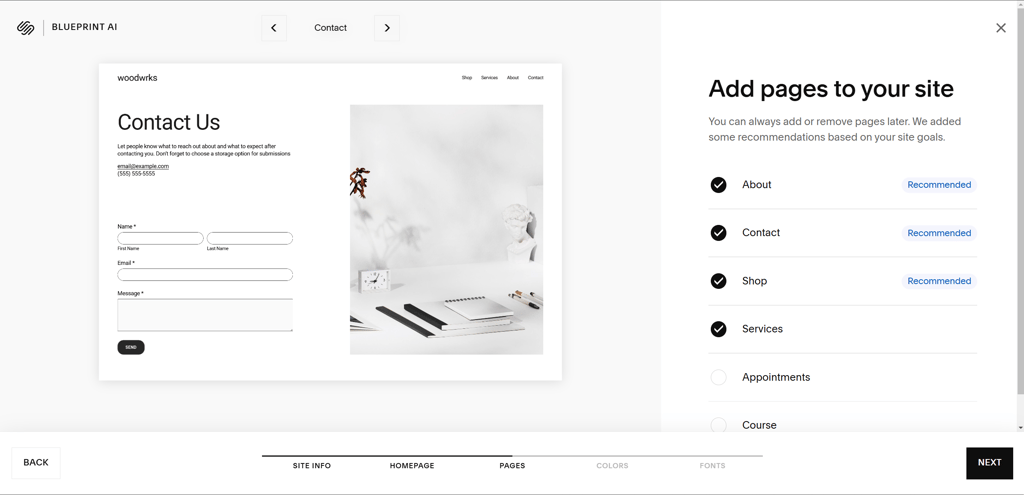
Here, you can also add other pages to your website. Blueprint AI also has recommendations on what you should add.
- Then, you can choose the color palette and font, and your website is ready to go.
Squarespace also offers plenty of generative AI tools, which I found to be less elaborate than Wix’s. However, you can ask the AI to simplify/shorten/lengthen the initial version, which is great if you like the text but want to tweak it a little.
-
Start by picking a template that fits your website idea. Even on a free trial, you can choose from as many websites and templates as you like.

-
After picking your template, answer a couple of questions to set up your site. You are asked to provide the site name and the pages required. There’s also a short tutorial on how Squarespace works.

-
Squarespace 7.1 uses Fluid Engine, a drag-and-drop editor that lets you place, resize, and rearrange blocks on a grid. You can even create desktop and mobile layouts separately, giving you more control over the final design than the older editor allowed.

-
Choose from several pre-made sections. They're all made to suit the template you pick in terms of style, fonts, and colors.

This system makes Squarespace a lot less customizable than Wix, but I think that’s perfect for beginners and more straightforward projects. Moreover, I noticed that Squarespace’s approach ensures the final website looks good on all types of devices.
Unfortunately, I ran into some trouble during the building process with Squarespace. For example, sometimes the editor would load the elements indefinitely until I refreshed the page. While I only had this happen to me a few times, it can turn into a real hassle when you’re designing a professional website.
Wix vs Squarespace: templates and design options
Wix wins for template variety, while Squarespace is better for curated design. Wix offers 2,000+ templates covering everything from portfolios and online stores to restaurants, education, travel, and business websites. Squarespace offers a smaller, more curated selection of professionally designed templates across categories such as fashion, food, fitness, photography, and more. Both providers offer responsive designs that can be customized to suit your website.
Templates on Wix
To start, Wix offers 2,000+ free website templates covering a wide range of industries and website types. You can customize them with Wix's classic drag-and-drop editor, allowing you to create a site that fits your needs.
If you want more premium designs, Wix also has a Marketplace with 2,000+ Studio templates, including both free and paid options created by Wix Partners. Paid templates are available at different prices, with some costing more than $100.00
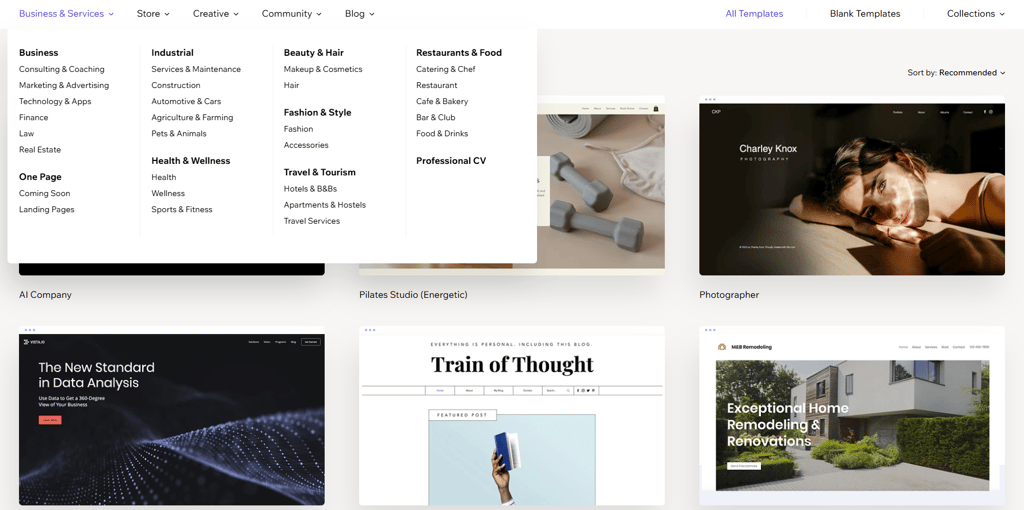
With so many template options, you can easily find the one that fits your needs – whether you want a classic-looking site or a modern one. In addition, grouping by topic allows for easy navigation.
Templates of Squarespace
While Wix has 2,000+, Squarespace offers 200 templates. There are fewer topics to choose from, too. With 20 options, there are templates for photography, food, events, and everything in between.
There is also a section for My Favorites, allowing you to find a template you’ve used before very quickly.

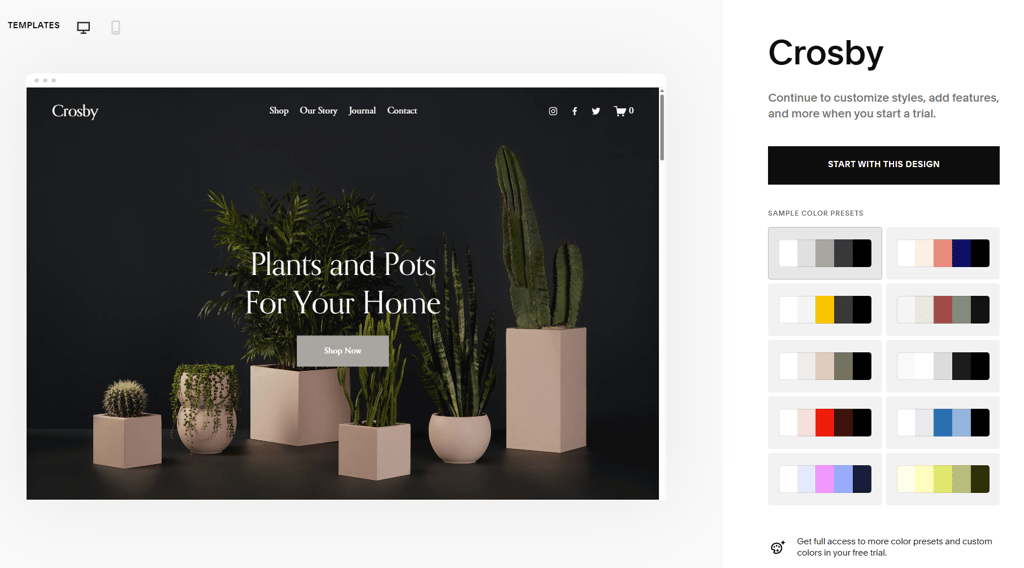
Squarespace also uses a simplistic section-based editor. This doesn’t offer many customization options, but it’s very easy to use, even for beginners.
Better yet, with this simplistic editor, you can always be certain that your website’s design will not vary too far from the template and will stay modern and professional.
What business features do Wix and Squarespace provide?
To build a successful and attractive business website, both Wix and Squarespace offer additional useful business features. From general website builder features like free SSLs and custom domain names to more advanced tools like eCommerce features, both of these providers have you covered.
Wix and Squarespace offer a variety of features enabling you to build a professional-looking business website. Here’s a comparison table of all the business features that Wix and Squarespace offer:
| Business features | Wix | Squarespace | Winner |
| eCommerce features | Product management, sale of services, point of sale, shipping, app store, advanced booking system, types of products, and abandoned cart recovery | Product management, bookings, payment and shipping options, types of products, point of sale, app store, and abandoned cart recovery. Squarespace allows selling unlimited products on all plans, including Basic | Squarespace |
| Security features | SSL certificates (256-bit), PCI Level 1 compliance, 2 layers of DDoS protection, 24/7 security monitoring, and firewall security | SSL certificates (128-bit), PCI Level 1 compliance, and firewall security | Wix |
| Free domain | ✅ Yes, for the 1st year (with an annual paid plan) | ✅ Yes, for the 1st year (with an annual paid plan) | Draw |
| Email marketing | Email builder for newsletters, email campaigns, subscriptions, promotional videos, email marketing reports, other marketing tools, and email app integrations | Email and newsletter templates, email campaigns, subscriber management, and integrated email marketing analytics | Wix |
| Social media integration | Facebook & Instagram Ads, multichannel selling on Facebook and Instagram (product tagging and shop sync) | Product tagging and shop sync on Instagram and Facebook, social account auto-publishing, Facebook Pixel support (no native ad creation tool) | Wix |
| Analytics | Traffic, visitor behavior, revenue report monitoring, personalized suggestions, customer insights, and product portfolio management | Traffic and engagement monitoring, sales statistics, Google Analytics integration, and Purchase Funnel | Wix |
| SEO tools | Meta titles and descriptions, URL customization, Google Search integration, canonical tags, image optimization, and site inspection | Meta titles and descriptions, custom URLs, image alt text, Google Search Console integration, and canonical tags | Wix |
With advanced SEO tools like Google Search integration and a built-in Site Inspection tool, along with analytics tools for monitoring traffic and user behavior and providing personalized improvement suggestions, Wix offers more opportunities to grow your site.
Wix also takes the lead in social media integration, with a native Facebook and Instagram Ads tool for creating and managing ad campaigns directly from the dashboard – a feature Squarespace lacks.
On the other hand, Squarespace has an edge in eCommerce, allowing unlimited product sales on all plans starting from the Basic plan $12.50/month, while Wix requires at least the Core plan $14.50/monthand caps at 50,000 products.
In terms of backups, Wix automatically saves a new version every time you save or publish, letting you roll back to any point in your site's history. Squarespace is more limited – it can restore deleted pages and blog posts within 30 days of deletion, but does not offer comprehensive version history or site-wide change rollback.
How do Wix and Squarespace perform in speed and uptime?
When comparing website builders, the number of templates and usability are not the only factors – performance also matters. You wouldn't like to lose users just because your website takes too long to load.
Together with our research team, I conducted speed and uptime tests to determine which provider performs better. Keep reading to find out which provider performed better: Wix or Squarespace.

Wix performance
My fully built Wix website rendered the Largest Contentful Paint (LCP) in around 6.8s during tests. While you may optimize your website, it's still slow. Also, it is far slower than Google's recommended 2.5s, so your website may struggle with ranking.


Fortunately, uptime tests showed great results. After a month of monitoring, Wix delivered 99.88% uptime. This was 0.1% less than the previous month in September. But keeping in mind that a guaranteed 100% is almost impossible, I think that it’s a pretty great result.
Squarespace performance
Squarespace showed far better results than Wix by rendering the LCP in 3.6s. While it's still slower than Google recommends your website to be, it's nearly two times better than Wix.


Squarespace also wins with uptime. After testing it for a month, I can safely say it stayed up 99.99% of the time. There were also only a few minor hiccups and no major disruptions.
In addition, Squarespace can boost your website's performance with its Content Delivery Network (CDN) technology. It saves parts of your website on servers worldwide so they can be accessed more quickly. It also automatically resizes images, so your website loads faster.
Wix vs Squarespace: customer support
Both Wix and Squarespace offer various customer support channels:
| Wix | Squarespace | |
| Live chat | ✅ Yes | ✅ Yes |
| Phone support | ✅ Yes | ❌ No |
| ✅ Yes | ✅ Yes | |
| Help center | ✅ Yes | ✅ Yes |
| Social media/forums | ✅ Yes | ✅ Yes |
Wix offers fast and personalized help in 10 languages, including English, Japanese, and Spanish. While this provider only offers 24/7 callback support in English, it’s great to see Wix ready to support clients from different parts of the world.
Overall, Squarespace concentrates more on written responses, which can be great in certain situations. On the other hand, Wix favors direct support via phone and live chat.
Video comparison
Prefer watching instead of reading? We’ve summed up our Wix vs Squarespace findings in the video below.
Final verdict: which one is better?
The key difference between Wix and Squarespace is flexibility. Wix offers over 2,000+ templates, advanced customization, and powerful business tools, making it the better choice. While it has a slight learning curve, its versatility outweighs the cons.
On the other hand, Squarespace is simpler but gives far better performance. By using CDN technology, Squarespace rendered the website nearly two times faster than Wix.
| Feature | Wix | Squarespace | Verdict |
| Pricing | Wix is more affordable, starting at 17.00and even offering a free plan, while Squarespace starts at $9.50/monthwith no free version. Overall, Wix provides better value for money. | ||
| Ease of use | Both builders are user-friendly, but Wix offers more customization options, which can feel overwhelming at first. Squarespace is simpler, though less flexible. | ||
| Performance | Squarespace outperforms Wix in both speed and uptime, due to its CDN technology. If performance is your top priority, Squarespace is the stronger choice. | ||
| Support | Wix provides faster, multi-channel support, including live chat and phone, while Squarespace focuses mainly on written support. Wix wins with more responsive and diverse customer service option. |
However, both are solid options in the end. Wix provides more design freedom, better business tools, stronger customer support, and a lower price. Meanwhile, with Squarespace, your website is simple but performs much faster, so your users won't be stuck on a loading screen.




Our in-house research team and expert writers work hand in hand to regularly test website builders and provide accurate and fact-checked information. Discover the ins and outs of how we test and evaluate website builders.
FAQ
Is Wix or Squarespace cheaper?
Wix is cheaper than Squarespace. Wix’s cheapest plan starts at $11.75/month, while Squarespace’s entry-level plan costs $9.50/month. However, the final price can vary depending on your billing cycle, promotions, and the plan you.
Is Wix or Squarespace better for a small business?
Wix is generally better for small businesses because it offers more flexibility, customization options, and tools for selling products and managing online services. Its cheaper starting price can also make it a more budget-friendly option. Squarespace is a strong choice for businesses that prioritize a polished, professional-looking website and prefer a simpler, more streamlined website-building experience.
Is Wix or Squarespace better for beginners?
Wix is better for beginners than Squarespace because it offers an AI-powered website builder for quick setup, an easy-to-use drag-and-drop editor, and 2,000+ pre-designed templates to choose from. When it comes to elements, Wix comes with a slight learning curve. However, it’s worth the extra customization options it offers.
Do professionals use Squarespace?
Yes, Squarespace is used by professionals. While Squarespace allows you to build a professional website without having web design and coding skills, plenty of customization options are available to professionals who want to speed up the website design process.
Is Squarespace cheaper than Wix?
No, Squarespace is not cheaper than Wix. Wix offers more affordable premium plans from $11.75/month and includes a free version, whereas Squarespace’s plans start at $9.50/month.
Can I switch from Squarespace to Wix?
No, you cannot automatically switch from Squarespace to Wix. However, if you wish to migrate to Wix, you can build a similar-looking website from scratch by opting for one out of hundreds of templates.