Weebly vs GoDaddy Website Builder
Our team of experts and researchers rigorously test and evaluate website builders through transparent, in-depth testing procedures and methods using both in-house and industry-approved tools.
Drawing on cybersecurity insights, we provide unbiased, empirical rankings and analysis to help users make informed digital platform choices.
Learn more

Weebly and GoDaddy website builders focus on helping small businesses build both their websites and online presence. But despite this similarity, they have a fair share of differences, too – and before choosing which one you pick, you need to do a little bit of research.
In this comparison, I’ll show you my test sites and tell you all about my experiences comparing Weebly vs GoDaddy, covering ease of use, templates, business features, website performance, and pricing.
| Weebly | GoDaddy website builder | |
| ⭐ Rating: | ||
| 🥇 Overall rank: | #22 out of #38 | #24 out of #38 |
| 💵 Price: | From $13.00/month | From $9.99/month |
| 🪄 Ease of use: | Very simple to use | Very simple to use, a bit limiting |
| 🎨 Templates: | 65 | 270 |
| 🏢 Business features: | Good in-house eCommerce | In-house features, suited for beginners |
| 👨💻 24/7 live support: | No | Yes |
| ✂️ Free domain (first year): | Yes (with Professional / Performance plans) | Yes |
| 🔒 Free SSL certificate: | Yes | Yes |
| 🔥 Coupons: | Cybernews Website Builder Coupons | Cybernews Website Builder Coupons |





Our in-house research team and expert writers work hand in hand to regularly test website builders and provide accurate and fact-checked information. Discover the ins and outs of how we test and evaluate website builders.
Weebly vs GoDaddy for different sites
Weebly and GoDaddy both focus on businesses – the features you can find in these builders are quite similar and aimed at one target audience. Below, you can find how these builders compare when it comes to building different kinds of websites.
| Website type | GoDaddy Website Builder | Weebly |
| Blog | Not a very extensive blogging editor, and you can only add one blog section per page | Quite a lackluster editor that doesn’t allow you to add headings to your texts – not the best option for blogging |
| Portfolio site | Modern design templates to portray your art with a flexible design editor | A limited number of simple themes suited for portfolios |
| Business site | Solid features for business and marketing, good SEO tools | Simple site-building features with an advanced marketing suite |
| eCommerce site | Great eCommerce features, accompanied with helpful guides to help out beginners | Well-curated tools for eCommerce, great for online stores of any size |
Ease of use
Both website builders are intuitive and well-suited for beginners, making website building as simple as possible. Weebly offers a beginner-friendly interface, a customizable drag-and-drop website builder, and eCommerce features. Meanwhile, GoDaddy offers less customization, but it’s quite simple and functional.
Using Weebly
Upon signing up, I was asked what type of website I wanted to create and had two options to choose from.
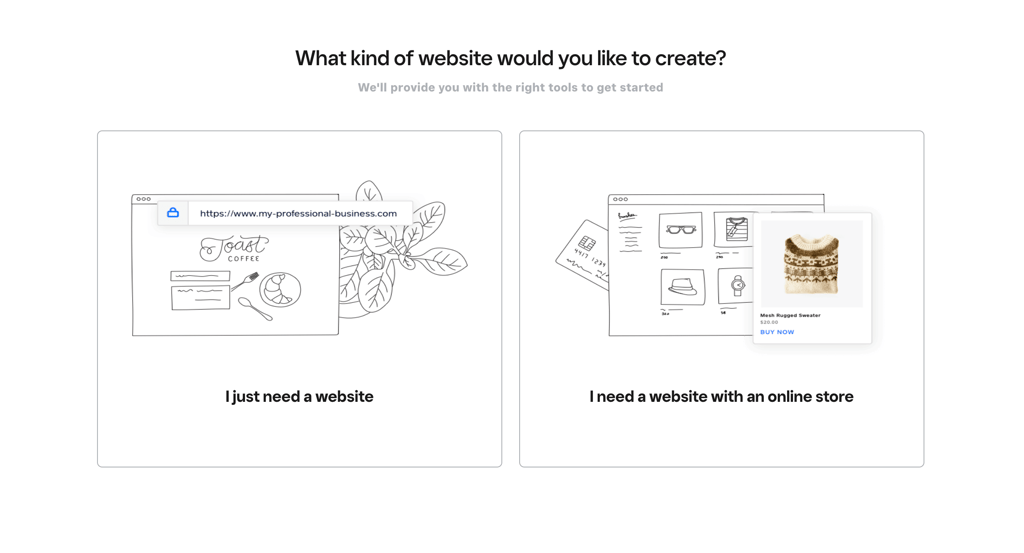
Then, I was asked to select a template. I can also change the template later if my chosen one doesn't fit my needs.

Once I made these choices, I accessed the Weebly editor. On the left-hand side, I saw all the available options to edit my website.
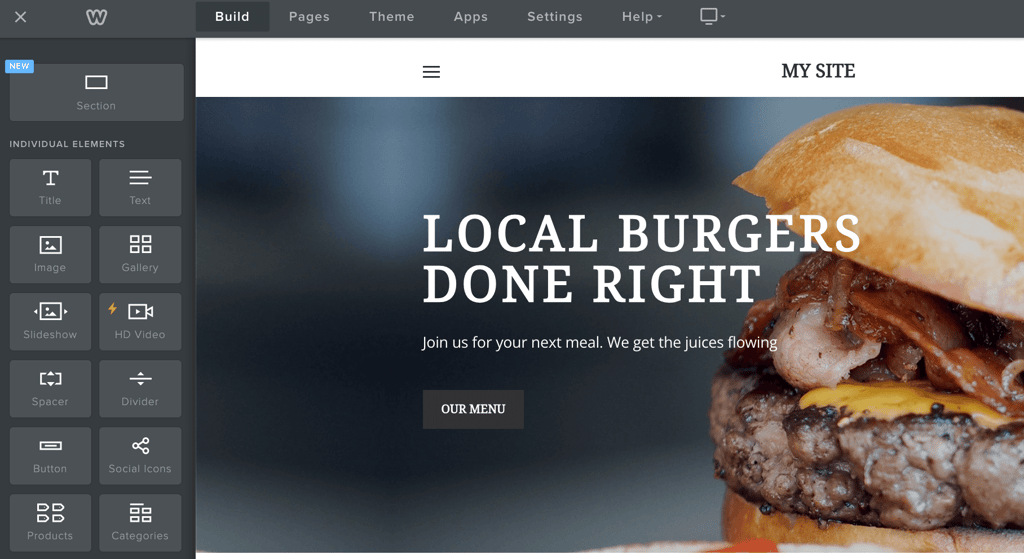
Weebly allows moving elements by dragging and dropping each of them onto the website.

If you don't want to mix and match various elements into a presentable-looking website, you can choose one of the few pre-made sections Weebly offers. That will make building a custom website just a bit easier.
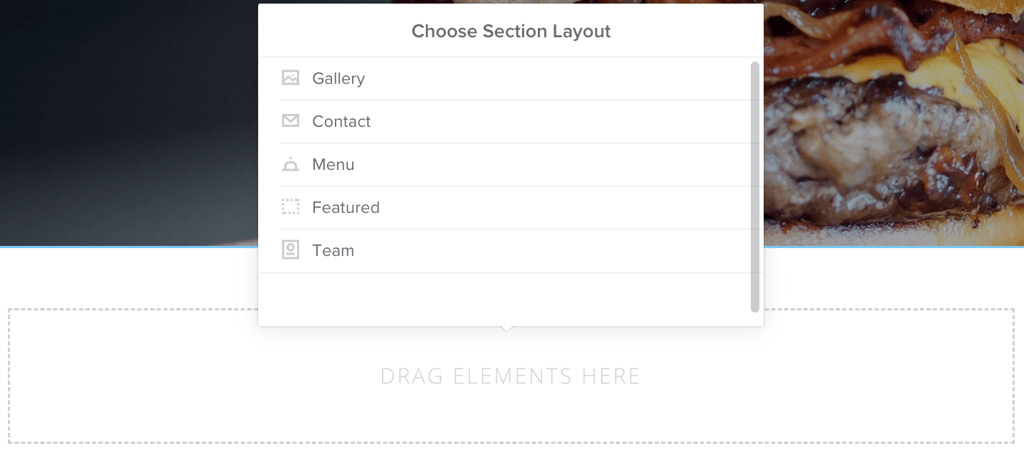
You can also add some of those elements and combine them with the pre-made sections to further personalize them, which I found to be pretty neat.
In the past, Weebly had several more elements you could add to the site. On one hand, having fewer options to choose from, certainly makes building a website easier and faster. That said, I wish more design options were available.
Once the website was put together, all I had to do was click the Publish button. Everything was simple – as it should be.
Using GoDaddy
GoDaddy also does its absolute best to make the onboarding process as simple as possible. I logged in to the site, clicked the Start for Free button, registered using my Google sign-in, and that was it – I was already out there building my website.
First, I had to select my site category, pick out a site name, and tell GoDaddy a little bit about my website.
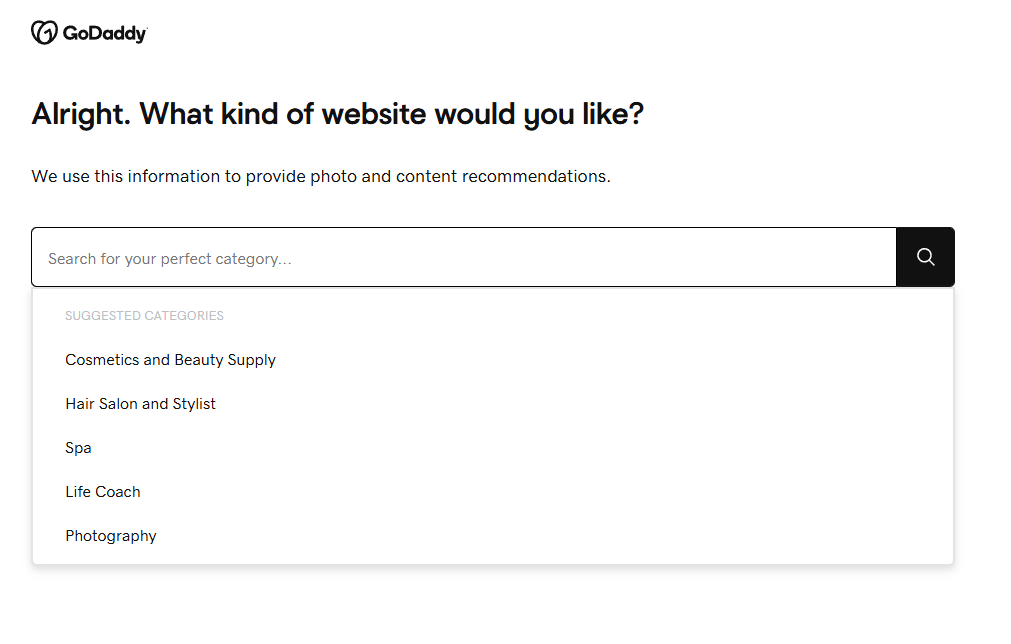
My chosen topic determined the added demo content – images, texts, and elements. And my selected title became the site's title.
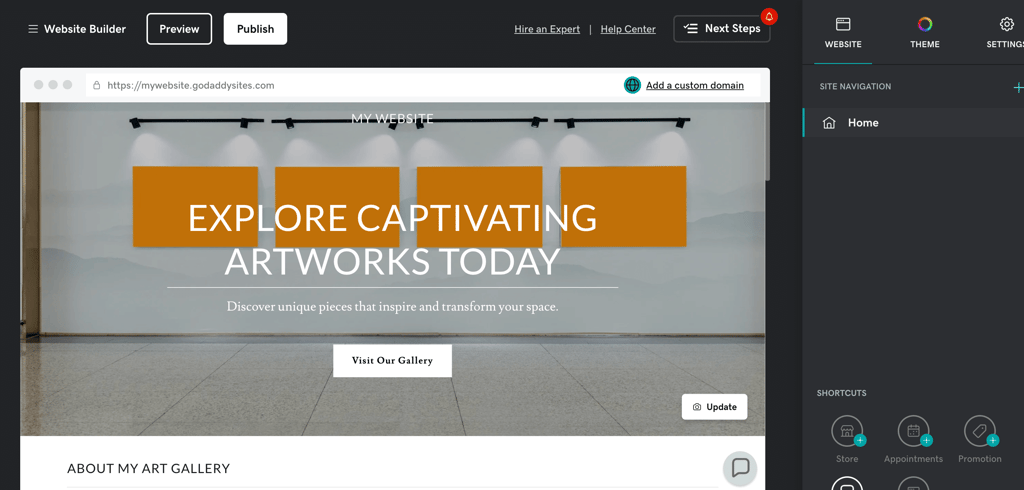
When comparing the editing on Weebly vs GoDaddy Website Builder, GoDaddy looks a lot less intricate than Weebly. Everything's put together in a simple grid system. Each element can move up and down, and the smaller ones can move left and right. I was able to edit the size, color, and layout of each element by clicking on it on the website.

One thing that really impressed me was the selection of possible sections. There are over 30 different types of sections, such as content, menus, photo galleries, and donation buttons. Plus, each section has multiple layouts, so you can pick out the one that best matches your style.
Overall, I enjoyed Weebly’s editing process more. Both platforms are easy to use, but Weebly offers more design freedom to edit the site to your liking.
Templates
Weebly offers 65 across several different niches, while GoDaddy offers 270 templates that are more versatile and give you more customization options.
For a beginner user with limited web design experience, a good template can be an excellent starting point, making website building a lot easier.
Weebly templates
Weebly has 65 separated into 7 different niches.

I found them to look pretty good. They're minimalist, letting you quickly set your own mood and style by making a few tweaks and adding images.


Of course, your decision on whether you'll enjoy Weebly's templates will depend entirely on your taste. Personally, I don't find 70 themes to be enough to fully satisfy both the niche and the design tastes of all users. But if you enjoy both the style and the topics that Weebly offers, it's a pretty solid pick.
GoDaddy website builder templates
GoDaddy offers 270 pre-made website templates to pick from, built for 16 different niches.
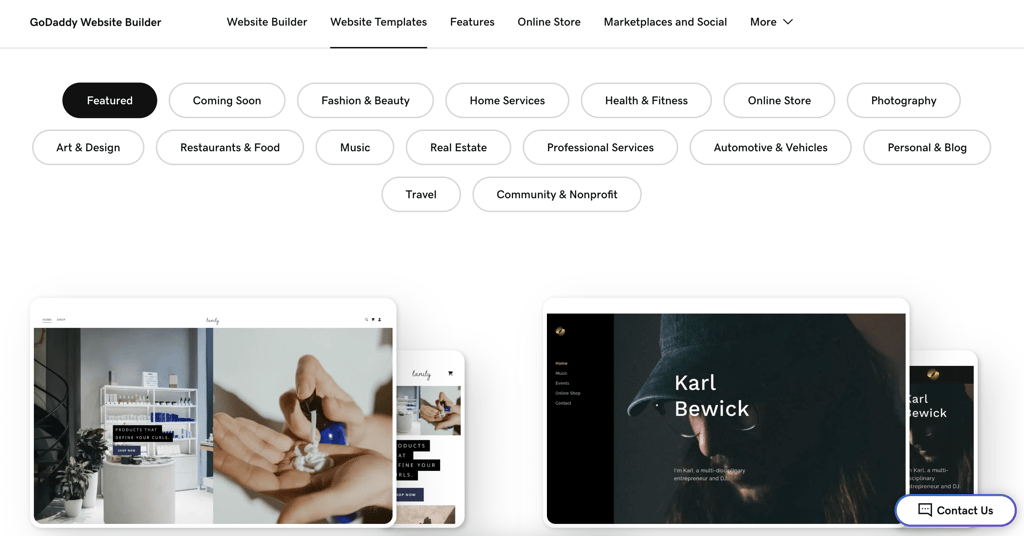
Once you sign up, you'll be asked to mention what kind of website you're making. That will determine the demo content that gets added to your site. And then, you'll be given the option to choose how the menus will look and how different elements will interact with one another. There are 20 varying options for that.

You won’t get full design freedom with GoDaddy – but you're sure getting the freedom to mix and match every element provided.
Weebly offers a classic approach, with 65, while GoDaddy provides 270 customizable templates. GoDaddy's approach seems better suited for a wider range of businesses, who don't have to depend on the platform to have the theme that looks just right.
Business features
Weebly offers a solid eCommerce platform that combines well with multiple third-party tools. GoDaddy's biggest strength is its business management tools which are a lifesaver for smaller businesses. Both of these platforms focus heavily on small businesses, offering eCommerce, marketing, and SEO tools to go together with their website builders. Let's take a look at how each builder can help you with each of these business hurdles.
eCommerce
Weebly has a solid eCommerce suite built right into the platform. From the dashboard, it's simple to add and manage products, set up coupons and gift cards, or check out customer reviews.
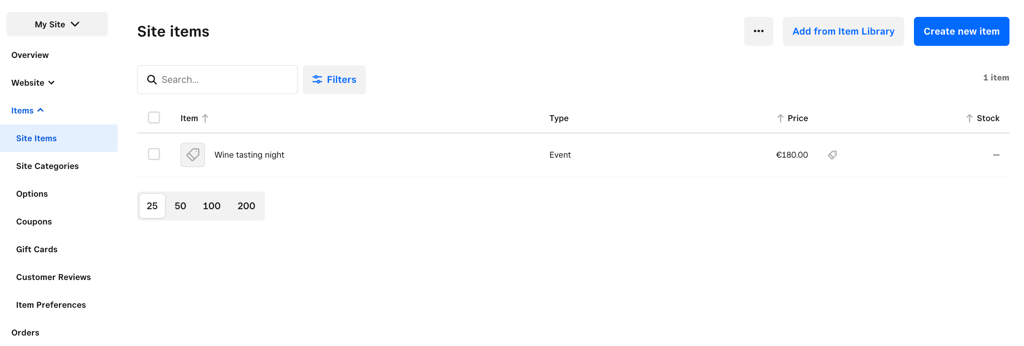
Since Weebly is closely tied to the Square payment gateway, it's no surprise to see eCommerce embedded deeply in everything this builder is doing. This is a great option for beginner users: everything is simple and set up automatically.
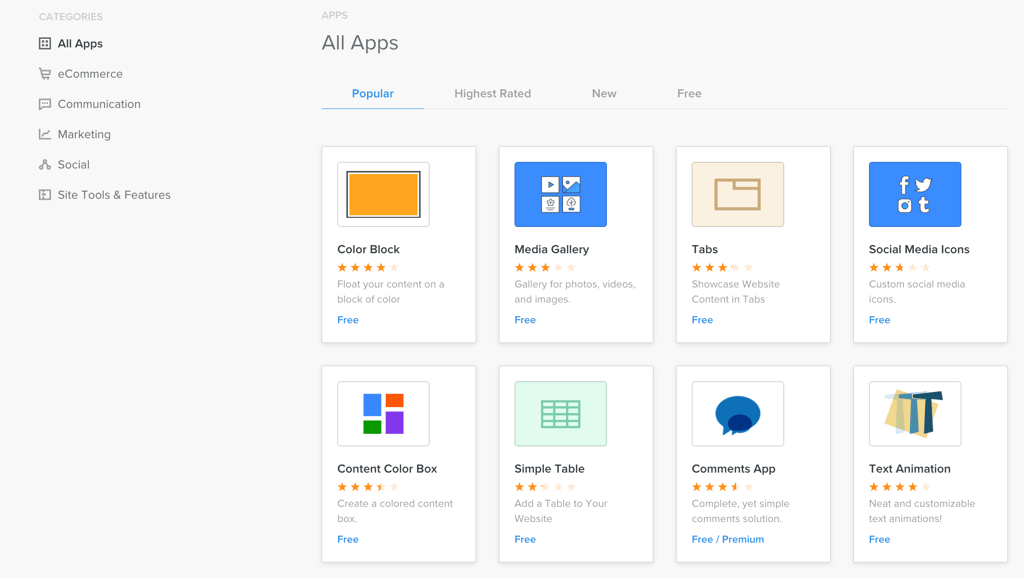
On top of the built-in eCommerce features, Weebly also has a third-party application store, which includes a lot of various eCommerce tools. So, it'll be pretty easy to add additional capabilities, like dropshipping, popups, or analytics.
When it comes to adding the store to the site, simplicity defeats customizability. You can only choose from 4 options on how your products could be laid out on the site.
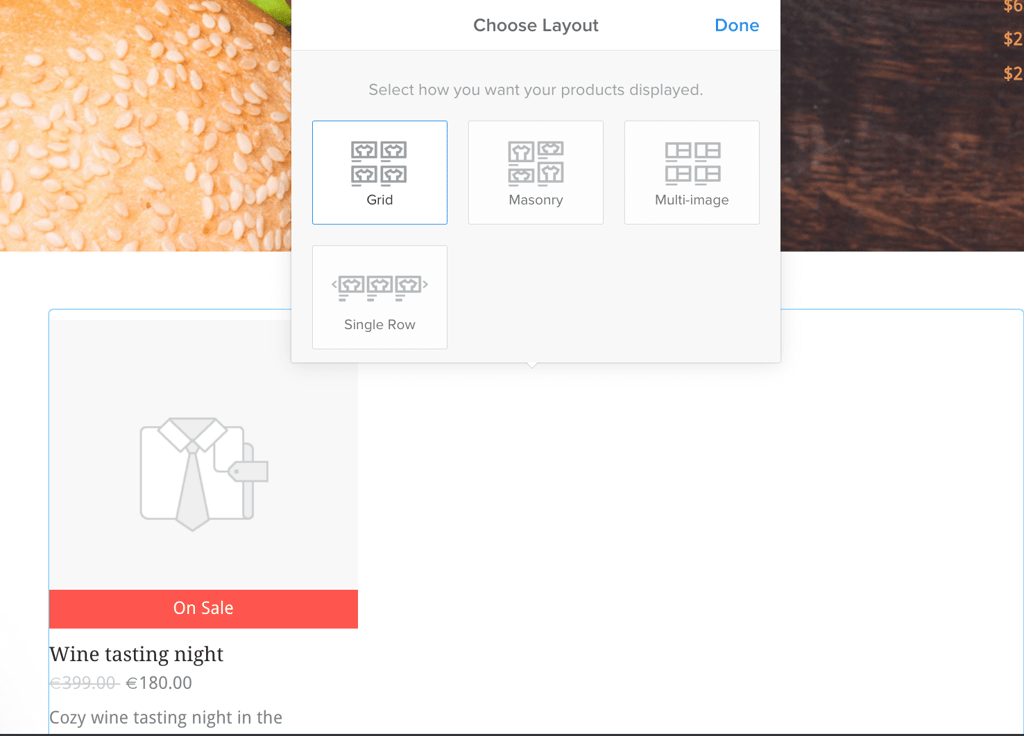
Overall, I was rather impressed with how Weebly weaved eCommerce into its platform. This is certainly one of its strengths.
GoDaddy also has a pretty strong eCommerce suite. It clearly lays out tasks on the dashboard, guiding new store owners through the setup process.

Adding the online store to the site is also rather simple – it can be done via the website editor by clicking on the Store tab to add widgets or manage the store.
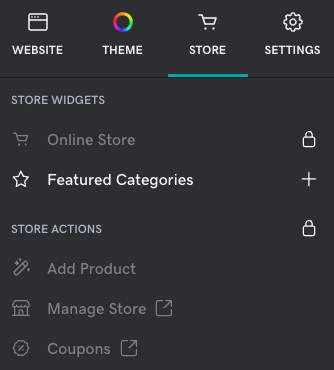
I genuinely enjoyed how GoDaddy adapted the product screen, depending on the colors and fonts that I chose.


Both platforms offer solid eCommerce suites, but for me, Weebly is ever so slightly ahead. It manages to be easy to use and also brings in a solid third-party application store. If that doesn't impress you all that much, either of the options will be great.
Marketing
This is where GoDaddy shines. GoDaddy calls its product Websites + Marketing, which already sets the expectation for marketing features higher.
My expectations were fulfilled, and I loved both email marketing and the social media posting features. They both follow a similar style and pattern, so I'd like to focus on the latter.
The social media posting features not only let you post to all your platforms directly from one dashboard but also include numerous pre-made post templates.

Social media presence has become as important as the website itself. I loved GoDaddy's approach to offer its clients a unified solution to post consistent, contemporary content throughout the platforms. If you’re not the best when it comes to design, this tool could be a huge timesaver.
Another excellent feature is GoDaddy InSight – a tool that helps you reach specific business goals and track your progress. First, you have to pick the goals you want to achieve.

It then takes you through the steps to help you achieve your goals. You can tick them off as you complete them.

You'll get scored and compared to other websites with similar goals. The score goes from 0 to 100, helping you track your progress and site improvements.

I genuinely loved this – the platform eliminates guesswork, giving you a clear direction of where to go and how much is left to get there. Overall, GoDaddy's marketing suite has impressed me.
Meanwhile, Weebly focuses mostly on email marketing and does a pretty good job there. I genuinely enjoyed the custom emails feature, which picks out suitable email templates to send to your website visitors.
For example, it offers to send out emails on various holidays or inform people about new items in your store.

The email builder is pretty simple to use and follows Weebly's design style.

I also liked the automated emails feature, which will automatically send out emails to your customers, depending on the actions that they do – e.g., signing up for your newsletter or completing a purchase.
For more advanced email marketing on GoDaddy, you'll need to purchase a separate marketing plan. It costs anywhere from $21.99 to $89.99 a month.
GoDaddy outshines Weebly when it comes to marketing. The combination of email marketing, social media posting, and GoDaddy InSight is an excellent option for all small business owners.
Search engine optimization
When it comes to search engine optimization (SEO), I really liked what GoDaddy had to offer. It doesn't assume that you know all the required SEO basics – instead, it tries to make everything as simple and approachable as possible.
The GoDaddy SEO wizard will ask for information about your website and then run you through a series of edits, making sure that everything about your site is as optimized as it can be.
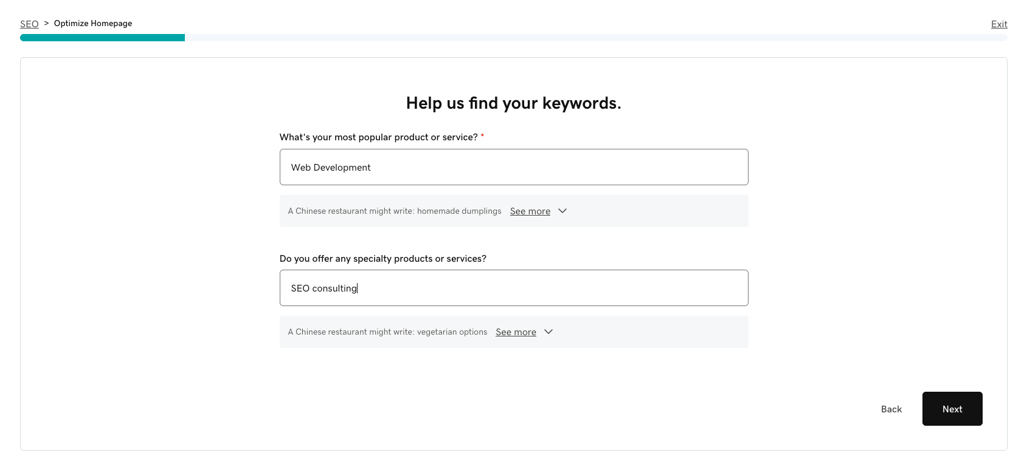
There isn't much you can do here, but I was very impressed by how user-friendly everything felt.
Weebly includes SEO tools in all its plans. The SEO section on the dashboard lets anyone quickly change the site information.

Each page can have its own SEO data added via the editor. Footer and header code can also be added for additional analytics, marketing, and tracking tools.

GoDaddy and Weebly use two different approaches for SEO. GoDaddy offers great ease of use but asks you to pay for it. Weebly leaves more work for you but doesn't charge anything extra for it.
Performance
For the final Weebly vs GoDaddy test, let's talk about performance – perhaps one of the most important things about your website. Your page can be as beautiful as they come, but if it takes ages to load, no one's going to stick around.
For this comparison, I tested both of my sites using GTMetrix, a tool that measures the overall page optimization and speed.
Below, you can see how the Weebly website did.
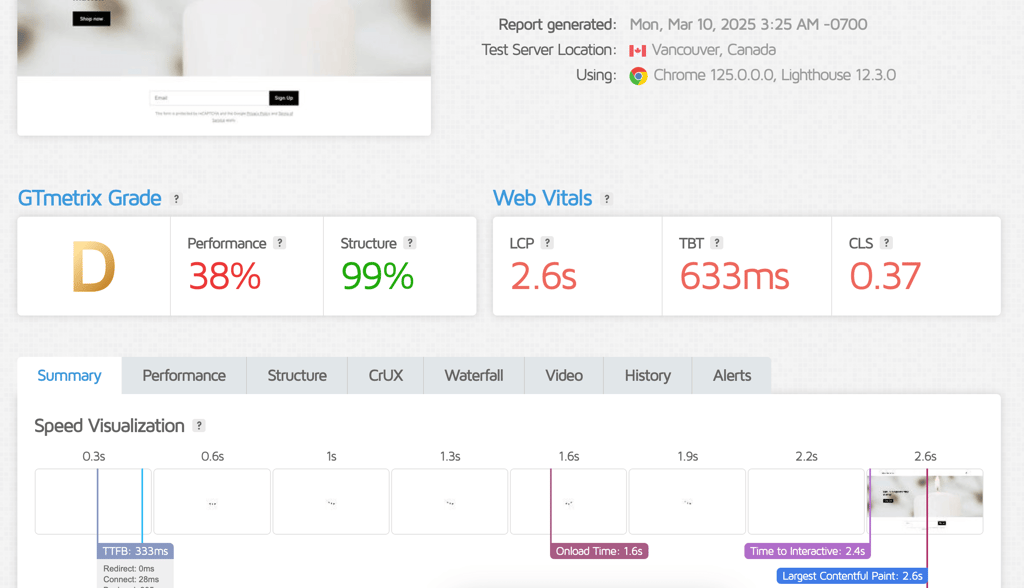
GoDaddy Website Builder was faster, loading my website in 1.8 seconds, while Weebly took a total of 2.6 seconds to load.
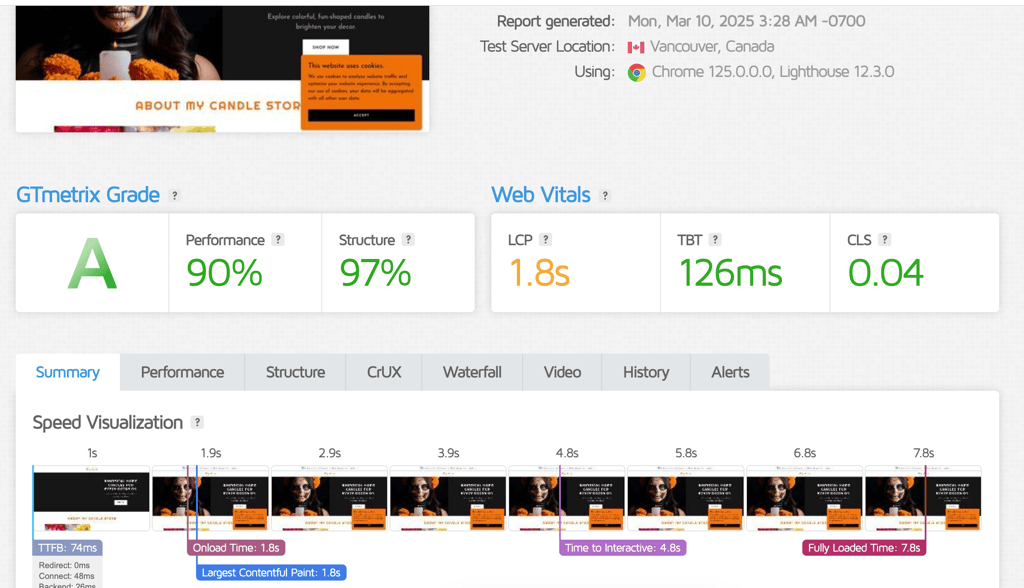
Despite the difference, both website builders are quite fast. They even load faster than Google's recommended 3-second threshold for optimal user experience.
Pricing
Both Weebly and GoDaddy offer 3 paid plans each that will offer a varying level of business and website-building features. Weebly's premium plans range from $10.00/month to $26.00/month, while GoDaddy Website Builder will cost anywhere from $9.99/month to $20.99/month.
On top of that, Weebly also offers an entirely free plan that lets you build a full website without paying anything. GoDaddy does not offer a free plan, but it offers a free 14-day trial for each of its plans.
Weebly plans
Here is every available plan for Weebly:
| Plan | Features |
| Free | This plan allows hosting a website on Weebly's subdomain, displays Weebly ads, and has 500MB storage. |
| Personal ($13.00/month) | This plan provides unlimited storage, lets you use a custom domain, and allows you to sell custom goods. |
| Professional ($15.00/month) | You get unlimited storage, advanced site stats, free custom domain, and no branding or ads. |
| Performance ($32.00/month) | This plan has everything included as in the previous plans plus advanced eCommerce insights, abandoned cart emails, item reviews, and priority support. |
These prices will only be valid when paying for 12 months in advance. If you wish to pay monthly, the prices will increase.
I don't recommend the free plan if you're serious about your website. The free plan will limit you to 500MB of storage, Weebly's own subdomain, and Weebly’s branding on your site. I only recommend it if you want to test Weebly’s capabilities and management before purchasing a paid plan.

GoDaddy Website Builder plans
GoDaddy has ę premium options:
| Plan | Features |
| Basic ($9.99/month) | This plan allows you to connect a custom domain, connect unlimited social media platforms, and send 100 marketing emails. |
| Premium($9.99/month) | With this plan you can connect unlimited social media platforms, send up to 25,000 monthly marketing emails, and use advanced online appointment features. |
| Commerce($14.99/month) | This plan includes all of the features mentioned above, plus includes eCommerce features. |
Once your initial purchase period ends, the prices of GoDaddy Website Builder plans will increase. GoDaddy also provides a 14-day trial for all of its plans, so you can start building a website for free to make sure it is the best option for you.
Weebly vs GoDaddy: side-by-side comparison
In the table below I'll compare how these platforms are different from one another based on their pricing and features.
| Weebly | GoDaddy website builder | |
| Rating | ||
| Pricing | Free plan available, premium plans start at $13.00/month | No free plan, premium options start at $9.99/month |
| Ease of use | An intuitive drag-and-drop interface, putting a priority on design freedom | A simple website-building interface suited for beginners |
| Templates | 65 | 270 templates and different layouts, adjusting to your site's content |
| Business features | Great eCommerce suite with a wide range of third-party tools | Excellent marketing, helpful SEO tools |
| Performance | Solid performance, above the industry standard | Excellent, 5-star performance |
Weebly has a simple and intuitive interface, making it a fantastic choice for running an online store. While the selection of website editing sections may feel limited, it still offers a solid, user-friendly eCommerce experience.
GoDaddy excels in marketing with solid email tools, social media posting, and GoDaddy InSight. However, its editing options are more basic compared to Weebly, making Weebly a better pick if you want to have more design freedom.
Overall, Weebly is better compared to GoDaddy, as it offers more freedom, a free plan fit for small sites, and feature-rich paid plan options. Plus, iIt covers all the basic tools, allowing you to build a site fit for any niche.
FAQ
Which is better: Weebly or GoDaddy?
Weebly is a more advanced option for selling online. GoDaddy Website Builder is better than Weebly if you're looking for additional business and marketing features.
Weebly vs GoDaddy for eCommerce: which to choose?
Both Weebly and GoDaddy have all the necessary features for an online store. The difference is in the price – Weebly offers eCommerce-related tools on the free plan, while with GoDaddy, you have to scale up to the pricy Commerce plan.
Is Weebly or GoDaddy cheaper?
Both Weebly and GoDaddy have similarly priced plans. However, Godaddy’s basic plan is cheaper, starting at $9.99/month. It also provides a solid feature set to build a fully functional and secure website.