Best WordPress alternatives 2026 – making website building simple
Our team of experts and researchers rigorously test and evaluate website builders through transparent, in-depth testing procedures and methods using both in-house and industry-approved tools.
Drawing on cybersecurity insights, we provide unbiased, empirical rankings and analysis to help users make informed digital platform choices.
Learn more
Back in the day, I worked with small-business clients who needed a good-looking website without spending too much or waiting months for it to be built. I’m not a developer – although, when needed, I can find my way around a website’s backend. For a long time, my go-to solution for everything was WordPress.org.
WordPress is highly flexible, which is exactly why it is widely used for projects. But over time, I started running into some familiar problems. What begins as a simple website can turn into a collection of plugins for SEO, forms, security, backups, caching, and design. Then come the maintenance, compatibility issues, and security concerns.
That was when I started looking for alternatives. Not because WordPress is a bad CMS – it definitely isn’t – but because managing the website sometimes started taking more time than actually working on it.
That said, there’s probably no perfect WordPress alternative. What works brilliantly for a small business website might be a terrible choice for an online store or a content-heavy blog. You’ll likely end up using different CMSes for different projects and needs.
That’s why I compiled this list of the 9 best WordPress alternatives – to help you find the option that works best for you.
Best WordPress.org alternatives 2026: shortlist
- Wix – best WordPress alternative overall
- Hostinger Website builder – affordable WordPress alternative
- Squarespace – WordPress replacement with eCommerce tools
- SITE123 – easy-to-use WordPress alternative
- GoDaddy website builder – WordPress alternative for small business
- Webflow – WordPress alternative for web design agencies
- Ghost – WordPress replacement for bloggers
- Joomla – free WordPress alternative
- Drupal – WordPress alternative for developers




Our in-house research team and expert writers work hand in hand to regularly test website builders and provide accurate and fact-checked information. Discover the ins and outs of how we test and evaluate website builders.
Why you might want to opt out to wordpress.org alternative
WordPress.org gives you a lot of freedom, but that freedom also means more responsibility. A self-hosted WordPress site requires you to deal with hosting, updates, backups, security, and other technical tasks. An alternative may be a better fit if you:
- Don’t want to deal with website maintenance. You’re responsible for updates, backups, security, and other technical tasks – or you need to pay someone else to handle them.
- Want a simpler setup. You need to get hosting, connect a domain, install WordPress, and configure your site before you can start publishing.
- Don’t have much technical experience. Managing hosting, plugins, themes, updates, and security can be more work than some beginners expect.
- Prefer an all-in-one platform. Website builders can combine hosting, site-building tools, templates, and other essentials in one place.
- Want more predictable costs. While WordPress itself is free, you’ll typically pay separately for hosting, a domain, premium themes or plugins, and potentially maintenance.
- Want to spend more time creating and less time troubleshooting. Plugin conflicts, compatibility issues, broken layouts after updates, or hosting problems can require additional troubleshooting.
- Want built-in features without relying on plugins. WordPress can be extended with plugins, but finding, configuring, updating, and maintaining them adds another layer of work.
- Don’t need extensive customization. If you only need a simple business website, portfolio, blog, or landing page, a more streamlined website builder may be easier.
- Want someone else to handle security and infrastructure. With a self-hosted site, you have more responsibility for keeping your WordPress installation, plugins, themes, and hosting environment secure and up to date.
Best WordPress alternatives 2026: detailed list
Together with the Cybernews team, I reviewed 45 providers to identify solutions that truly stand out as the best website builders for all types of users. This carefully curated list highlights the best WordPress.org alternatives, selected based on features, ease of use, pricing, templates, and my overall experience.
1. Wix – best WordPress alternative

| Rating | |
| Pricing | From $11.75/month |
| Standout feature | AI-powered website creation |
| Templates | 2,000 |
| Current deal | Get Wix with 50% OFF |
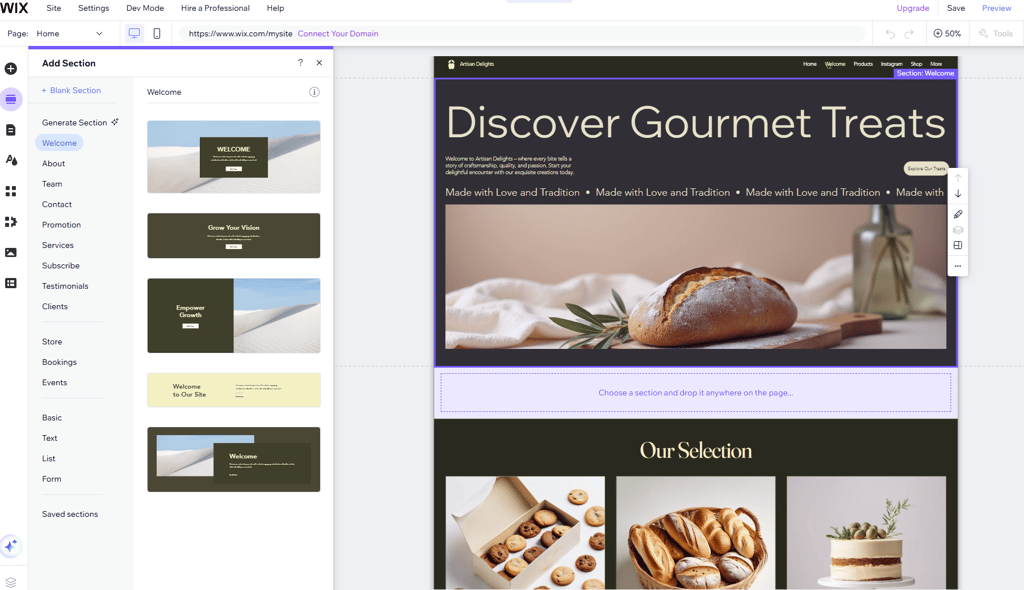
Wix is the best WordPress alternative if you want to build a professional-looking website without the maintenance that comes with WordPress.org. It's all-in-one approach takes care of hosting and much of the technical work while giving you an easy visual editor, templates, and built-in features to create and manage your site.
Why is Wix a good alternative to WordPress.org
- Easier to set up and use. When I use Wix, I can get a website up and running without dealing with hosting, installation, or technical setup. The dashboard is straightforward, and most things can be managed from one place.
- Less maintenance. Unlike self-hosted WordPress, I don’t have to manage my own hosting or worry as much about updates, plugin compatibility, and other technical maintenance. Wix takes care of the hosting and of the technical side, so there’s less to update, troubleshoot, or maintain yourself.
- More design freedom out of the box. Wix gives me a huge range of editing options directly in the visual editor. I can adjust layouts, images, backgrounds, buttons, and other elements without having to touch code or look for a plugin that does the job.
- A large selection of templates. Wix offers hundreds of professionally designed templates covering businesses, blogs, portfolios, online stores, and other website types. I can start with a professionally designed template and then change pretty much every part of it to make it my own.
- Built-in tools mean fewer plugins. Wix includes tools for things like ecommerce, blogging, bookings, forms, analytics, marketing, and SEO in its platform. That can make things simpler than building up a WordPress site by installing and maintaining separate plugins for different features.
- AI can speed up website creation. Wix’s AI website creator can generate a starting point based on what I tell it I need. I can then continue editing the result myself, which makes it useful if I have an idea for a website but don’t want to build everything from scratch.
Compare Wix to WordPress.org side by side
| Wix | WordPress | |
| ⭐ Rating: | ||
| 🥇 Overall rank: | #4 out of #45 | #26 out of #45 |
| 💵 Price: | From $11.75/month | From $2.75/month |
| 🪄 Ease of use: | Powerful interface, pretty easy to use | A pretty steep learning curve, made easier by plenty of great resources |
| 🎨 Templates: | 2,000 | 13,000 |
| 🏢 Business features: | Massive array of various business features | All brought in by the plugins that you use – some of them cost extra |
| 👨💻 24/7 live support: | Yes | Yes |
| ✂️ Free domain (first year): | Yes | Yes |
| 🔒 Free SSL certificate: | Yes | Yes |
| 🔥 Coupons: | Wix coupon 50% OFF | Cybernews Website Builder Coupons |
2. Hostinger Website Builder – cheap and innovative alternative to WordPress

| Rating | |
| Pricing | From $1.79/month |
| Standout feature | Extensive AI tools |
| Templates | 430 |
| Current deal | Get Hostinger Website Builder, 87% OFF + free months |
Hostinger Website Builder is a cheap and innovative alternative to WordPress. Its affordable plans combine website building and hosting in one service, helping users avoid the extra costs that can come with a self-hosted WordPress.org website. It also includes a range of AI-powered tools and an intuitive visual editor, making it a good choice for beginners and small businesses.
Why is Hostinger Web Builder a good alternative to WordPress.org
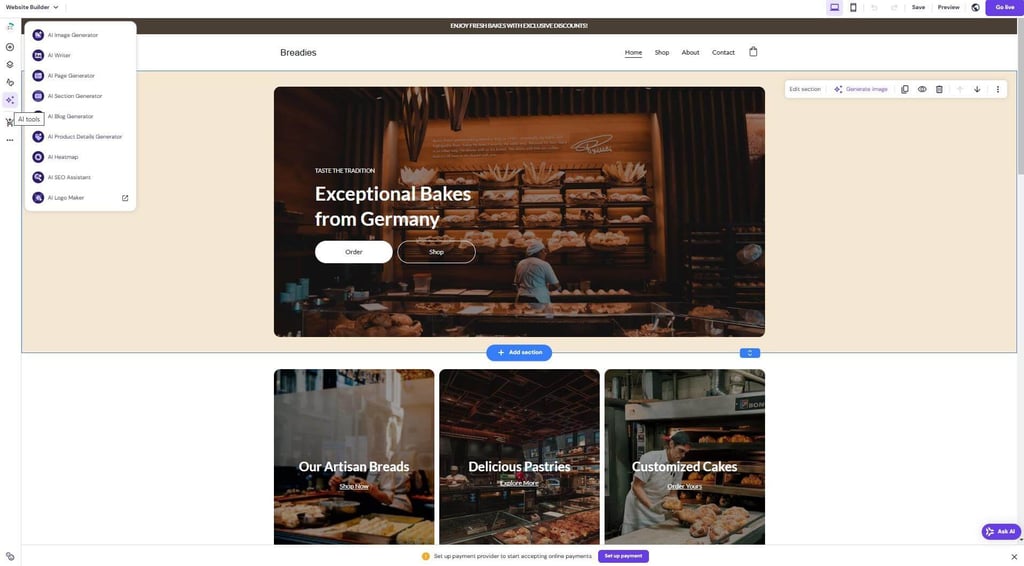
- Easier to use for beginners. When using Hostinger, the visual drag-and-drop editor allowed me to customize pages, add or remove elements, and change my website’s appearance without touching code. With WordPress.org, I would first need to deal with hosting, themes, plugins, and potentially more technical configurations.
- Hosting tools are included. Hostinger combines the website builder, hosting, and other essential website tools, which makes the setup much more straightforward. This is different from WordPress.org, where I would need to arrange hosting separately and potentially pay for additional themes or plugins.
- Built-in AI tools speed up the creation process. Hostinger offers an AI website builder, image generator, writing tools, blog generator, SEO tools, and AI Heatmaps, so I could use AI for multiple parts of the creation process. I found these tools particularly useful for speeding up basic tasks, although Wix offers more detailed customization for AI-generated websites.
- More than 430 templates for a quick start. Hostinger doesn't offer the same selection of themes and design options available across the WordPress ecosystem, but its 430+ templates cover major website categories and are easy to customize.
- Less maintenance to worry about. Unlike with WordPress.org, I wouldn't need to manage hosting separately or spend time looking for compatible plugins to add essential functionality.
- Good value for simple and small business websites. For portfolios, small business websites, blogs, and basic online stores, Hostinger combines the essential tools I would need into one platform. However, I would still choose WordPress.org for a highly complex or heavily customized website because it offers significantly more flexibility.
Compare Hostinger Web Builder to WordPress.org side by side
| Hostinger Website Builder | WordPress | |
| ⭐ Rating: | ||
| 🥇 Overall rank: | #8 out of #45 | #26 out of #45 |
| 💵 Price: | From $1.79/month | From $2.75/month |
| 🪄 Ease of use: | Extremely easy to use | A pretty steep learning curve, made easier by plenty of great resources |
| 🎨 Templates: | 430 | 13,000 |
| 🏢 Business features: | eCommerce functionality, analytic tools, SEO settings | All brought in by the plugins that you use – some of them cost extra |
| 👨💻 24/7 live support: | Yes | Yes |
| ✂️ Free domain (first year): | Yes | Yes |
| 🔒 Free SSL certificate: | Yes | Yes |
| 🔥 Coupons: | Hostinger Website Builder coupon 87% OFF! | Cybernews Website Builder Coupons |
3. Squarespace – visually appealing WordPress competitor

| Rating | |
| Pricing | From $9.50/month |
| Standout feature | Professional templates with built-in commerce |
| Templates | 200 |
| Current deal | Get up to 50% OFF Squarespace |
Squarespace is one of the best alternatives to WordPress.org for users who want their website to look professionally designed without spending hours working with themes, plugins, or code. Its polished templates, clean editor, and all-in-one approach make it especially appealing to creatives, portfolios, and businesses that care about how their website looks as much as how it works.
Why is Squarespace a good alternative to WordPress.org
- Squarespace is easier to use than WordPress.org. Its clean and minimalistic editor keeps everything I need in one place – from editing pages and changing colors and fonts to adding animations and accessing website settings. WordPress.org offers more freedom, but getting a website exactly the way I want can require more technical knowledge.
- Squarespace makes it easier to create a polished portfolio-like website. Its professionally designed templates provide a strong starting point for portfolios, business websites, blogs, and online stores. I found that approximately 200 templates are more than enough for most basic needs, even though WordPress offers a much larger selection.
- Most essential features are built in. Squarespace includes business-focused tools such as SEO, marketing, analytics, and ecommerce features, reducing the need to install multiple plugins. WordPress.org can offer more functionality overall, but I would often need to find, install, and maintain additional tools to get it.
- Squarespace can help users create a website faster with AI. Blueprint AI asks about your website goals, industry, and brand to generate a polished website, while additional AI tools can help create content, images, and logos.
- Setting up an online store is simpler. Squarespace can guide you through the store creation process during signup and prepare the website with the necessary ecommerce features. With WordPress.org, building an online store usually requires choosing hosting, installing WooCommerce, and configuring additional extensions.
- Squarespace is easier to manage. Squarespace’s app marketplace and customization options are smaller, so highly specific websites may feel limited. However, for users who want a portfolio, business website, blog, or small online store without constantly managing plugins, updates, and integrations, the simpler approach can be a good advantage.

Compare Squarespace to WordPress.org side by side
| Squarespace | WordPress | |
| ⭐ Rating: | ||
| 🥇 Overall rank: | #12 out of #45 | #26 out of #45 |
| 💵 Price: | From $10/month | From $2.75/month |
| 🪄 Ease of use: | Perfect for beginners | A pretty steep learning curve, made easier by plenty of great resources |
| 🎨 Templates: | 200 | 13,000 |
| 🏢 Business features: | Solid in-house eCommerce and marketing | All brought in by the plugins that you use – some of them cost extra |
| 👨💻 24/7 live support: | Yes | Yes |
| ✂️ Free domain (first year): | Yes | Yes |
| 🔒 Free SSL certificate: | Yes | Yes |
| 🔥 Coupons: | Squarespace coupon code CYBERNEWS50 for 50% OFF | Cybernews Website Builder Coupons |
4. SITE123 – WordPress alternative for beginners

| Rating | |
| Pricing | From $5.50/month |
| Standout feature | Pre-designed, mobile-responsive layouts |
| Templates | 160 |
| Current deal | Get SITE123 now 50% OFF |
SITE123 is one of the easiest website builders to use, but that doesn't mean it lacks functionality. Additionally, SITE123’s TextAI simplifies content creation by generating tailored text and content ideas based on your website details, like name, category, and focus.
Using SITE123
SITE123 is a simple WordPress alternative for beginners who want to get a website online without learning the ins and outs of website building. For building a simple website, I found SITE123 particularly convenient because its guided setup and structured editor do much of the all work for me.
Why is SITE123 a good alternative to WordPress.org
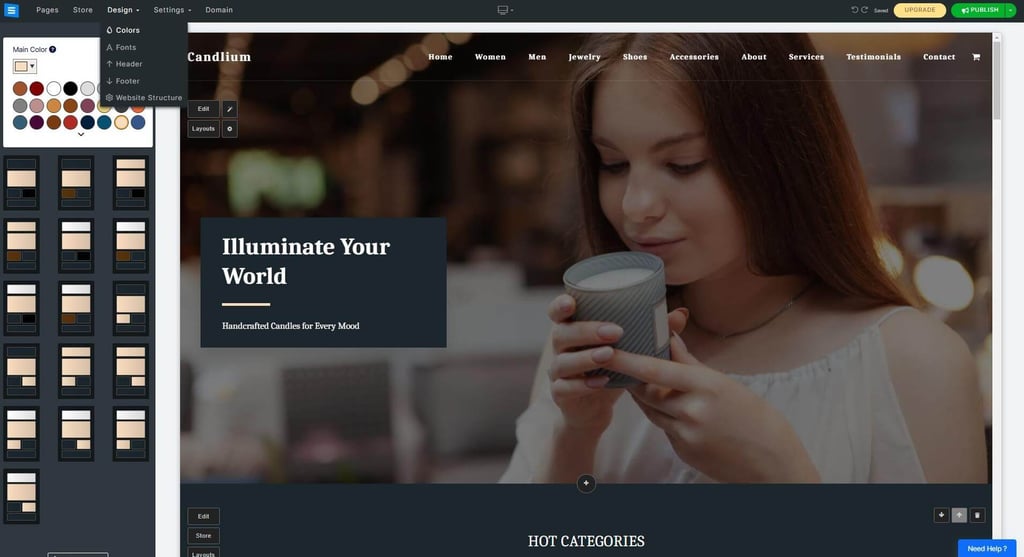
- SITE123 is particularly good for building a simple website. Its guided setup and straightforward editor let me create a website without needing much technical knowledge. When I started building, SITE123 asked me what type of website I wanted and generated a starting point based on my answers.
- SITE123 makes website creation faster than WordPress.org. It provides ready-made page structures and layouts that I can quickly customize with my own content. While this is more restrictive than WordPress.org, it works well when I want to get a simple website online quickly.
- SITE123 has useful features built in. I get tools for SEO, blogging, forms, analytics, and ecommerce without having to search for separate plugins. WordPress.org can offer far more functionality, but I may need to install and maintain additional plugins to get the same features.
- SITE123 is a good option for small online stores. I can add products, manage orders, track store statistics, and handle other parts of my store from within the platform. WordPress.org gives me more ecommerce flexibility, but setting everything up can take considerably more work.
- SITE123 makes mobile optimization simple. Websites are automatically responsive, so I don't have to manually create separate layouts for smartphones and tablets. WordPress.org can achieve the same result, but the experience depends more on the theme and plugins I choose.
- SITE123 is less customizable than WordPress.org – but that can be good for beginners. Its limited flexibility means fewer design decisions to make, making it easier to get a professional-looking website online quickly.
Compare SITE123 to WordPress.org side by side
| SITE123 | WordPress | |
| ⭐ Rating: | ||
| 🥇 Overall rank: | #21 out of #45 | #26 out of #45 |
| 💵 Price: | From $5.50/month | From $2.75/month |
| 🪄 Ease of use: | Very easy to use and manage | A pretty steep learning curve, made easier by plenty of great resources |
| 🎨 Templates: | 160 | 13,000 |
| 🏢 Business features: | Simple first and third-party features | All brought in by the plugins that you use – some of them cost extra |
| 👨💻 24/7 live support: | Yes | Yes |
| ✂️ Free domain (first year): | Yes | Yes |
| 🔒 Free SSL certificate: | Yes | Yes |
| 🔥 Coupons: | SITE123 now 50% OFF | Cybernews Website Builder Coupons |
5. GoDaddy website builder – fast and business-centered WordPress competitor

| Rating | |
| Pricing | From $9.99/month |
| Standout feature | GoDaddy Insight |
| Templates | 270 |
| Current deal | Get Hostinger Website Builder, 87% OFF + free months |
If I were a business owner who wanted to create a professional website quickly, GoDaddy Website Builder would be one of my first choices. Its easy-to-use editor, AI-powered tools, and built-in business features make it a strong WordPress.org alternative for users who want to spend less time managing their website and more time growing their business.
Why is GoDaddy Website Builder a good alternative to WordPress.org?
- GoDaddy makes website creation faster than WordPress.org. I can choose a template and start customizing my website right away without first finding separate hosting, installing WordPress, and configuring a theme. I can change colors, fonts, and page elements directly in the editor, making the setup process much more simple.
- GoDaddy provides more guidance for beginners. The editor includes a suggestion box that can guide me through the next steps, which is useful if I'm not sure what to do next. I can also find built-in guidance and resources for SEO, social media, and analytics instead of having to figure out which WordPress plugins I need.
- GoDaddy InSight helps turn website data into actionable recommendations. The tool provides personalized suggestions based on my industry and goals and can give my website a performance score based on my progress. WordPress.org offers access to more advanced analytics tools, but I would need to find and configure them myself.
- GoDaddy Airo makes it easier to create a complete online presence with AI. It can help generate a website and add business-focused features such as SEO, marketing, and customer insights, while also assisting with branding elements. This gives beginners a more guided experience than starting with a blank WordPress installation.
- GoDaddy brings website and business management tools together. From its dashboard, I can access my website, domain, billing information, store, appointments, marketing tools, and other services from one place. With WordPress.org, I would likely manage these tools through different plugins, services, and dashboards.
- GoDaddy is less flexible than WordPress.org – but easier for standard business websites. Its customization options, templates, and integrations are more limited than WordPress's enormous ecosystem. However, I think the more structured approach works well for small businesses that want a professional website, online booking, or simple store without spending time on technical maintenance.

Compare GoDaddy Website Builder to WordPress.org side by side
| GoDaddy website builder | WordPress | |
| ⭐ Rating: | ||
| 🥇 Overall rank: | #31 out of #45 | #26 out of #45 |
| 💵 Price: | From $9.99/month | From $2.75/month |
| 🪄 Ease of use: | Very simple to use, a bit limiting | A pretty steep learning curve, made easier by plenty of great resources |
| 🎨 Templates: | 270 | 13,000 |
| 🏢 Business features: | In-house features, suited for beginners | All brought in by the plugins that you use – some of them cost extra |
| 👨💻 24/7 live support: | Yes | Yes |
| ✂️ Free domain (first year): | Yes | Yes |
| 🔒 Free SSL certificate: | Yes | Yes |
| 🔥 Coupons: | Cybernews Website Builder Coupons | Cybernews Website Builder Coupons |
6. Webflow – WordPress alternative for designers

| Rating | |
| Pricing | From $14.00/month |
| Standout feature | Visual CSS grid |
| Template | 7400+ |
| Current deal | Get Webflow AI tools now 22% cheaper |
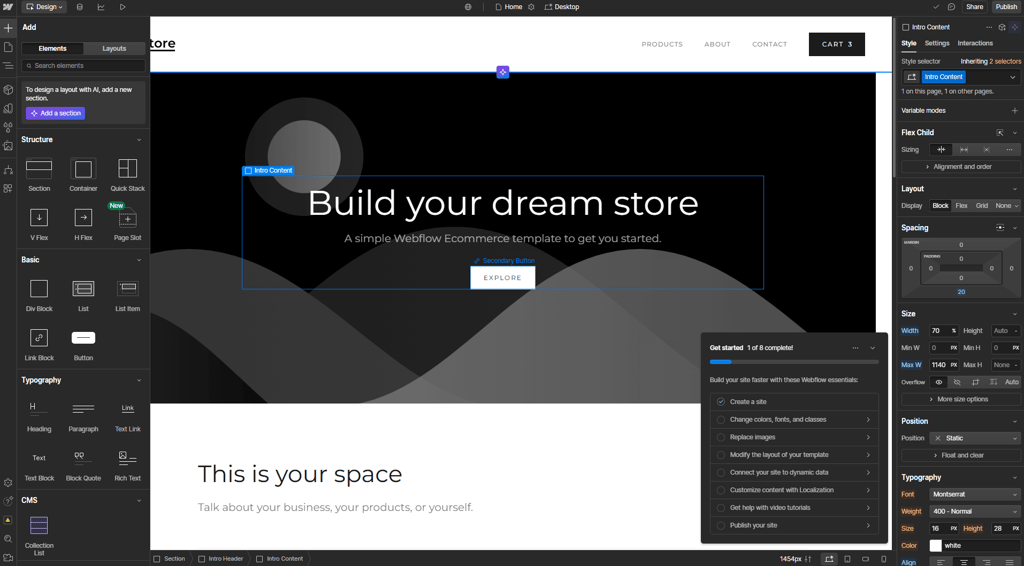
Webflow is a strong WordPress alternative for designers who want more creative freedom without building an entire website from scratch with code. I found that its visual editor offers far more control than a typical website builder, making it possible to create highly customized websites while still working in a visual environment.
Why is Webflow a good alternative to WordPress.org?
- Webflow gives designers more visual control than WordPress.org. I can customize layouts, animations, interactions, and other design elements directly in the visual editor without relying heavily on pre-made themes or plugins. This makes it easier to turn a specific design idea into a functional website.
- Webflow combines visual design with advanced customization. While many website builders limit how much I can change, Webflow gives me detailed control over HTML and CSS-based styling. Compared to WordPress.org, I don't have to build everything around a theme or install multiple plugins to achieve a custom design.
- Webflow is powerful, although it has a steeper learning curve. When I first used the editor, it felt more complex and cluttered than WordPress or simpler website builders. However, after spending some time with the platform and going through the initial tutorial, I found that the additional complexity gave me much more control over the final result.
- Webflow's AI Assistant can make getting started easier. It provides in-context guidance and suggestions while I work, which can be particularly helpful when learning the editor. The Modify copy tool can also generate or edit text within website elements based on prompts.
- Webflow lets me start with a template or build from scratch. Its template library includes some free options, although many templates are paid. This makes it flexible for designers who want either a starting point or complete creative control – something that can be more difficult to achieve with a standard WordPress theme.
- Webflow offers more technical flexibility for designers and developers. I get access to HTML, CSS, and JavaScript, along with APIs and options for integrating Webflow into more complex projects. WordPress.org has a larger development ecosystem, but Webflow offers an interesting middle ground between a visual website builder and a more hands-on development environment.
Compare Webflow to WordPress.org side by side
| Webflow | WordPress | |
| ⭐ Rating: | ||
| 🥇 Overall rank: | #25 out of #45 | #26 out of #45 |
| 💵 Price: | From $14.00/month | From $2.75/month |
| 🪄 Ease of use: | Steep learning curve made very easy | A pretty steep learning curve, made easier by plenty of great resources |
| 🎨 Templates: | 7400 | 13,000 |
| 🏢 Business features: | Good in-house eCommerce | All brought in by the plugins that you use – some of them cost extra |
| 👨💻 24/7 live support: | Yes | Yes |
| ✂️ Free domain (first year): | Yes | Yes |
| 🔒 Free SSL certificate: | Yes | Yes |
| 🔥 Coupons: | Webflow AI coupon for 22% OFF | Cybernews Website Builder Coupons |
7. Ghost – WordPress alternative for publishers

| Rating | |
| Pricing | From $10.00/month |
| Standout feature | Built-in membership and subscription platform |
| Templates | Undisclosed number |
Ghost is a strong WordPress alternative for publishers, bloggers, and content creators who want to focus on writing rather than managing a complex website. I found it much more streamlined than WordPress.org, combining essential publishing tools with built-in memberships and newsletters for creators who want to grow and monetize an audience.
Why is Ghost a good alternative to WordPress.org?
- Ghost offers a more focused publishing experience than WordPress.org. Its dashboard is designed around creating and managing content, allowing me to write posts, save drafts, and schedule publications without dealing with unnecessary design or website management tools.
- Ghost is easier to navigate for content creators. I found the interface less cluttered than WordPress.org, which makes it easier to focus on publishing. WordPress offers significantly more functionality, but that flexibility can also make the platform feel more complicated for someone who simply wants to run a blog or publication.
- Ghost includes built-in membership and subscription tools. I can create member sign-ups, offer paid subscriptions, and send email newsletters without installing multiple plugins. Ghost also takes 0% transaction fees on creator subscriptions, which makes it particularly appealing for independent publishers.
- Ghost makes it easy to manage a publishing schedule. From the dashboard, I can create posts, save drafts, and schedule content for publication. WordPress.org offers similar capabilities, but Ghost keeps these tools at the center of the platform.
- Ghost offers enough design flexibility for most publications. I can customize my website and content using themes and Cards, which allow me to add different content elements to posts. It is less flexible than WordPress.org for complex website designs, but that limitation makes Ghost better suited to creators who prioritize content over extensive customization.
- Ghost offers themes designed specifically for publications. There are free and paid options for magazines, photography, travel, lifestyle, and other content-focused websites. However, some premium themes can be expensive, especially compared to the large selection of free WordPress themes.

Compare Ghost to WordPress.org side by side
| Ghost | WordPress | |
| ⭐ Rating: | ||
| 🥇 Overall rank: | – | #18 out of #37 |
| 💵 Price: | From $10.00/month | From $2.75/month |
| 🪄 Ease of use: | Easy to use platform even for beginners, which prioritizes speed and simplicity | A pretty steep learning curve, made easier by plenty of great resources |
| 🎨 Templates: | Undisclosed number | 13,000 |
| 🏢 Business features: | Email newsletter engine, native subscription filling framework, automated SEO optimization | All brought in by the plugins that you use – some of them cost extra |
| 👨💻 24/7 live support: | No | Yes |
| ✂️ Free domain (first year): | Yes (free Ghost subdomain) | Yes |
| 🔒 Free SSL certificate: | Yes | Yes |
| 🔥 Coupons: | Cybernews Website Builder Coupons | Cybernews Website Builder Coupons |
8. Joomla – free WordPress alternative
| Rating | |
| Pricing | Free |
| Standout feature | Advanced, native Access Control List (ACL) and user management system |
| Templates | – |
Joomla is a powerful WordPress alternative for users who need more than a simple website or blog. Like WordPress.org, it is a free and open-source CMS, but I found Joomla particularly appealing for complex projectsdue to its built-in multilingual support, granular user permissions, and flexible content management tools.
Why is Joomla a good alternative to WordPress.org?
- Joomla offers built-in multilingual functionality. I can create and manage multilingual content without relying on a separate translation plugin. WordPress.org can also support multilingual websites, but this usually requires installing and configuring an additional plugin.
- Joomla gives me more advanced user management out of the box. Its Access Control List (ACL) lets me create different user groups and define detailed permissions. This makes Joomla particularly useful for organizations, membership websites, and projects with multiple people managing content.
- Joomla is highly flexible for complex websites. I can use it to build business websites, communities, intranets, and other advanced projects, while extensions and templates allow me to add more functionality. WordPress.org has a larger ecosystem, but Joomla already includes several advanced features in its core.
- Joomla includes useful SEO features without relying entirely on extensions. It offers search-engine-friendly features and URL options out of the box. WordPress.org has excellent SEO capabilities too, but many users rely on plugins for more advanced optimization.
- Joomla offers thousands of extensions and templates. This gives me plenty of opportunities to customize my website, although its ecosystem is smaller than WordPress.org's. I think it is still more than sufficient for users who need flexibility without requiring access to WordPress's enormous plugin library.
- Joomla has a steeper learning curve than WordPress.org for beginners. Its advanced functionality and administration tools can take time to understand, making it less suitable for someone building their first simple website. However, I would consider the additional complexity worthwhile for larger projects that need multilingual support or detailed user permissions.
Compare Joomla to WordPress.org side by side
| Joomla | WordPress | |
| ⭐ Rating: | ||
| 🥇 Overall rank: | – | #18 out of #37 |
| 💵 Price: | Free | From $2.75/month |
| 🪄 Ease of use: | Moderate to difficult for beginners | A pretty steep learning curve, made easier by plenty of great resources |
| 🎨 Templates: | – | 13,000 |
| 🏢 Business features: | Advanced user permissions, native multilingual support, and strong security without requiring extra plugins | All brought in by the plugins that you use – some of them cost extra |
| 👨💻 24/7 live support: | No | Yes |
| ✂️ Free domain (first year): | No | Yes |
| 🔒 Free SSL certificate: | No | Yes |
| 🔥 Coupons: | Cybernews Website Builder Coupons | Cybernews Website Builder Coupons |
9. Drupal – WordPress alternative for developers
| Rating | |
| Pricing | Free |
| Standout feature | Structured content architecture (Flexible data modeling and content reuse) |
| Templates | – |
Drupal is a powerful WordPress alternative for users building complex, content-heavy websites that need to grow over time. Like WordPress.org, it is free and open source, but I found Drupal particularly suitable for larger projects thanks to its structured content management, advanced editorial workflows, multilingual capabilities, and scalability.
Why is Drupal a good alternative to WordPress.org?
- Drupal is built for complex and content-heavy websites. Its flexible content model allows me to create and organize different types of structured content, making it particularly useful for large websites with hundreds or thousands of pages.
- Drupal offers powerful content workflows for larger teams. I can create customizable approval processes, manage drafts, and organize content changes more effectively. This makes it a strong alternative to WordPress.org for organizations where multiple people create, review, and publish content.
- Drupal is highly scalable for growing websites. It is designed to handle complex data structures and high-traffic websites, making it a good choice for organizations that expect their website to grow significantly over time.
- Drupal offers strong multilingual capabilities. I can create and manage content in multiple languages using built-in functionality instead of relying entirely on third-party solutions. This can make it particularly useful for international organizations and websites targeting audiences in different markets.
- Drupal gives developers extensive flexibility. Its API-first architecture and modular structure make it possible to build custom digital experiences and connect websites with other platforms and services. WordPress.org also offers extensive customization, but Drupal is particularly well suited to projects with complex technical requirements.
- Drupal has a steeper learning curve than WordPress.org. I wouldn't recommend it for someone who simply wants to start a small blog quickly, as setting up and managing a Drupal website can require more technical knowledge. However, the additional complexity can be worthwhile for larger projects that need more structured content management and scalability.
Compare Drupal to WordPress.org side by side
| Drupal | WordPress | |
| ⭐ Rating: | ||
| 🥇 Overall rank: | – | #18 out of #37 |
| 💵 Price: | Free | From $2.75/month |
| 🪄 Ease of use: | Drupal offers built-in tools for managing complex, enterprise-level content architectures and requires a significantly steeper learning curve to set up and maintain. | A pretty steep learning curve, made easier by plenty of great resources |
| 🎨 Templates: | – | 13,000 |
| 🏢 Business features: | Granular access controls, multi-site management, native multilingual support | All brought in by the plugins that you use – some of them cost extra |
| 👨💻 24/7 live support: | No | Yes |
| ✂️ Free domain (first year): | No | Yes |
| 🔒 Free SSL certificate: | No | Yes |
| 🔥 Coupons: | Cybernews Website Builder Coupons | Cybernews Website Builder Coupons |
Best WordPress alternatives: final thoughts
WordPress is one of the most well-known website builders and a go-to solution for bloggers, offering over 13,000 templates. However, its interface isn’t very user-friendly, and for almost any feature, you need to install a plugin or code it yourself. Fortunately, there are many alternatives that surpass it.
After thorough research, I’ve found that Wix is the best alternative to WordPress. It provides a strong library of 2,000+ templates, a helpful AI-powered website creator, a drag-and-drop web builder, eCommerce tools, and numerous built-in features that don’t require installing plugins. A close contender to Wix is Hostinger Website Builder, which is affordable and offers a variety of AI tools that streamline website and content creation.
WordPress alternatives: FAQ
What is the cheapest WordPress alternative?
The cheapest WordPress alternative is Hostinger Website Builder. Its plan costs only $1.79/month with the 48-month subscription, and $3.59/month with the 12 or 24 months plan, solidifying its place as the cheapest web builders available.
What is a good WordPress alternative for a blog?
A good WordPress alternative for a blog is Ghost. The prices start at $10.00/month, and you get all the blogging tools you need without WordPress’s level of difficulty.
Are there WordPress alternatives to WooCommerce?
Yes, there are WordPress alternatives to WooCommerce. If you want to sell online and grow your business, you can try the GoDaddy website builder. Thanks to its smart business tools and GoDaddy Insight, you have the chance to turn your business into a profitable one.
Is there a free alternative to WordPress?
Yes, there are several free alternatives to WordPress.org, including Joomla and Drupal. Both are open-source CMSs, meaning you can download and use the software for free. However, you'll still need to pay for essentials like web hosting and a domain.
Which CMS is faster than WordPress?
GoDaddy website builder is faster than WordPress. It offers a simple editor that streamlines website creation, built-in tools, and templates, making the setup process quick.